Restoring the activities
Once you have created the zip file containing the exported objects, you can use it to restore the objects in the the application's 5.x environment. To restore the objects, perform the following steps.
-
Copy the exported zip file to a Kubernetes shared location in the PVC.
-
Open the restore.xml located at <shared>/migration/template/restore.xml.

shared is the folder created at the root level in the PVC when you deploy Adeptia Automate. -
Provide the path of the exported zip file in the <SourceZipLoc> tag of the restore.xml as illustrated below.

-
Go to the ArtifactHUB page for Adeptia Automate Migration Helm Chart.
-
Click DEFAULT VALUES, and then click
 to download the values-migration.yaml file.

-
Open the values-migration.yaml file.
-
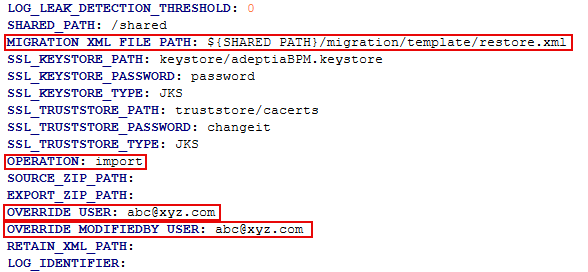
In the environmentVariables section, provide the values for the following variables :
Variable Value BACKEND_DB_URL Azure SQL
jdbc:sqlserver://<DB Hostname>:<Port Number>;database=<Backend Database Name>;sendStringParametersAsUnicode=false;
Oracle
jdbc:oracle:thin:@<hostName>:<portNumber>:<S ID/ServiceName>
Azure MySQL
jdbc:mysql://<hostName>:<portNumber>/<Backend DB Name>?sslMode=VERIFY_IDENTITY&fallbackToSystemKeyStore=falseBACKEND_DB_USERNAME Username for your Backend Database. Do not provide a value to this variable if you want to use an existing secret. BACKEND_DB_PASSWORD Password for your Backend Database. Do not provide a value to this variable if you want to use an existing secret. LOG_DB_URL Azure SQL
jdbc:sqlserver://<DB Hostname>:<Port Number>;database=<Log Database Name>;sendStringParametersAsUnicode=false;
Oracle
jdbc:oracle:thin:@<hostName>:<portNumber>:<S ID/ServiceName>
Azure MySQL
jdbc:mysql://<hostName>:<portNumber>/<DBName>?sslMode=VERIFY_IDENTITY&fallbackToSystemKeyStore=falseLOG_DB_USERNAME Username for your Log Database (To be provided by the infra team). Do not provide a value to this variable if you want to use an existing secret. LOG_DB_PASSWORD Password for your Log Database (To be provided by the infra team). Do not provide a value to this variable if you want to use an existing secret. MIGRATION_XML_FILE_PATH ${SHARED_PATH}/migration/template/restore.xml OPERATION import OVERRIDE_USER User ID for example, abc@xyz.com, of the user to whom you want to provide ownership of the migrated activities. OVERRIDE_MODIFIEDBY_USER User ID for example, abc@xyz.com, of the user who will be reflected in the Modified By field of every activity after the migration. -
Optional: To authenticate using an existing secret rather than specifying database credentials in the environmentVariables section, enter the name of that secret in the dbCredSecrets variable.
-
If the target environment is an Amazon Red Hat OpenShift (ARO) cluster, do the following:
-
In the values-migration.yaml file, go to securityContext > podSecurityContext.
-
Remove the values set for the following variables:
- runAsUser
- runAsGroup
- fsGroup
-
-
If you make any changes to the resources in the migration values.yaml file, change the JVM parameters accordingly through the environment variable JAVA_OPTS – It can be up to 70% of the allocated resources.
-
Add migration repo using following command:
Code
helm repo add adeptia-automate-migration https://adeptia.github.io/adeptia-automate-migration-package/charts/
Where, adeptia-automate-migration is the repo name. 12. Run the following command to restore the objects.
Code
helm install my-migration adeptia-automate-migration/migration -f <Path of the values-migration.yaml file> --version 5.1.0 -n <Namespace where the application is deployed>
Where, my-migration is the name of the release. adeptia-automate-migration is the repo name.
| Some variables from the AC v3.x environment are available as an environment variables in v5.x environment. Once the migration has completed successfully, you need to manually update the values for the environment variables in the values.yaml file for the respective microservice. For example, the values of the variables from the AC v3.x ldapConfiguration.xml file need to be manually updated in the values.yaml file for the portal microservice. |
|---|
- Restart all the running pods.
- Redeploy all the accelerators (the bundled accelerators, and the drivers).
In the application's v5.x environment, the server-configure.properties, and other properties files do not exist. These properties coming from the AC v3.5 environment are handled in the following manner in v5.x environment:
-
Some of the properties have become environment variables.
You can find the list of these environment variables in a .csv file that is generated by the system after performing the restore operation. You can refer to this file to make the changes in the values of these environment variables (converted properties) in values.yaml file. The file is created with the name Config_Report_<name of the exported ZIP>. This file is created in the same folder where the exported ZIP file is located in the PVC. following is an excerpt from the file.

-
Some properties are moved to database with the same name or different names.
-
A few properties are deleted.
-
Some of the properties have been handled internally by the application.