Importing objects using DevOps pipeline
You can use a CI/CD pipeline for importing the Adeptia Automate objects to a new environment automatically. This CI/CD pipeline uses the Exported ZIP file that you must have created as a prerequisite for import operation, and imports the objects to the target environment.
 | • If you want to retain the activities while importing the objects, you need to configure the parameters in the retain.xml file that you want to retain. The objects can be retained at service and field level. You can find retain.xml in the <shared>/migration/template folder in PVC. For more information, refer to Structure of Retain XML. • Importing the exported objects requires an Import XML file. You can find import.xml in the <shared>/migration/template folder in PVC. For more information, refer to Structure of Import XML. |
|---|
- How the Import pipeline works
- Creating and triggering the import pipeline
- Rolling back the import operation
How the Import pipeline works
The diagram below represents how the import pipeline works, and automates the import process.

When triggered, the pipeline performs the following sequence of actions.
- Connects to the GitHub repository, pulls the Import XML and Exported ZIP files, and places them to a location in the PVC (shared folder).
- Pulls the retain XML from the GitHub repository (if specified in the import pipeline) to retain certain activities during the import process.
- Pulls and deploys the migration utility helm chart to import the objects.
- Creates a rollback ZIP file at the shared repository file location, and pushes it to the GitHub repository.
- Deletes the migration workspace created during the import process.
To start with importing the objects, you first need to create an import pipeline having all the required parameters for exporting the objects.
| Adeptia provides you with an import pipeline file that you can use to create the pipeline. |
|---|
After you create the pipeline, you need to trigger the pipeline to perform the import operation.
Creating and triggering the import pipeline
To create the pipeline in Jenkins using the import pipeline provided by Adeptia, follow the steps given below.
-
Log in to the Jenkins with admin privileges.
-
Select New Item.
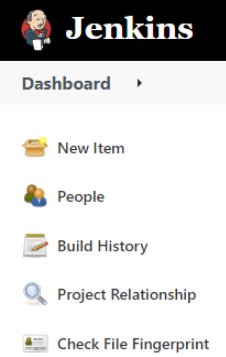
-
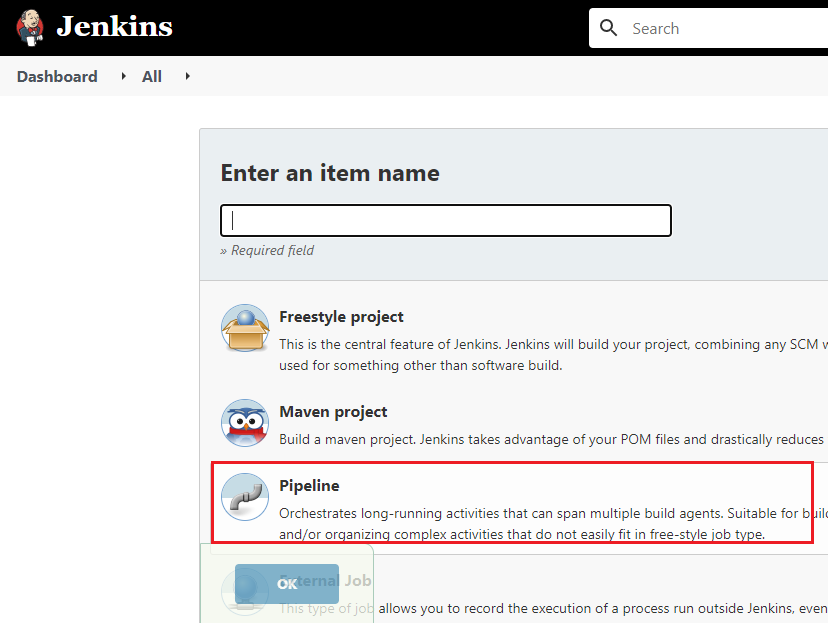
Enter a name for the Import pipeline, and then select Pipeline.
-
Click OK.
-
Copy the content from the provided import pipeline file. [+] Import Pipeline [-] Hide
Code
import jenkins.model.Jenkins
import java.nio.file.Path;
import java.nio.file.Paths;
import java.io.File;


/*
    This pipeline used to deploys migration promotion through operations like import, rollback, retain from one build environment to another.

    Pipeline is created using the following steps
    1. Init Parameters
    2. Pull import/retain XML and source solution zip file from GitHub
    3. Upload import/retain XML and source solution zip to k8 shared PVC
    4. Download Helm chart & deploy migration solution (import/retain/rollback)
    5. Download rollback zip from k8 shared PVC
    6. Push rollback zip to GitHub
	7. Clean up workspace

	Pre-requisite
	a) Tools/Plugins needs to install:
		1. Helm
		2. kubectl client
		3. Jenkins
		4. Java 1.8+
		5. git
		6. az client (for AKS)
		7. azure kubelogin (for AKS)
	b) OS Linux
	c) Jenkins plugins
		1. Kubernetes
		2. Git (git plugin 4.8.3, Git client plugin 3.9.0)
		3. Mask Password
		4. Credentials Binding Plugin (1.27)
		5. Parameter Separator
		6. BlueOcean (Optional)

	Usage:
		Steps to create pipeline using jenkinsfile.
		1. Login into the Jenkins GUI with admin privileges.
		2. create a pipeline by choosing New Item > Pipeline.
		3. Copy/paste containt of jenkinsfile to Pipeline Definition area.
		4. Uncheck checkbox "Use Groovy Sandbox".
		5. Save the pipeline.
		6. Trigger the pipeline once to initialize parameters.

*/

def k8login (CLUSTER_CONTEXT, KUBERNETES_CLUSTER_TYPE, K8_CREDENTIALS_ID, RESOURCEGROUP){
	echo "Login into Kubernetes cluster"

		if (KUBERNETES_CLUSTER_TYPE.toString().trim().contains("aks")){
			withCredentials([azureServicePrincipal(credentialsId: K8_CREDENTIALS_ID,
												subscriptionIdVariable: 'SUBS_ID',
												clientIdVariable: 'CLIENT_ID',
												clientSecretVariable: 'CLIENT_SECRET',
		tenantIdVariable: 'TENANT_ID')])
			{
				try {
				sh '''#!/bin/bash
				az login --service-principal -u $CLIENT_ID -p $CLIENT_SECRET -t $TENANT_ID
				az aks get-credentials --resource-group '''+RESOURCEGROUP+''' --name '''+CLUSTER_CONTEXT+'''
				kubelogin convert-kubeconfig -l azurecli
				kubectl config use-context '''+CLUSTER_CONTEXT+'''
								'''
				} catch (err) {
				echo "Caught: ${err}. Error in login into AKS cluster."
				error("Caught: ${err}")
				currentBuild.result = 'FAILURE'
				}
			}
		}else if (KUBERNETES_CLUSTER_TYPE.toString().trim().contains("eks")){
		withKubeConfig([credentialsId: K8_CREDENTIALS_ID, serverUrl: SERVER_URL]) {
				try {
				sh '''#!/bin/bash
				kubectl config use-context '''+CLUSTER_CONTEXT+'''
								'''
				} catch (err) {
				echo "Caught: ${err}. Error in login into AKS cluster."
				error("Caught: ${err}")
				currentBuild.result = 'FAILURE'
				}
			}
		}else {
			error("Kubernetes cluster not supported. The pipeline supports EKS and AKS clusters only.")
		}
}

/*
    Upload file to Kubernetes PVC
 */
def uploadToSharedPVC (NAMESPACE, CLUSTER_CONTEXT, K8_CREDENTIALS_ID, SERVER_URL, SRC_FILE_PATH, TRG_FILE_PATH) {
    echo "Upload files to K8 shared PVC"
	if (KUBERNETES_CLUSTER_TYPE.toString().trim().contains("aks")){
					try {
						  sh '''#!/bin/bash
							kubectl config use-context '''+CLUSTER_CONTEXT+'''
							TRG_FILE_PATH='''+TRG_FILE_PATH+'''
							if [[ ${TRG_FILE_PATH::1} == "/" ]]
								then
								  TRG_FILE_PATH=${TRG_FILE_PATH:1};
								else
								  echo "Forward shash(/) already removed "; fi
							podname=$(kubectl -n '''+NAMESPACE+''' get pods | grep -m 1 ac-deployment-manager | awk '{print $1}')
							kubectl -n '''+NAMESPACE+''' cp '''+SRC_FILE_PATH+''' ${podname}:${TRG_FILE_PATH}
							jobname=$(kubectl -n '''+NAMESPACE+''' get jobs | grep -m 1 migration | awk '{print $1}')
							if [[ -n "$jobname" ]]; then
								kubectl -n '''+NAMESPACE+''' delete job ${jobname}
								else
									echo "Migration resource does not exist"
							fi
											'''

						} catch (err) {
								echo "Caught: ${err}. Error in uploading file."
								error("Caught: ${err}")
								currentBuild.result = 'FAILURE'
							}
	}else if (KUBERNETES_CLUSTER_TYPE.toString().trim().contains("eks")){
		withKubeConfig([credentialsId: K8_CREDENTIALS_ID, serverUrl: SERVER_URL]) {
					try {
						  sh '''#!/bin/bash
							kubectl config use-context '''+CLUSTER_CONTEXT+'''
							TRG_FILE_PATH='''+TRG_FILE_PATH+'''
							if [[ ${TRG_FILE_PATH::1} == "/" ]]
								then
								  TRG_FILE_PATH=${TRG_FILE_PATH:1};
								else
								  echo "Forward shash(/) already removed "; fi
							podname=$(kubectl -n '''+NAMESPACE+''' get pods | grep -m 1 ac-deployment-manager | awk '{print $1}')
							kubectl -n '''+NAMESPACE+''' cp '''+SRC_FILE_PATH+''' ${podname}:${TRG_FILE_PATH}
							jobname=$(kubectl -n '''+NAMESPACE+''' get jobs | grep -m 1 migration | awk '{print $1}')
							if [[ -n "$jobname" ]]; then
								kubectl -n '''+NAMESPACE+''' delete job ${jobname}
								else
									echo "Migration resource does not exist"
							fi
											'''

						} catch (err) {
								echo "Caught: ${err}. Error in uploading file."
								error("Caught: ${err}")
								currentBuild.result = 'FAILURE'
							}
		}
	}else {
		error("Kubernetes cluster not supported. The pipeline supports EKS and AKS clusters only.")
	}

}

/*
    Download file from Kubernetes PVC
 */
def downloadFromSharedPVC (NAMESPACE, CLUSTER_CONTEXT, K8_CREDENTIALS_ID, SERVER_URL, SRC_FILE_PATH, TRG_FILE_PATH) {
    echo "Download files from K8 shared PVC"
		if (KUBERNETES_CLUSTER_TYPE.toString().trim().contains("aks")){
					try {
						sh '''#!/bin/bash
							SRC_FILE_PATH='''+SRC_FILE_PATH+'''
							if [[ ${SRC_FILE_PATH::1} == "/" ]]
								then
								  SRC_FILE_PATH=${SRC_FILE_PATH:1};
								else
								  echo "Forward shash(/) already removed "; fi
							kubectl config use-context '''+CLUSTER_CONTEXT+'''
							podname=$(kubectl -n '''+NAMESPACE+''' get pods | grep -m 1 ac-deployment-manager | awk '{print $1}')
							kubectl -n '''+NAMESPACE+''' cp ${podname}:${SRC_FILE_PATH} '''+TRG_FILE_PATH+'''
								'''
						} catch (err) {
								echo "Caught: ${err}. Error in downloading file from K8 PVC."
								error("Caught: ${err}")
								currentBuild.result = 'FAILURE'
							}
		}else if (KUBERNETES_CLUSTER_TYPE.toString().trim().contains("eks")){
			withKubeConfig([credentialsId: K8_CREDENTIALS_ID, serverUrl: SERVER_URL]) {
					try {
						sh '''#!/bin/bash
							SRC_FILE_PATH='''+SRC_FILE_PATH+'''
							if [[ ${SRC_FILE_PATH::1} == "/" ]]
								then
								  SRC_FILE_PATH=${SRC_FILE_PATH:1};
								else
								  echo "Forward shash(/) already removed "; fi
							kubectl config use-context '''+CLUSTER_CONTEXT+'''
							podname=$(kubectl -n '''+NAMESPACE+''' get pods | grep -m 1 ac-deployment-manager | awk '{print $1}')
							kubectl -n '''+NAMESPACE+''' cp ${podname}:${SRC_FILE_PATH} '''+TRG_FILE_PATH+'''
								'''
						} catch (err) {
								echo "Caught: ${err}. Error in downloading file from K8 PVC."
								error("Caught: ${err}")
								currentBuild.result = 'FAILURE'
							}
			}
		}else {
		error("Kubernetes cluster not supported. The pipeline supports EKS and AKS clusters only.")
	}
}

/*
    Pull Helm Chart
 */
def pullHelmChart (HELM_REPO_URL, CHART_NAME) {
    echo "Pull Helm Chart ("+CHART_NAME+") from Artifact Hub"
					try {
						sh '''#!/bin/bash
							helm repo add adeptia-connect-migration '''+HELM_REPO_URL+'''
							helm pull adeptia-connect-migration/'''+CHART_NAME+''' --untar
							'''
						} catch (err) {
								echo "Caught: ${err}. Error in pulling Helm chart from repo."
								error("Caught: ${err}")
								currentBuild.result = 'FAILURE'
							}

}

/*
    Deploy Helm to Kubernetes cluster
 */
def deployToCluster (NAMESPACE, CLUSTER_CONTEXT, K8_CREDENTIALS_ID, BACKEND_DATABASE_CREDENTIALS_ID, LOG_DATABASE_CREDENTIALS_ID, SERVER_URL) {
    echo "Deploy Helm chart to Kubernetes cluster"
			if (KUBERNETES_CLUSTER_TYPE.toString().trim().contains("aks")){
					try {
						def BACKEND_DB_USERNAME = getUserName(BACKEND_DATABASE_CREDENTIALS_ID);
						def BACKEND_DB_PASSWORD = getPassword(BACKEND_DATABASE_CREDENTIALS_ID).replaceAll( /([^a-zA-Z0-9])/, '\\\\$1' );
						def LOG_DB_USERNAME = getUserName(LOG_DATABASE_CREDENTIALS_ID);
						def LOG_DB_PASSWORD = getPassword(LOG_DATABASE_CREDENTIALS_ID).replaceAll( /([^a-zA-Z0-9])/, '\\\\$1' );
						wrap([$class: 'MaskPasswordsBuildWrapper', varPasswordPairs: [[password:BACKEND_DB_PASSWORD], [password:BACKEND_DB_USERNAME], [password:LOG_DB_PASSWORD], [password:LOG_DB_USERNAME]]]) {
						  sh '''#!/bin/bash
							kubectl config use-context '''+CLUSTER_CONTEXT+'''
							helm upgrade -i migration migration -f migration/values.yaml --set environmentVariables.BACKEND_DB_URL=${BACKEND_DB_URL} --set environmentVariables.LOG_DB_URL=${LOG_DB_URL} --set environmentVariables.BACKEND_DB_USERNAME='''+BACKEND_DB_USERNAME+''' --set environmentVariables.BACKEND_DB_PASSWORD='''+BACKEND_DB_PASSWORD+''' --set environmentVariables.LOG_DB_USERNAME='''+LOG_DB_USERNAME+''' --set environmentVariables.LOG_DB_PASSWORD='''+LOG_DB_PASSWORD+''' --set environmentVariables.BACKEND_DB_DRIVER_CLASS=${BACKEND_DB_DRIVER_CLASS} --set environmentVariables.BACKEND_DB_TYPE=${BACKEND_DB_TYPE} --set environmentVariables.SOURCE_ZIP_PATH=${SOURCE_ZIP_PATH} --set environmentVariables.MIGRATION_XML_FILE_PATH=${MIGRATION_XML_FILE_PATH} --set environmentVariables.OVERRIDE_USER=${OVERRIDE_USER} --set environmentVariables.OVERRIDE_MODIFIEDBY_USER=${OVERRIDE_MODIFIEDBY_USER} --set environmentVariables.RETAIN_XML_PATH=${RETAIN_XML_PATH} --set environmentVariables.LOG_IDENTIFIER=${LOG_IDENTIFIER} --set environmentVariables.OPERATION=${OPERATION} --set environmentVariables.ROLLBACK_ZIP_PATH=${ROLLBACK_ZIP_PATH} -n '''+NAMESPACE+'''
											'''
							}
						} catch (err) {
								echo "Caught: ${err}. Error in deploying Helm chart."
								error("Caught: ${err}")
								currentBuild.result = 'FAILURE'
							}
			}else if (KUBERNETES_CLUSTER_TYPE.toString().trim().contains("eks")){
				withKubeConfig([credentialsId: K8_CREDENTIALS_ID, serverUrl: SERVER_URL]) {
					try {
						def BACKEND_DB_USERNAME = getUserName(BACKEND_DATABASE_CREDENTIALS_ID);
						def BACKEND_DB_PASSWORD = getPassword(BACKEND_DATABASE_CREDENTIALS_ID).replaceAll( /([^a-zA-Z0-9])/, '\\\\$1' );
						def LOG_DB_USERNAME = getUserName(LOG_DATABASE_CREDENTIALS_ID);
						def LOG_DB_PASSWORD = getPassword(LOG_DATABASE_CREDENTIALS_ID).replaceAll( /([^a-zA-Z0-9])/, '\\\\$1' );
						wrap([$class: 'MaskPasswordsBuildWrapper', varPasswordPairs: [[password:BACKEND_DB_PASSWORD], [password:BACKEND_DB_USERNAME], [password:LOG_DB_PASSWORD], [password:LOG_DB_USERNAME]]]) {
						  sh '''#!/bin/bash
							kubectl config use-context '''+CLUSTER_CONTEXT+'''
							helm upgrade -i migration migration -f migration/values.yaml --set environmentVariables.BACKEND_DB_URL=${BACKEND_DB_URL} --set environmentVariables.LOG_DB_URL=${LOG_DB_URL} --set environmentVariables.BACKEND_DB_USERNAME='''+BACKEND_DB_USERNAME+''' --set environmentVariables.BACKEND_DB_PASSWORD='''+BACKEND_DB_PASSWORD+''' --set environmentVariables.LOG_DB_USERNAME='''+LOG_DB_USERNAME+''' --set environmentVariables.LOG_DB_PASSWORD='''+LOG_DB_PASSWORD+''' --set environmentVariables.BACKEND_DB_DRIVER_CLASS=${BACKEND_DB_DRIVER_CLASS} --set environmentVariables.BACKEND_DB_TYPE=${BACKEND_DB_TYPE} --set environmentVariables.SOURCE_ZIP_PATH=${SOURCE_ZIP_PATH} --set environmentVariables.MIGRATION_XML_FILE_PATH=${MIGRATION_XML_FILE_PATH} --set environmentVariables.OVERRIDE_USER=${OVERRIDE_USER} --set environmentVariables.OVERRIDE_MODIFIEDBY_USER=${OVERRIDE_MODIFIEDBY_USER} --set environmentVariables.RETAIN_XML_PATH=${RETAIN_XML_PATH} --set environmentVariables.LOG_IDENTIFIER=${LOG_IDENTIFIER} --set environmentVariables.OPERATION=${OPERATION} --set environmentVariables.ROLLBACK_ZIP_PATH=${ROLLBACK_ZIP_PATH} -n '''+NAMESPACE+'''
											'''
							}
						} catch (err) {
								echo "Caught: ${err}. Error in deploying Helm chart."
								error("Caught: ${err}")
								currentBuild.result = 'FAILURE'
							}
				}
		}else {
		error("Kubernetes cluster not supported. The pipeline supports EKS and AKS clusters only.")
	}

}

/*
    Wait until deployment finish on Kubernetes cluster
 */
def waitUntilDepoymentComplete(NAMESPACE, CLUSTER_CONTEXT, K8_CREDENTIALS_ID, SERVER_URL, POD, time_out) {
    echo "Fetching pod status"
			if (KUBERNETES_CLUSTER_TYPE.toString().trim().contains("aks")){
					try {
						int inter = 5, count = 1;
						sh('kubectl config use-context ${CLUSTER_CONTEXT};')
						while (true) {
								def status = sh script: "kubectl -n ${NAMESPACE} get pods | grep -m 1 ${POD} | awk '{print \$3}' ", returnStdout: true
                                if (status.toString().trim().contains("Completed")) {
                                    break;
                                    }
								else if (status.toString().trim().contains("Error")) {
									error("Caught: Migration deployment failed due to error. Please check migration logs.")
									currentBuild.result = 'FAILURE'
                                    break;
                                    }
                               sleep(inter)
							   echo count+" retry in "+inter*count+" seconds."
							   count++
							   if ((count)>=((time_out-10)/inter)) {
									error("Caught: Migration deployment taking more then ideal time. Please check migration logs.")
									currentBuild.result = 'FAILURE'
									break;
							   }
                            }
						} catch (err) {
								echo "Caught: ${err}. Error in fetching pod status. Migration deployment taking more then ideal time. Please check migration logs."
								error("Caught: ${err}")
								currentBuild.result = 'FAILURE'
							}
			}else if (KUBERNETES_CLUSTER_TYPE.toString().trim().contains("eks")){
				withKubeConfig([credentialsId: K8_CREDENTIALS_ID, serverUrl: SERVER_URL]) {
					try {
						int inter = 5, count = 1;
						sh('kubectl config use-context ${CLUSTER_CONTEXT};')
						while (true) {
								def status = sh script: "kubectl -n ${NAMESPACE} get pods | grep -m 1 ${POD} | awk '{print \$3}' ", returnStdout: true
                                if (status.toString().trim().contains("Completed")) {
                                    break;
                                    }
								else if (status.toString().trim().contains("Error")) {
									error("Caught: Migration deployment failed due to error. Please check migration logs.")
									currentBuild.result = 'FAILURE'
                                    break;
                                    }
                               sleep(inter)
							   echo count+" retry in "+inter*count+" seconds."
							   count++
							   if ((count)>=((time_out-10)/inter)) {
									error("Caught: Migration deployment taking more then ideal time. Please check migration logs.")
									currentBuild.result = 'FAILURE'
									break;
							   }
                            }
						} catch (err) {
								echo "Caught: ${err}. Error in fetching pod status. Migration deployment taking more then ideal time. Please check migration logs."
								error("Caught: ${err}")
								currentBuild.result = 'FAILURE'
							}
				}
			}else {
			error("Kubernetes cluster not supported. The pipeline supports EKS and AKS clusters only.")
		}

}

/*
    Push soution Zip to GitHub repository
 */
def pushToGitHub (GIT_BRANCH, GIT_CREDENTIALS_ID, GIT_REPO_URL, FILE_PATH) {
    echo "Pushing file ("+FILE_PATH+") to GitHub repo"
				withCredentials([gitUsernamePassword(credentialsId: GIT_CREDENTIALS_ID, gitToolName: 'git-tool')]) {
					try {
						def gitUser = getUserName(GIT_CREDENTIALS_ID);
							sh('sleep 10')
							sh('git config --global user.name "'+gitUser+'"')
							sh('git config --global user.email "you@example.com"')
							sh('git add '+FILE_PATH)
							sh('git commit -m "auto commit message" ')
							sh('git push ${GIT_REPO_URL} HEAD:'+GIT_BRANCH)
						} catch (err) {
								echo "Caught: ${err}. Error in pushing file to Github."
								error("Caught: ${err}")
								currentBuild.result = 'FAILURE'
							}
					}
}

/*
    Generate rollback soution Zip file path
 */
def convertRollbackZipPath(FILE_PATH) {
					def rollbackZipPath = null
					def Append = "Rollback_"
					try {
						Path path = Paths.get(FILE_PATH);
						def fileName=path.getFileName().toString()
						def parentDir=path.getParent().toString()
						rollbackZipPath=parentDir + File.separator + Append + fileName
						if(isUnix()){
						rollbackZipPath=rollbackZipPath.replace("\\", "/")
						}
						} catch (err) {
								echo "Caught: ${err}. Error in generating rollback soution Zip file path."
								error("Caught: ${err}")
								currentBuild.result = 'FAILURE'
							}
					return rollbackZipPath
}

/*
    Get username from credentials id
 */
def getUserName(id) {
	def userName = null
	withCredentials([usernamePassword(credentialsId: id, passwordVariable: 'PASSWORD', usernameVariable: 'USERNAME')]) {
					try {
						userName = USERNAME
						} catch (err) {
								echo "Caught: ${err}. Error in extracting username from "+id+" ."
								error("Caught: ${err}")
								currentBuild.result = 'FAILURE'
							}
	}
	return userName
}

/*
    Get password from credentials id
 */
def getPassword(id) {
	def password = null
	withCredentials([usernamePassword(credentialsId: id, passwordVariable: 'PASSWORD', usernameVariable: 'USERNAME')]) {
					try {
						password = PASSWORD;
						} catch (err) {
								echo "Caught: ${err}. Error in extracting password from "+id+" ."
								error("Caught: ${err}")
								currentBuild.result = 'FAILURE'
							}
	}
	return password
}


pipeline {
	// Global default variables
    environment {
		//manage deployment status timeout
		time_out = 300
    }
	parameters{
		//separator(name: 'separator-ce1a9ef5-cd10-4002-a43f-8ae24d9d0bb3', sectionHeader: '''Helm Chart Parameters''', sectionHeaderStyle: 'background-color:#eeeee4;font-size:15px;font-weight:normal;text-transform:uppercase;border-color:gray;', separatorStyle: '''font-weight:bold;line-height:1.5em;font-size:1.5em;''')
		string(defaultValue: '', description: 'ArtifactHub Helm chart URL e.g. https://adeptia.github.io/adeptia-connect-migration/charts', name: 'HELM_REPO_URL', trim: true)
		string(defaultValue: '', description: 'Name of Helm chart to be downloaded from ArtifactHub repository e.g. migration', name: 'CHART_NAME', trim: true)

		//separator(name: 'separator-ce1a9ef5-cd10-4002-a43f-8ae24d9d0bb3', sectionHeader: '''GitHub Parameters''', sectionHeaderStyle: 'background-color:#eeeee4;font-size:15px;font-weight:normal;text-transform:uppercase;border-color:gray;', separatorStyle: '''font-weight:bold;line-height:1.5em;font-size:1.5em;''')
		string(defaultValue: '', description: 'GitHub credentials ID configured in Jenkins e.g. gitCredential_id', name: 'GIT_CREDENTIALS_ID', trim: true)
		string(defaultValue: '', description: 'GitHub server URL e.g. https://github.com/adeptia/migration-defination.git', name: 'GIT_REPO_URL', trim: true)
		string(defaultValue: '', description: 'GitHub Branch name e.g. main', name: 'GIT_BRANCH', trim: true)
		string(defaultValue: '', description: 'Source zip path to be downloaded from GitHub. e.g. test/SA_PF.zip', name: 'GIT_SOURCE_ZIP_PATH', trim: true)
		string(defaultValue: '', description: 'Rollback zip path to upload file to GitHub. e.g. test/Rollback_SA_PF.zip. No need to fill this field in case of performing "rollback" operation', name: 'GIT_ROLLBACK_ZIP_PATH', trim: true)
		string(defaultValue: '', description: 'Import xml file path to be downloaded from GitHub. e.g. test/import.xml', name: 'GIT_MIGRATION_XML_FILE_PATH', trim: true)
		string(defaultValue: '', description: 'Retain xml file path to be downloaded from GitHub. e.g. test/retain.xml', name: 'GIT_RETAIN_XML_PATH', trim: true)

		//separator(name: 'separator-ce1a9ef5-cd10-4002-a43f-8ae24d9d0bb3', sectionHeader: '''Migration Parameters''', sectionHeaderStyle: 'background-color:#eeeee4;font-size:15px;font-weight:normal;text-transform:uppercase;border-color:gray;', separatorStyle: '''font-weight:bold;line-height:1.5em;font-size:1.5em;''')
		string(defaultValue: '', description: 'Type of operation for which deployment will be performed. e.g. import or rollback', name: 'OPERATION', trim: true)
		string(defaultValue: '', description: 'Migration source zip path. e.g. /shared/SA_PF.zip', name: 'SOURCE_ZIP_PATH', trim: true)
		string(defaultValue: '', description: 'Migration import/retain xml file path. e.g. /shared/import.xml', name: 'MIGRATION_XML_FILE_PATH', trim: true)
		string(defaultValue: '', description: 'User Id or User name with which all objects will be deployed e.g IndigoUser:127000000001107055536473900001', name: 'OVERRIDE_USER', trim: true)
		string(defaultValue: '', description: 'User Id or User name which will be reflected in the modified by field of every activity after deployment e.g. IndigoUser:127000000001107055536473900001', name: 'OVERRIDE_MODIFIEDBY_USER', trim: true)
		string(defaultValue: '', description: 'Location of retain xml file. e.g. /shared/retain.xml', name: 'RETAIN_XML_PATH', trim: true)
		string(defaultValue: '', description: 'Location of rollback zip file. e.g. /shared/Rollback_SA_PF.zip. No need to fill this field in case of performing "rollback" operation', name: 'ROLLBACK_ZIP_PATH', trim: true)
		string(defaultValue: '', description: 'Migration log identifier to capture logs in ms environment.', name: 'LOG_IDENTIFIER', trim: true)

		//separator(name: 'separator-ce1a9ef5-cd10-4002-a43f-8ae24d9d0bb3', sectionHeader: '''K8 Cluster Parameters''', sectionHeaderStyle: 'background-color:#eeeee4;font-size:15px;font-weight:normal;text-transform:uppercase;border-color:gray;', separatorStyle: '''font-weight:bold;line-height:1.5em;font-size:1.5em;''')
		string(defaultValue: '', description: 'Configure Kubernetes custer type e.g. eks or aks', name: 'KUBERNETES_CLUSTER_TYPE', trim: true)
		string(defaultValue: '', description: 'Configure resouce group of Kubernetes custer (Applicable when K8 cluster is "aks")', name: 'RESOURCE_GROUP', trim: true)
		string(defaultValue: '', description: 'Credentials ID configured in Jenkins to access K8 cluster.', name: 'K8_CREDENTIALS_ID', trim: true)
		string(defaultValue: '', description: 'URL to access K8 cluster e.g. https://<cluster-name>-dns-xxxxxxxx.hcp.<region>.azmk8s.io:443. You can get the server Url from K8 config file.(Applicable when K8 cluster is "eks")', name: 'SERVER_URL', trim: true)
		string(defaultValue: '', description: 'Cluster context to access K8 cluster e.g. adeptia-context', name: 'CLUSTER_CONTEXT', trim: true)
		string(defaultValue: '', description: 'K8 cluster name space deployment where Connect microservices deployed e.g. adeptia', name: 'NAMESPACE', trim: true)
		string(defaultValue: '', description: 'URL of database backend bind with application.', name: 'BACKEND_DB_URL', trim: true)
		string(defaultValue: '', description: 'Credentials ID configured in Jenkins to access database.', name: 'BACKEND_DATABASE_CREDENTIALS_ID', trim: true)
		string(defaultValue: '', description: 'Driver class of database e.g com.microsoft.sqlserver.jdbc.SQLServerDriver', name: 'BACKEND_DB_DRIVER_CLASS', trim: true)
		string(defaultValue: '', description: 'Database type e.g SQL-Server.', name: 'BACKEND_DB_TYPE', trim: true)
		string(defaultValue: '', description: 'URL of log database bind with application.', name: 'LOG_DB_URL', trim: true)
		string(defaultValue: '', description: 'Credentials ID configured in Jenkins to access database.', name: 'LOG_DATABASE_CREDENTIALS_ID', trim: true)
		string(defaultValue: '', description: 'Driver class of database e.g com.microsoft.sqlserver.jdbc.SQLServerDriver', name: 'LOG_DB_DRIVER_CLASS', trim: true)
		string(defaultValue: '', description: 'Database type e.g SQL-Server.', name: 'LOG_DB_TYPE', trim: true)
		}

    /*
		agent {
        	label 'LinuxAgent'
    }
	*/
	agent any

stages {
        stage('Checkout files from GitHub') {
            steps {
                script {
					echo 'Checkout xml and zip from github'
					checkout([$class: 'GitSCM', branches: [[name: '*/'+GIT_BRANCH]], extensions: [], userRemoteConfigs: [[credentialsId: GIT_CREDENTIALS_ID, url: GIT_REPO_URL]]])

                }
            }
        }
		stage('Upload files to PVC') {
            steps {
                script {
					echo 'Uploading import zip and xml file'
					k8login (CLUSTER_CONTEXT, KUBERNETES_CLUSTER_TYPE, K8_CREDENTIALS_ID, RESOURCE_GROUP)
					uploadToSharedPVC (NAMESPACE, CLUSTER_CONTEXT, K8_CREDENTIALS_ID, SERVER_URL, GIT_SOURCE_ZIP_PATH, SOURCE_ZIP_PATH)
					uploadToSharedPVC (NAMESPACE, CLUSTER_CONTEXT, K8_CREDENTIALS_ID, SERVER_URL, GIT_MIGRATION_XML_FILE_PATH, MIGRATION_XML_FILE_PATH)
					//Condition to handle retain feature within import
					if((GIT_RETAIN_XML_PATH.contains(".xml")) && (RETAIN_XML_PATH.contains(".xml"))){
					uploadToSharedPVC (NAMESPACE, CLUSTER_CONTEXT, K8_CREDENTIALS_ID, SERVER_URL, GIT_RETAIN_XML_PATH, RETAIN_XML_PATH)
					}
                }
            }
        }
		stage('Pull Helm Chart & Deploy Migration') {
            steps {
				script {
						echo 'Pulling Helm Chart'
						pullHelmChart (HELM_REPO_URL, CHART_NAME)


						echo 'Deploying Helm Chart'
						deployToCluster (NAMESPACE, CLUSTER_CONTEXT, K8_CREDENTIALS_ID, BACKEND_DATABASE_CREDENTIALS_ID, LOG_DATABASE_CREDENTIALS_ID, SERVER_URL)
						timeout(time: env.time_out, unit: "SECONDS"){
						waitUntilDepoymentComplete(NAMESPACE, CLUSTER_CONTEXT, K8_CREDENTIALS_ID, SERVER_URL, 'migration', env.time_out.toInteger())
						}
				}
            }
        }
		stage('Download Rollback zip') {
            when {
                    expression { params.OPERATION == 'import' }
            }
            steps {
                script {
                    echo 'Download Rollback zip file to shared PVC'
					downloadFromSharedPVC (NAMESPACE, CLUSTER_CONTEXT, K8_CREDENTIALS_ID, SERVER_URL, ROLLBACK_ZIP_PATH, GIT_ROLLBACK_ZIP_PATH)
                }
            }
        }
		stage('Push Rollback Zip') {
            when {
                    expression { params.OPERATION == 'import' }
            }
            steps {
                script {
					echo 'Push Rollback Zip to GitHub'
					pushToGitHub (GIT_BRANCH, GIT_CREDENTIALS_ID, GIT_REPO_URL, GIT_ROLLBACK_ZIP_PATH)

                }
            }
        }

	}
	post('Clean-up') {
			always {
				echo 'Cleanup workspace'
				cleanWs()
			}
			success {
				echo 'Pipeline succeeded!'
			}
			unstable {
				echo 'Pipeline unstable :/'
			}
			failure {
				echo 'Pipeline failed :('
			}
		}
}
-
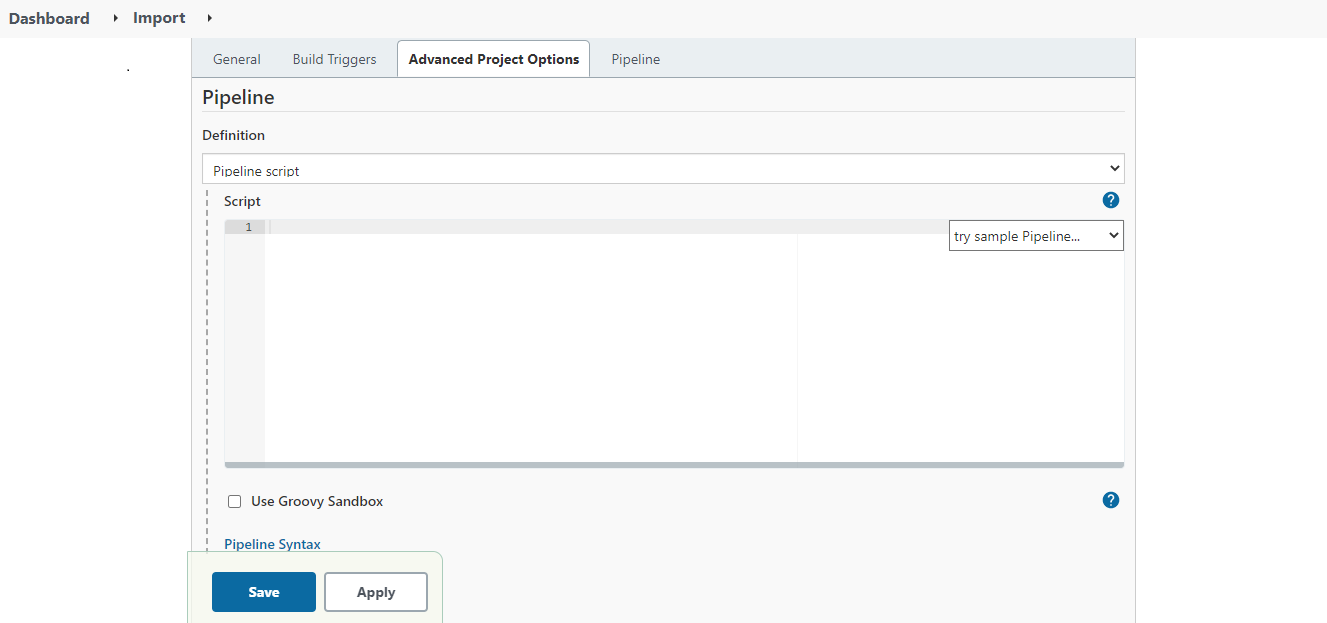
In the Pipeline Definition section, paste the copied content and uncheck the Use Groovy Sandbox checkbox.
|
 | If you are using Jenkins on Windows OS, and have created an agent on Linux OS, you need to do the followings in the export pipeline file.
1. Uncomment the following code snippet.
Code
    /*
		agent {
        	label 'LinuxAgent'
    }
	*/
Where,
LinuxAgent is the name of the agent that you have created.
2. Comment the following lines of code.
Code
agent any
| | --- | --- | 7. Click Save. 8. On the screen that follows, click Build Now. As you build the pipeline for the very first time, all the parameters get initialized. 9. Refresh the page. The Build Nowoption now changes to Build with Parameters. 10. Click Build with Parameters.
You will see all the parameters inherited from the import pipeline file. 11. Enter the parameter values as per your requirement.
| It is mandatory to provide a valid value for all the Jenkins parameters. |
|---|
[+] Click here to expand the list of Import parameters [-] Hide
| Parameters | Value | Description |
|---|---|---|
| Helm Chart | ||
| HELM_REPO_URL | https://adeptia.github.io/adeptia-connect-migration/charts | Migration Helm chart repository URL. |
| CHART_NAME | migration | Migration Helm chart name. |
| GitHub | ||
| GIT_CREDENTIALS_ID | <credential ID generated by Jenkins> | Credential ID for GitHub in Jenkins. Refer to the prerequisitesfor more details. |
| GIT_REPO_URL | https://github.com/adeptia/migration-defination.git | URL of the GitHub repository. |
| GIT_BRANCH | main | GitHub branch name. |
| GIT_SOURCE_ZIP_PATH | test/SA_PF.zip | Path of the exported ZIP in the GitHub repository. |
| GIT_MIGRATION_XML_FILE_PATH | test/import.xml | Path of the import.xml file in the GitHub repository. |
| GIT_RETAIN_XML_PATH | xml/retain.xml | Path of the retain XML file in the GitHub repository. |
| GIT_ROLLBACK_ZIP_PATH | test/Rollback_SA_PF.zip | Path in the GitHub repository where you want to upload the rollback zip. |
| Migration | ||
| OPERATION | import | The type of operation for which deployment will be performed. |
| SOURCE_ZIP_PATH | /shared/migrationtest1/SA_PF.zip | Path of the exported ZIP in the PVC. |
| ROLLBACK_ZIP_PATH | /shared/Rollback_SA_PF.zip | Path in the PVC where you want to keep the rollback zip. |
| MIGRATION_XML_FILE_PATH | /shared/migrationtest1/import.xml | Path of the import.xml file in the PVC. |
| OVERRIDE_USER | IndigoUser:127000000001107055536473900001 | User Id or user name of an IT user with which all objects will be deployed. |
| OVERRIDE_MODIFIEDBY_USER | IndigoUser:127000000001107055536473900001 | User Id or user name which will be reflected in the modified by field of every activity after the deployment. |
| RETAIN_XML_PATH | /shared/migrationtest1/retain.xml | Path of the retain XML file in the PVC. |
| LOG_IDENTIFIER | Test_Identifier_Tag | Log identifier to capture logs from MS environment. |
| Kubernetes Cluster | ||
| CLUSTER_TYPE | • Amazon Elastic Kubernetes Service (cluster in AWS) • Azure Kubernetes Service (cluster in MS Azure) | Type of Kubernetes cluster. |
| RESOURCE_GROUP | Resource group name | Resource group of Kubernetes cluster. |
| K8_CREDENTIALS_ID | <credential ID generated by Jenkins> | Credential ID for Kubernetes in Jenkins. Refer to the prerequisitesfor more details. |
| SERVER_URL | https://<host name of the Kubernetes cluster>:<Port number> | URL of the Kubernetes cluster. |
| CLUSTER_CONTEXT | test-dev | Kubernetes cluster context. |
| NAMESPACE | namespace | Kubernetes cluster namespace for deployment. |
| Backend Database | ||
| BACKEND_DB_URL | jdbc:sqlserver://<DB Hostname>:<Port number>;database=<Backend Database Name> | Backend database URL used in the deployment of migration Helm chart. Database info configured in value.yaml file. |
| DATABASE_CREDENTIALS_ID | <credential ID generated by Jenkins> | Credential ID for database in Jenkins. Refer to the prerequisitesfor more details. |
| BACKEND_DB_DRIVER_CLASS | com.microsoft.sqlserver.jdbc.SQLServerDriver | Backend database driver class used in the deployment of migration Helm chart. Database info configured in values.yaml file. |
| BACKEND_DB_TYPE | SQL-Server | Backend database type used in the deployment of migration Helm chart. Database info configured in values.yaml file. |
| Log Database | ||
| LOG_DB_URL | jdbc:sqlserver://<DB Hostname>:<Port number>;database=<log Database Name> | Log database URL used in the deployment of migration Helm chart. Database info configured in value.yaml file. |
| LOG_DATABASE_CREDENTIALS_ID | <credential ID generated by Jenkins> | Credential ID for database in Jenkins. |
| LOG_DB_DRIVER_CLASS | com.microsoft.sqlserver.jdbc.SQLServerDriver | Log database driver class used in the deployment of migration Helm chart. Database info configured in values.yaml file. |
| LOG_DB_TYPE | SQL-Server | Log database type used in the deployment of migration Helm chart. Database info configured in values.yaml file. |
| Parameters used in rollback operation | ||
| Helm Chart | ||
| HELM_REPO_URL | https://adeptia.github.io/adeptia-connect-migration/charts | Migration Helm chart repository URL. |
| CHART_NAME | migration | Migration Helm chart name. |
| GitHub | ||
| GIT_REPO_URL | https://github.com/adeptia/migration-defination.git | URL of the GitHub repository. |
| GIT_BRANCH | main | GitHub branch name. |
| GIT_SOURCE_ZIP_PATH | test/Rolllback_SA_PF.zip | Location of the rollback ZIP in GitHub repository. |
| GIT_MIGRATION_XML_FILE_PATH | test/import.xml | Location of the import.xml file in GitHub repository. |
| Migration | ||
| OPERATION | rollback | The type of operation for which deployment will be performed. |
| SOURCE_ZIP_PATH | /shared/migrationtest1/Rolllback_SA_PF.zip | Path of the rollback ZIP in the PVC. |
| MIGRATION_XML_FILE_PATH | /shared/migrationtest1/import.xml | Path of the import.xml file in the PVC. |
| LOG_IDENTIFIER | Test_Identifier_Tag | Log identifier to capture logs from MS environment. |
| Kubernetes Cluster | ||
| CLUSTER_TYPE | • Amazon Elastic Kubernetes Service (cluster in AWS) • Azure Kubernetes Service (cluster in MS Azure) | Type of Kubernetes cluster. |
| RESOURCE_GROUP | Resource group name | Resource group of Kubernetes cluster. |
| K8_CREDENTIALS_ID | <credential ID generated by Jenkins> | Credential ID for Kubernetes in Jenkins. Refer to the prerequisitesfor more details. |
| SERVER_URL | https://<host name of the Kubernetes cluster>:<Port number> | URL of the Kubernetes cluster. |
| CLUSTER_CONTEXT | test-dev | Kubernetes cluster context. |
| NAMESPACE | namespace | Kubernetes cluster namespace for deployment. |
| Backend Database | ||
| BACKEND_DB_URL | jdbc:sqlserver://<DB Hostname>:<Port number>;database=<Backend Database Name> | Backend database URL used in the deployment of migration Helm chart. Database info configured in value.yaml file. |
| DATABASE_CREDENTIALS_ID | <credential ID generated by Jenkins> | Credential ID for database in Jenkins. Refer to the prerequisitesfor more details. |
| BACKEND_DB_DRIVER_CLASS | com.microsoft.sqlserver.jdbc.SQLServerDriver | Backend database driver class used in the deployment of migration Helm chart. Database info configured in values.yaml file. |
| BACKEND_DB_TYPE | SQL-Server | Backend database type used in the deployment of migration Helm chart. Database info configured in values.yaml file. |
| Log Database | ||
| LOG_DB_URL | jdbc:sqlserver://<DB Hostname>:<Port number>;database=<log Database Name> | Log database URL used in the deployment of migration Helm chart. Database info configured in value.yaml file. |
| LOG_DATABASE_CREDENTIALS_ID | <credential ID generated by Jenkins> | Credential ID for database in Jenkins. |
| LOG_DB_DRIVER_CLASS | com.microsoft.sqlserver.jdbc.SQLServerDriver | Log database driver class used in the deployment of migration Helm chart. Database info configured in values.yaml file. |
| LOG_DB_TYPE | SQL-Server | Log database type used in the deployment of migration Helm chart. Database info configured in values.yaml file. |
-
Click Build to trigger the pipeline.
•
The objects are imported to the target environment.
•
The rollback ZIP is created and pushed to the GitHub repository.
•
All the log statements generated by the migration utility during the import process are tagged with a unique identifier. This allows you to search for this unique identifier in the centralized logging system, and fetch all the associated logs.
Rolling back the import operation
If you decide upon rolling back the import operation, use the rollback ZIP created during the import operation.
Here are the steps to perform the rollback operation.
-
Log in to Jenkins.
-
Click Build with Parameters.
-
Enter the values for the following parameters.
It is mandatory to provide a valid value for all the Jenkins parameters, except for GIT_ROLLBACK_ZIP_PATH and ROLLBACK_ZIP_PATH.
[+] Click here to expand the list of rollback parameters [-] Hide
| Helm Chart | ||
|---|---|---|
| HELM_REPO_URL | https://adeptia.github.io/ adeptia-connectmigration/charts | Migration Helm chart repository URL. |
| CHART_NAME | migration | Name of the Migration Helm chart. |
| GitHub | ||
| GIT_CREDENTIALS_ID | <credential ID generated by Jenkins> | Credential ID for GitHub in Jenkins. Refer to the prerequisitesfor more details. |
| GIT_REPO_URL | https://github.com/adeptia/ migration-defination.git | URL of the GitHub repository. |
| GIT_BRANCH | main | GitHub branch name. |
| GIT_SOURCE_ZIP_PATH | test/Rolllback_SA_PF.zip | Location of the rollback ZIP in GitHub repository. |
| GIT_MIGRATION_XML_FILE_PATH | test/import.xml | Location of the import.xml file in GitHub repository. |
| Migration | ||
| OPERATION | rollback | The type of operation for which deployment will be performed. |
| SOURCE_ZIP_PATH | /shared/migrationtest1/ Rolllback_SA_PF.zip | Path of the rollback ZIP in the PVC. |
| MIGRATION_XML_FILE_PATH | /shared/migrationtest1/ import.xml | Path of the import.xml file in the PVC. |
| LOG_IDENTIFIER | Test_Identifier_Tag | Log identifier to capture logs from MS environment. |
| Kubernetes Cluster | ||
| CLUSTER_TYPE | • Amazon Elastic Kubernetes Service (cluster in AWS) • Azure Kubernetes Service (cluster in MS Azure) | Type of Kubernetes cluster. |
| RESOURCE_GROUP | Resource group name | Resource group of Kubernetes cluster. |
| K8_CREDENTIALS_ID | <credential ID generated by Jenkins> | Credential ID for Kubernetes in Jenkins. Refer to the prerequisitesfor more details. |
| SERVER_URL | https://<host name of the Kubernetes cluster>:<Port number> | URL of the Kubernetes cluster. |
| CLUSTER_CONTEXT | test-dev | Kubernetes cluster context. |
| NAMESPACE | namespace | Kubernetes cluster namespace for deployment. |
| Database | ||
| BACKEND_DB_URL | jdbc:sqlserver://<DB Hostname>:<Port number>;database=<Backend Database Name> | Backend database URL used in the deployment of migration Helm chart. Database info configured in value.yaml file. |
| DATABASE_CREDENTIALS_ID | <credential ID generated by Jenkins> | Credential ID for database in Jenkins. Refer to the prerequisitesfor more details. |
| BACKEND_DB_DRIVER_CLASS | com.microsoft.sqlserver. jdbc.SQLServerDriver | Backend database driver class used in the deployment of migration Helm chart. Database info configured in values.yaml file. |
| BACKEND_DB_TYPE | SQL-Server | Backend database type used in the deployment of migration Helm chart. Database info configured in values.yaml file. |
| Log Database | ||
| LOG_DB_URL | jdbc:sqlserver://<DB Hostname>:<Port number>;database=<log Database Name> | Log database URL used in the deployment of migration Helm chart. Database info configured in value.yaml file. |
| LOG_DATABASE_CREDENTIALS_ID | <credential ID generated by Jenkins> | Credential ID for database in Jenkins. |
| LOG_DB_DRIVER_CLASS | com.microsoft.sqlserver.jdbc.SQLServerDriver | Log database driver class used in the deployment of migration Helm chart. Database info configured in values.yaml file. |
| LOG_DB_TYPE | SQL-Server | Log database type used in the deployment of migration Helm chart. Database info configured in values.yaml file. |
-
Click Buildto roll back the import operation.
RetainXmlLocation, OverRideuser, and OverrideModifiedByuser parameters are not applicable in case of rollback.