Setting up Envoy Gateway
Envoy Gateway is a Kubernetes-native gateway controller that uses the standard Gateway API (GatewayClass, Gateway, HTTPRoute) to route external HTTPS traffic to Adeptia Automate running on an AKS or EKS cluster.
This document covers setup for both AKS (Azure) and EKS (AWS). Steps that apply to only one platform are clearly marked.
Architecture overview
Envoy Gateway has two components.
Control plane (Envoy Gateway Controller): Watches GatewayClass, Gateway, HTTPRoute, and policy CRDs and translates them into Envoy Proxy configuration. It manages configuration only and does not carry application traffic.
Data plane (Envoy Proxy): Pods deployed automatically when a Gateway is created. They terminate TLS, apply Layer-7 routing rules and policies, and forward traffic to backend Kubernetes services. All client traffic passes through these pods.
Traffic flow
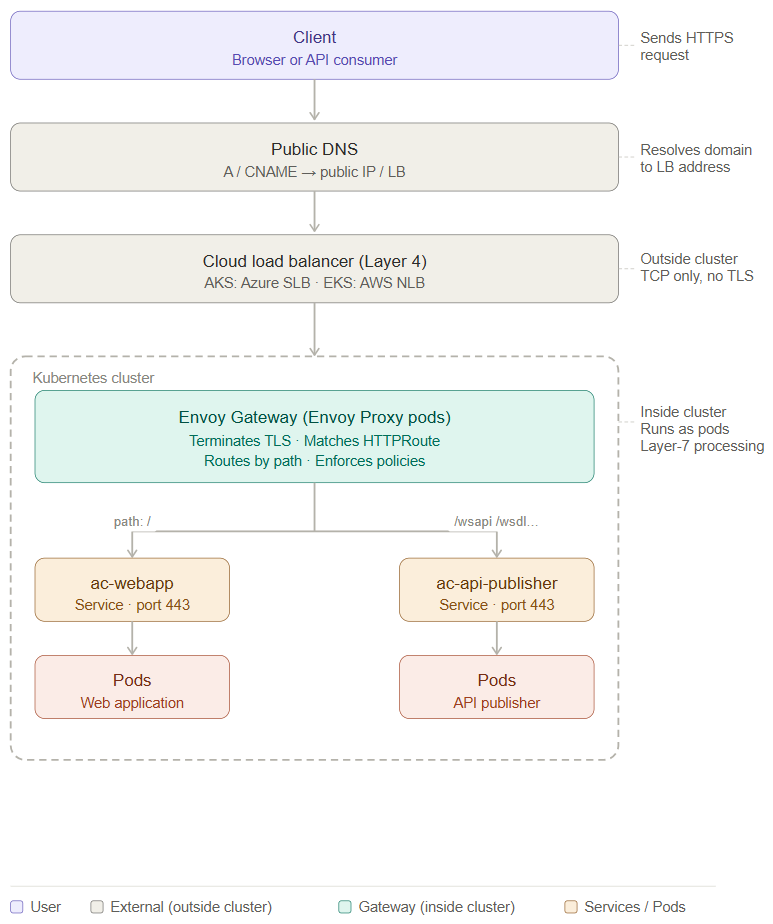
Because Envoy handles Layer-7 routing, the cloud load balancer in front of it must operate at Layer 4 only. On AKS, Azure automatically creates an Azure Standard Load Balancer (Layer 4) — no extra configuration is needed. On EKS, you must explicitly configure an internet-facing NLB (Layer 4).
Prerequisites
For AKS
- An active Azure subscription
- An AKS cluster
- Azure CLI v2.53 or higher
For EKS
- An AWS account
- An EKS cluster
- AWS CLI v2.x
Required tools (for AKS and EKS)
- Helm v3.9 or higher
- kubectl (Kubernetes v1.26 or higher)
Step 1: Install CRDs and the Envoy Gateway Controller
1.1 Install CRDs
CRDs add new Kubernetes resource types — Gateway, HTTPRoute, and Envoy policy objects. Without them, Kubernetes does not recognize these resources.
Code
helm template eg-crds oci://docker.io/envoyproxy/gateway-crds-helm \n --version v1.6.1 \n --set crds.gatewayAPI.enabled=true \n --set crds.gatewayAPI.channel=standard \n --set crds.envoyGateway.enabled=true \n | kubectl apply --server-side -f -
Verify:
Code
kubectl get crds | egrep 'gateway.networking.k8s.io|gateway.envoyproxy.io'
1.2 Install the Envoy Gateway Controller
Note: Choose one of the following commands based on your load balancer preference. Do not run both.
For a public load balancer (default):
Code
helm install eg oci://docker.io/envoyproxy/gateway-helm \n --version v1.6.1 \n -n envoy-gateway-system \n --create-namespace \n --skip-crds
For a private (internal) load balancer — AKS only:
Code
helm install eg oci://docker.io/envoyproxy/gateway-helm \n --version v1.6.1 \n -n envoy-gateway-system \n --create-namespace \n --skip-crds \n --set service.type=LoadBalancer \n --set-string service.annotations.service\.beta\.kubernetes\.io/azure-load-balancer-internal="true"
Verify that the controller pods are running:
Code
kubectl -n envoy-gateway-system get pods
kubectl -n envoy-gateway-system get svc -o wide
kubectl -n envoy-gateway-system rollout status deploy/envoy-gateway
All pods must be in Running state before proceeding.
Step 2: Create the GatewayClass
GatewayClass is the binding between the Gateway API and the Envoy Gateway controller. It tells Kubernetes that gateway.envoyproxy.io/gatewayclass-controller is responsible for managing Gateways of this class. This is a one-time, cluster-wide resource.
Code
apiVersion: gateway.networking.k8s.io/v1
kind: GatewayClass
metadata:
  name: <gatewayclass_name>
spec:
  controllerName: gateway.envoyproxy.io/gatewayclass-controller
Apply and verify:
Code
kubectl apply -f gatewayclass.yaml
kubectl get gatewayclass
kubectl describe gatewayclass <gatewayclass_name>
The ACCEPTED column must show True. Gateways will not work if the GatewayClass is not accepted.
Step 3: Create the TLS Secret
This Kubernetes secret stores the HTTPS certificate and private key for your domain. Envoy uses it to terminate TLS on incoming client connections.
Follow the steps below to create TLS secret:
- Find the Certificate Alias Inspect the JKS keystore to identify the alias name of your certificate entry:
Code
keytool -list -v -keystore wildcard_adeptia_org.jks \
-storepass <password> | grep "Alias name"
- Convert JKS to PKCS12 FormatKubernetes and OpenSSL work with PKCS12 format. Convert your JKS keystore accordingly:
Code
keytool -importkeystore \ -srckeystore wildcard_adeptia_org.jks \ -destkeystore wildcard_adeptia_org.p12 \ -deststoretype PKCS12 \ -srcalias <alias-from-step-1> \ -srcstorepass <password> \ -deststorepass <password>
- Extract private keyExtract the private key from the PKCS12 file into a plain
.keyfile:
Code
openssl pkcs12 -in wildcard_adeptia_org.p12 \ -nocerts -nodes \ -passin pass:<password> \ -out tls.key
- Extract full certificate chainExtract all certificates from the PKCS12 file:
Code
openssl pkcs12 -in wildcard_adeptia_org.p12 \ -nokeys \ -passin pass:<password> \ -out fullchain.crt
- Verify certificate chainConfirm that the certificate chain is complete and valid before proceeding:
Code
grep -c "BEGIN CERTIFICATE" fullchain.crt openssl x509 -in fullchain.crt -noout -subject -issuer
- Create/update Kubernetes TLS secretCreate (or update if it already exists) the TLS secret in your target namespace:
Code
kubectl create secret tls ingress-tls \ --cert=fullchain.crt \ --key=tls.key \ -n <namespace> \ --dry-run=client -o yaml | kubectl apply -f -
- Verify TLS secretConfirm the secret was created successfully and contains the expected certificates:
Code
kubectl get secret ingress-tls -n <namespace> \ -o jsonpath='{.data.tls\.crt}' | base64 -d | grep -c "BEGIN CERTIFICATE"
Step 4: Configure the EnvoyProxy Resource
Before creating the Gateway, configure an EnvoyProxy resource that controls how Envoy provisions the cloud load balancer. The configuration differs by platform and load balancer type.
 | Select the scenario that applies to your environment and follow only that configuration. |
|---|
AKS — Private (Internal) Load Balancer
Code
apiVersion: gateway.envoyproxy.io/v1alpha1
kind: EnvoyProxy
metadata:
  name: <envoy_proxy_name>
  namespace: <application_namespace>
spec:
  provider:
    type: Kubernetes
    kubernetes:
      envoyService:
        type: LoadBalancer
        annotations:
          service.beta.kubernetes.io/azure-load-balancer-internal: "true"
          service.beta.kubernetes.io/azure-load-balancer-ipv4: <lb_private_ip>
AKS — Public Load Balancer with Resource Limits
If you need to set resource limits on the Envoy deployment:
Code
apiVersion: gateway.envoyproxy.io/v1alpha1
kind: EnvoyProxy
metadata:
  name: <envoy_proxy_name>
  namespace: <application_namespace>
spec:
  provider:
    kubernetes:
      envoyDeployment:
        replicas: 2
        container:
          resources:
            requests:
              cpu: "500m"
              memory: "1Gi"
            limits:
              cpu: "2000m"
              memory: "2Gi"
      envoyService:
        annotations:
          service.beta.kubernetes.io/azure-load-balancer-tcp-idle-timeout: "30"
        externalTrafficPolicy: Local
        type: LoadBalancer
      type: Kubernetes
EKS — Public NLB
On EKS, this resource annotates the Envoy Service so that Kubernetes provisions an internet-facing Layer-4 NLB:
Code
apiVersion: gateway.envoyproxy.io/v1alpha1
kind: EnvoyProxy
metadata:
  name: <envoyproxy_name>
  namespace: <application_namespace>
spec:
  provider:
    type: Kubernetes
    kubernetes:
      envoyService:
        annotations:
          service.beta.kubernetes.io/aws-load-balancer-scheme: internet-facing
          service.beta.kubernetes.io/aws-load-balancer-type: nlb
Code
kubectl apply -f envoyproxy-aws-nlb.yaml
Step 5: Create the Gateway
The Gateway resource defines the public entry point for traffic. It specifies the ports Envoy listens on, the hostnames it exposes, and TLS termination settings.
After applying, run kubectl get gateway -n <namespace> to confirm the following:
| Field | Meaning |
|---|---|
CLASS | GatewayClass binding is correct |
ADDRESS | External IP has been assigned. You will need to map this external IP address to your application domain. |
PROGRAMMED=True | Envoy Gateway successfully configured the data plane |
AKS — Public Load Balancer Gateway
Code
apiVersion: gateway.networking.k8s.io/v1
kind: Gateway
metadata:
  name: <gateway_name>
  namespace: <application_namespace>
spec:
  gatewayClassName: <gatewayclass_name>
  listeners:
  - name: https
    hostname: <subdomain>            # e.g. myapp.example.com
    port: 443
    protocol: HTTPS
    tls:
      mode: Terminate
      certificateRefs:
      - kind: Secret
        name: <tls_secret_name>
  # Add the following listener only if using a custom port for the API Publisher gateway
  - name: https-9443
    hostname: <subdomain>
    port: 9443
    protocol: HTTPS
    tls:
      mode: Terminate
      certificateRefs:
      - kind: Secret
        name: <tls_secret_name>
AKS — Private (Internal) Load Balancer Gateway
When using an internal load balancer, reference the EnvoyProxy resource via the infrastructure section:
Code
apiVersion: gateway.networking.k8s.io/v1
kind: Gateway
metadata:
  name: <gateway_name>
  namespace: <application_namespace>
spec:
  gatewayClassName: <gatewayclass_name>
  infrastructure:
    parametersRef:
      group: gateway.envoyproxy.io
      kind: EnvoyProxy
      name: <envoy_proxy_name>
  listeners:
  - name: https
    hostname: <subdomain>
    port: 443
    protocol: HTTPS
    tls:
      mode: Terminate
      certificateRefs:
      - kind: Secret
        name: <tls_secret_name>
  # Add the following listener only if using a custom port for the API Publisher gateway
  - name: https-9443
    hostname: <subdomain>
    port: 9443
    protocol: HTTPS
    tls:
      mode: Terminate
      certificateRefs:
      - kind: Secret
        name: <tls_secret_name>
EKS — Gateway with NLB
On EKS, the infrastructure.parametersRef is required to attach the NLB settings from the EnvoyProxy resource configured in Step 4:
Code
apiVersion: gateway.networking.k8s.io/v1
kind: Gateway
metadata:
  name: <gateway_name>
  namespace: <application_namespace>
spec:
  gatewayClassName: <gatewayclass_name>
  # AWS ONLY — attaches NLB settings from the EnvoyProxy resource
  infrastructure:
    parametersRef:
      group: gateway.envoyproxy.io
      kind: EnvoyProxy
      name: <envoyproxy_name>
  listeners:
  - name: https
    hostname: <subdomain>            # e.g. myapp.example.com
    port: 443
    protocol: HTTPS
    tls:
      mode: Terminate
      certificateRefs:
      - kind: Secret
        name: <tls_secret_name>
Apply and verify:
Code
kubectl apply -f gateway.yaml
kubectl get gateway -n <application_namespace>
kubectl describe gateway <gateway_name> -n <application_namespace>
Step 6: Create HTTPRoute
HTTPRoute defines URL path-based routing rules. Envoy evaluates incoming requests against these rules and forwards each request to the matching backend service.
Code
apiVersion: gateway.networking.k8s.io/v1
kind: HTTPRoute
metadata:
  name: <httproute_name>
  namespace: <application_namespace>
spec:
  parentRefs:
  - name: <gateway_name>
    sectionName: <section_name>     # example: https-443
  hostnames:
  - <subdomain>      # myapp.example.com
  rules:
  - matches:
    - path: { type: PathPrefix, value: /wsapi }
    - path: { type: PathPrefix, value: /rest/triggerprocess }
    - path: { type: PathPrefix, value: /wsdl }
    - path: { type: PathPrefix, value: /wsdl/services }
    - path: { type: PathPrefix, value: /wsdl/SOAPWebhook }
    - path: { type: PathPrefix, value: /wsx/services }
    - path: { type: PathPrefix, value: /rest/wsx/services }
    backendRefs:
    - name: ac-api-publisher-gateway
      port: 443
    timeouts:
      backendRequest: "30m"
      request: "30m"

  - matches:
    - path: { type: PathPrefix, value: / }
    backendRefs:
    - name: ac-webapp-gateway
      port: 443
    timeouts:
      backendRequest: "30m"
      request: "30m"

# if configuring with custom port for api-publisher gateway (9443) create a separate httproute for that
---
apiVersion: gateway.networking.k8s.io/v1
kind: HTTPRoute
metadata:
  name: <httproute_name>
  namespace: <application_namespace>
spec:
  parentRefs:
  - name: <gateway_name>
    sectionName: <section_name>   # for example https-9443
  hostnames:
  - <subdomain>               # myapp.example.com
  rules:
  - matches:
    - path: { type: PathPrefix, value: /wsapi }
    - path: { type: PathPrefix, value: /rest/triggerprocess }
    - path: { type: PathPrefix, value: /wsdl }
    - path: { type: PathPrefix, value: /wsdl/services }
    - path: { type: PathPrefix, value: /wsdl/SOAPWebhook }
    - path: { type: PathPrefix, value: /wsx/services }
    - path: { type: PathPrefix, value: /rest/wsx/services }
    backendRefs:
    - name: ac-api-publisher-gateway
      port: 9443
    timeouts:
      backendRequest: "30m"
      request: "30m"
Apply and verify:
Code
kubectl apply -f <http Route yaml>
kubectl get httproute -n <application_namespace>
kubectl describe httproute <http Route Name> -n <application_namespace>
Step 7: Apply Client Traffic Policy
This policy configures two behaviors on the Envoy Gateway listener.
Underscore header support: Envoy blocks HTTP headers containing underscores by default. Adeptia Connect internal API calls use headers with underscores, so this policy allows them to pass through.
TLS version enforcement: Only TLS 1.2 and TLS 1.3 are permitted. TLS 1.0 and 1.1 are blocked.
Code
apiVersion: gateway.envoyproxy.io/v1alpha1
kind: ClientTrafficPolicy
metadata:
  name: <client-traffic-policy-name>
  namespace: <application_namespace>
spec:
  connection:
    bufferLimit: 800Mi
  headers:
    withUnderscoresAction: Allow
  http2:
    initialConnectionWindowSize: 10485760
    initialStreamWindowSize: 10485760
  targetRefs:
    - group: gateway.networking.k8s.io
      kind: Gateway
      name: <gateway_name>
  timeout:
    http:
      idleTimeout: "30m"
      requestReceivedTimeout: "30m"
  tls:
    maxVersion: "1.3"
    minVersion: "1.2"
Apply and verify:
Code
kubectl apply -f clienttrafficpolicy.yaml
kubectl get clienttrafficpolicy -n <application_namespace>
kubectl describe clienttrafficpolicy <clienttrafficpolicy_name> -n <application_namespace>
Step 8: Configure Backend TLS
This step configures Envoy to validate TLS certificates when connecting to backend Adeptia services. A ConfigMap holds the internal CA certificate, and a BackendTLSPolicy references it.
8.1 Create the CA ConfigMap
Code
apiVersion: v1
kind: ConfigMap
metadata:
  name: <configmap_name>
  namespace: <application_namespace>
data:
  ca.crt: |
    -----BEGIN CERTIFICATE-----
    <REPLACE WITH INTERNAL CA CERTIFICATE>
    -----END CERTIFICATE-----
Apply and verify:
Code
kubectl apply -f ca_config.yaml
kubectl get configmap -n <application_namespace>
kubectl describe configmap <configmap_name> -n <application_namespace>
8.2 Create BackendTLSPolicy for Webapp Gateway and API Gateway
Code
apiVersion: gateway.networking.k8s.io/v1
kind: BackendTLSPolicy
metadata:
  name: <backendtls_apipublisher_name>
  namespace: <application_namespace>
spec:
  targetRefs:
  - group: ""
    kind: Service
    name: ac-api-publisher-gateway
    sectionName: defaultport        # Service port name for 443
  # Add the following targetRef only if using port 9443
  - group: ""
    kind: Service
    name: ac-api-publisher-gateway
    sectionName: customport         # Service port name for 9443
  validation:
    hostname: adeptiaconnect
    caCertificateRefs:
    - group: ""
      kind: ConfigMap
      name: <configmap_name>
---
apiVersion: gateway.networking.k8s.io/v1
kind: BackendTLSPolicy
metadata:
  name: <backendtls_webapp_name>
  namespace: <application_namespace>
spec:
  targetRefs:
  - group: ""
    kind: Service
    name: ac-webapp-gateway
    sectionName: https
  validation:
    hostname: adeptiaconnect
    caCertificateRefs:
    - group: ""
      kind: ConfigMap
      name: <configmap_name>
Apply and verify:
Code
kubectl apply -f backendtlspolicy.yaml
kubectl get backendtlspolicy -n <application_namespace>
kubectl describe backendtlspolicy <backendtlspolicy_name> -n <application_namespace>
Accessing the Application
Once all resources are applied and verified, the application is accessible at the hostname, for example,https://myapp.example.com.