For SQL
This document discusses the parameters you need to set in the global values.yaml before deploying the application.
- Cluster selection parameter
- DB secrets
- Other DB parameters
- DB for AIMap
- RabbitMQ Configuration
- Prerequisite
- Configure RabbitMQ mode
- Enable Pod Disruption Budget (Recommended for HA)
- Static and migration job execution settings
- Settings to enable authentication to download heap dumps
- Mapping Agent for AIMap
- LLM provider
- LLM provider credentials
- Environment variables
Cluster selection parameter
In the global > config > autoscaling section of the values.yaml file, set the cluster on which you want to deploy the application.
| Parameter | Possible value | Description |
|---|---|---|
| clusterType | • AKS • ARO • EKS | Set to: • AKS to deploy the application on AKS cluster • ARO to deploy the application on ARO cluster • EKS to deploy the application on EKS cluster |
DB secrets
In the the global > envSecret section of the values.yaml file, set the following variables to your database credentials.
To authenticate using these credentials, ensure that global > dbPullSecrets > create is set to true. If you do not want to specify credentials in the values.yaml file, refer to this section.
| Parameter | Description |
|---|---|
| BACKEND_DB_USERNAME | Username for your Backend Database. |
| BACKEND_DB_PASSWORD | Password for your Backend Database. |
| LOG_DB_USERNAME | Username for your Log Database. |
| LOG_DB_PASSWORD | Password for your Log Database. |
| LOG_ARCHIVE_DB_USERNAME | Username for your Log Archive Database. |
| LOG_ARCHIVE_DB_PASSWORD | Password for your Log Archive Database. |
| QUARTZ_DB_USERNAME | Username for your Quartz database. This value will be the same as that for the Backend Database. |
| QUARTZ_DB_PASSWORD | Password for your Quartz database. This value will be the same as that for the Backend Database. |
Other DB parameters
In the global > environmentVariables section of the values.yaml file, set the values for the following DB parameters.
| Variable | Value |
|---|---|
| BACKEND_DB_URL | jdbc:sqlserver://<DB Hostname>:<Port Number>;database=<Backend Database Name>;sendStringParametersAsUnicode=false; |
| BACKEND_DB_DRIVER_CLASS | com.microsoft.sqlserver.jdbc.SQLServerDriver |
| BACKEND_DB_TYPE | SQL-Server |
| BACKEND_DB_DIALECT | org.hibernate.dialect.SQLServerDialect |
| BACKEND_DB_TRANSACTION_ISOLATION | 1 |
| BACKEND_AUTHTYPE | Basic |
| LOG_DB_DRIVER_CLASS | com.microsoft.sqlserver.jdbc.SQLServerDriver |
| LOG_DB_URL | jdbc:sqlserver://<DB Hostname>:<Port Number>;database=<Log Database Name>;sendStringParametersAsUnicode=false; |
| LOG_DB_TYPE | SQL-Server |
| LOG_DB_DIALECT | org.hibernate.dialect.SQLServerDialect |
| LOG_DB_TRANSACTION_ISOLATION | 1 |
| LOG_DB_AUTHTYPE | Basic |
| LOG_ARCHIVE_DB_URL | jdbc:sqlserver://<DB Hostname>:<Port Number>;database=<Log Archive Database Name>;sendStringParametersAsUnicode=false; |
| LOG_ARCHIVE_DB_DRIVER_CLASS | com.microsoft.sqlserver.jdbc.SQLServerDriver |
| LOG_ARCHIVE_DB_TYPE | SQL-Server |
| LOG_ARCHIVE_DB_DIALECT | org.hibernate.dialect.SQLServerDialect |
| LOG_ARCHIVE_DB_VALIDATION_QUERY | SELECT 1 |
| LOG_ARCHIVE_DB_AUTHTYPE | Basic |
| LOG_ARCHIVE_DB_TRANSACTION_ISOLATION | 1 |
| QUARTZ_DB_URL | jdbc:sqlserver://<DB Hostname>:<Port Number>;database=<Backend Database Name>;sendStringParametersAsUnicode=false; |
| QUARTZ_DB_DRIVER_CLASS | com.microsoft.sqlserver.jdbc.SQLServerDriver |
| QUARTZ_DB_TYPE | SQL-Server |
| QUARTZ_DB_DIALECT | org.hibernate.dialect.SQLServerDialect |
| QUARTZ_DB_AUTHTYPE | Basic |
| BACKEND_DB_VALIDATION_QUERY | SELECT 1 |
| LOG_DB_VALIDATION_QUERY | SELECT 1 |
| LOG_ARCHIVE_DB_SEPARATE | Defines whether archived logs use the same database as logs or a separate database. If set to true, archived logs must be stored in a separate database. • false (default) • true |
| QUARTZ_DB_VALIDATION_QUERY | SELECT 1 |
| QUARTZ_DRIVER_DELEGATE_CLASS | org.quartz.impl.jdbcjobstore.MSSQLDelegate |
| SPRING_QUARTZ_PROPERTIES_ORG_QUARTZ_JOBSTORE_LOCKHANDLER_CLASS | org.quartz.impl.jdbcjobstore.UpdateLockRowSemaphore |
| QUARTZ_SELECT_WITH_LOCK_SQL | SELECT * FROM {0}LOCKS WITH (UPDLOCK,ROWLOCK) WHERE SCHED_NAME = {1} AND LOCK_NAME = ? |
| QUARTZ_DB_TRANSACTION_ISOLATION | 1 |
DB for AIMap
In the global > aimap > environmentVariables section of the values.yaml file, set the value for the following DB parameters for AIMap.
| Variable | Value |
|---|---|
| AIMAP_BACKEND_URL | mssql+pyodbc://<host>:<port>/<Backend Database Name>?driver=ODBC+Driver+17+for+SQL+Server |
| AIMAP_LOG_URL | mssql+pyodbc://<host>:<port>/<Log Database Name>?driver=ODBC+Driver+17+for+SQL+Server |
RabbitMQ Configuration
In the global > rabbitmq section of the values.yaml file, configure RabbitMQ according to your deployment requirements.
Prerequisite
Before configuring RabbitMQ, ensure that the RabbitMQ Cluster Operator is installed. For installation steps, see Installing RabbitMQ Operator.
Configure RabbitMQ mode
Set RabbitMQ_HA_mode and replicaCount based on whether you want to deploy RabbitMQ in HA or non-HA mode.
HA Mode (3 replicas)
HA mode ensures that the RabbitMQ cluster remains available during node failures or maintenance by maintaining quorum across three nodes.
Code
global:
  rabbitmq:
    RabbitMQ_HA_mode: true
    replicaCount: 3
Non-HA Mode (single replica)
Code
global:
  rabbitmq:
    RabbitMQ_HA_mode: false
    replicaCount: 1
 | RabbitMQ must not be configured with 2 replicas. A two-node cluster cannot maintain quorum and will result in a broken cluster state. |
|---|
Enable Pod Disruption Budget (Recommended for HA)
For HA deployments, enabling a PodDisruptionBudget (PDB) is strongly recommended. A PDB ensures that a minimum number of RabbitMQ pods remain available during node maintenance or rolling updates, preserving cluster quorum.
To enable PDB, set CREATE_PDB to true under global > rabbitmq:
Code
global:
  rabbitmq:
    CREATE_PDB: true
Static and migration job execution settings
Set the following parameters for static and migration job execution.
| Section in the values.yaml | Parameter | Description |
|---|---|---|
| global > migration | EXECUTE_MIGRATION_JOB | Set to true to ensure that all the accelerators are deployed with Adeptia Connect. |
| global > static | EXECUTE_STATIC_JOB | Set to true to ensure that all the static files (In the /shared directory in Adeptia Connect) are included in the deployment. |
Settings to enable authentication to download heap dumps
In the following sections of the values.yaml file, set the username and password for enabling authentication to download heap dumps. To authenticate using these credentials, ensure that the createparameter in these sections is set to true:
global > webappGateway > customActuatorSecretsglobal > apigateway > customActuatorSecrets
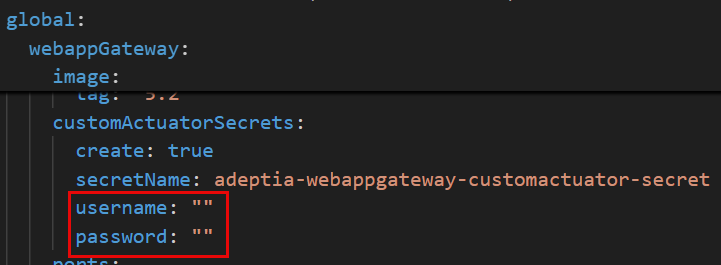 If you do not want to specify credentials for enabling authentication to download heap dumps, set
 create to false and provide your secret name in the secretName parameter in the above sections. Refer to the table below for details:
| Parameter | Description |
|---|---|
create | Determines whether the Helm chart creates a Secret in the target namespace. Set to true (default) for Helm to create the Secret from the username and password you provide. Set to false if you want the pods to reference an existing Secret created outside Helm — for example, by HashiCorp Vault, External Secrets Operator, a CI/CD pipeline, or a platform-managed Kubernetes Secret. |
secretName | The name of the Kubernetes Secret that stores the credentials. Pods refer to this Secret for authentication. |
Mapping Agent for AIMap
Configure the following parameters in the values.yaml to enable the Mapping Agent.
LLM provider
| Parameter | values.yaml path | Accepted values |
|---|---|---|
| LLM Provider | global > acagent > llm > provider | • azure_openai• openai• anthropic• ollama |
LLM provider credentials
Set the following secrets under global > acagent > secretValues based on your chosen LLM provider.
| Provider | Required Secrets |
|---|---|
| Azure OpenAI | • azureOpenAiApiKey• azureOpenAiEndpoint• azureOpenAiDeploymentName |
| OpenAI | • openAiApiKey• openAiBaseUrl• openAiModel |
| Anthropic | • anthropicApiKey• anthropicModel |
| Ollama | • ollamaBaseUrl• ollamaModel |
Environment variables
Set the following variables under global > acagent > environmentVariables:
| Variable | Accepted values | Description |
|---|---|---|
AI_AGENT_BACKEND_URL | User-defined | Connection string for the backend database. Use the format: mssql+pyodbc://<host>:<port>/<Backend Database Name>?driver=ODBC+Driver+17+for+SQL+Server |
AUTH_TYPE | • jwt• api-key | Authentication method used by the Mapping Agent. |
For optional parameters, refer to this page.
After configuring the parameters, refer to this page to continue with the application deployment steps.