Configuring Adeptia Automate values.yaml
This document provides detailed guidance on configuring the values.yaml file used to deploy Adeptia Automatevia Helm. It explains the structure and usage of key configuration sections including global settings, environment variables, security controls, resource limits, probes, and autoscaling parameters. This configuration file plays a central role in customizing the deployment according to your environment and infrastructure needs.
Use this guide to understand the purpose of each section and how to modify its parameters for secure, efficient, and scalable deployments of Adeptia Automate.
- Global configurations
- Security Context (securityContext)
- Environment variables (environmentVariables)
- Config Management (configManagement)
- Service-Specific configurations
- Autoscaling (autoscaling)
- Resources (resources )
- Liveness Probe (livenessProbe)
- Readiness Probe (readinessProbe)
- Startup Probe (startupProbe)
- Security Context (securityContext)
- Session Affinity (sessionAffinity)
- Tolerations (tolerations)
Global configurations
This section outlines global settings that apply across all microservices in Adeptia Automate. These configurations provide defaults for security context, environment variables, and other core behaviors unless explicitly overridden at the microservice level.
Security Context (securityContext)
The securityContext section under global > config defines the default security context settings that globally apply to all Adeptia Automate microservices' pods and their containers. These settings help enforce secure runtime behavior by limiting privileges and defining user/group permissions.
Pod-Level Security Context (podSecurityContext)
This section applies security settings at the pod level.
| Field | Description | Default value |
|---|---|---|
| runAsUser | User ID under which all container processes in the pod will run. Helps avoid running as root. | 1000 |
| runAsGroup | Primary group ID used for running the main container processes. | 2000 |
| fsGroup | Group ID used to manage permissions for mounted shared volumes. | 3000 |
| fsGroupChangePolicy | Defines when the fsGroup ownership change should be applied to volumes. | Always |
Container-Level Security Context (containerSecurityContext)
This section defines security rules for individual containers.
| Field | Description | Default value |
|---|---|---|
| runAsNonRoot | Ensures that containers do not run as the root user. | true |
| allowPrivilegeEscalation | Prevents the container from gaining additional privileges after starting. | false |
| readOnlyRootFilesystem | Mounts the root file system as read-only, preventing any modifications to it. | true |
| privileged | When set to false, restricts containers from having host-level privileges. | false |
| capabilities.drop | Drops specified Linux capabilities from the container. Dropping ALL removes all capabilities. | ALL |
| seccompProfile.type | Specifies the Seccomp profile type to apply restrictions on low-level system calls. | RuntimeDefault |
Environment variables (environmentVariables)
Environment variables for Backend, Log, AIMap, Log archive, and Quartz database
The following tables describe the Backend, Log, AIMap, Log archive, and Quartz database environment variables in the global > environmentVariables section of the values.yaml file along with their possible values for different databases.
| Backend database properties | Backend database properties | Backend database properties |
|---|---|---|
| Property: BACKEND_DB_USERNAME | ||
| Database | Value | Description |
| Azure SQL | <User defined> | Username for your backend database. If you're using external Secrets, you need not provide a value for this property. |
| Oracle | <User defined> | |
| Azure MySQL | <User defined> | |
| Property: BACKEND_DB_PASSWORD | ||
| Database | Value | Description |
| Azure SQL | <User defined> | Password for your backend database. If you're using external Secrets, you need not provide a value for this property. |
| Oracle | <User defined> | |
| Azure MySQL | <User defined> | |
| Property: BACKEND_AUTHTYPE | ||
| Database | Value | Description |
| Azure SQL | Basic | Authentication type for your backend database. |
| Oracle | • Basic • KerberosWithKeyTab • KerberosWithServiceAccount | |
| Azure MySQL | Basic | |
| Property: BACKEND_KERBEROS_DB_LOGIN_MODULE_NAME | ||
| Database | Value | Description |
| Azure SQL | Not applicable | Name of the login module. Set its value to KerberosServer if you want to use Kerberos authentication for the Oracle database. |
| Oracle | Refer to the Descriptioncolumn. | |
| Azure MySQL | Not applicable | |
| Property: BACKEND_ KERBEROS_CONFIGURATION | ||
| Database | Value | Description |
| Azure SQL | Not applicable | Kerberos login module parameters. |
| Oracle | Refer to the Description column. | |
| Azure MySQL | Not applicable | |
| Property: BACKEND_DB_URL | ||
| Database | Value | Description |
| Azure SQL | jdbc:sqlserver://<DB Hostname>:<Port Number>;database=<Backend Database Name>;sendStringParametersAsUnicode=false; | Backend database name and its URL. Currently, the MS Azure SQL, Oracle, and Azure MySQL databases are certified. |
| Oracle | jdbc:oracle:thin:@<hostName>:<portNumber>:<S ID/ServiceName> | |
| Azure MySQL | jdbc:mysql://<hostName>:<portNumber>/<DBName>?useSSL=true | |
| Property: BACKEND_DB_DRIVER_CLASS | ||
| Database | Value | Description |
| Azure SQL | com.microsoft.sqlserver.jdbc.SQLServerDriver | Driver class name based on the backend db. Do not change the value for this pre-defined property. |
| Oracle | oracle.jdbc.OracleDriver | |
| Azure MySQL | com.mysql.cj.jdbc.Driver | |
| Property : BACKEND_DB_TYPE | ||
| Database | Value | Description |
| Azure SQL | SQL-Server | Currently, the MS Azure SQL, Oracle, and Azure MySQL databases are certified. Do not change the value for this pre-defined property. |
| Oracle | Oracle | |
| Azure MySQL | MySQL | |
| Property : BACKEND_DB_DIALECT | ||
| Database | Value | Description |
| Azure SQL | org.hibernate.dialect.SQLServerDialect | Currently, the MS Azure SQL, Oracle, and Azure MySQL databases are certified. Do not change the value for this pre-defined property. |
| Oracle | org.hibernate.dialect.OracleDialect | |
| Azure MySQL | org.hibernate.dialect.MySQLDialect | |
| Property: BACKEND_DB_TRANSACTION_ISOLATION | ||
| Database | Value | Description |
| Azure SQL | 1 | Transaction isolation level in the database. |
| Oracle | 2 | |
| Azure MySQL | 1 | |
| Property: **** BACKEND_DB_VALIDATION_QUERY | ||
| Database | Value | Description |
| Azure SQL | SELECT 1 | Query that can be used by the pool to validate connections before they are returned to the application. |
| Oracle | SELECT 1 from dual | |
| Azure MySQL | SELECT 1 |
| AIMap Properties | AIMap Properties | AIMap Properties |
|---|---|---|
| Property: AIMAP_BACKEND_URL | ||
| Database | Value | Description |
| Azure SQL | mssql+pyodbc://<host>:<port>/<database_name>?driver=ODBC+Driver+17+for+SQL+Server | The backend database URL for AIMAP. If you need to add additional queries, use & followed by the query at the end of the database URL, for example, &authentication=ActiveDirectoryPassword. You can add multiple queries using this approach. |
| Oracle | oracle+cx_oracle://<host>:<port>/<database_name> | |
| Azure MySQL | mysql+mysqlconnector://<host>:<port>/<database_name> |
| Log database properties | Log database properties | Log database properties |
|---|---|---|
| Property: LOG_DB_USERNAME | ||
| Database | Value | Description |
| Azure SQL | <User defined> | Username for your log database. If you're using external Secrets, you need not provide a value for this property. |
| Oracle | <User defined> | |
| Azure MySQL | <User defined> | |
| Property: LOG_DB_PASSWORD | ||
| Database | Value | Description |
| Azure SQL | <User defined> | Username for your log database. If you're using external Secrets, you need not provide a value for this property. |
| Oracle | <User defined> | |
| Azure MySQL | <User defined> | |
| Property: LOG_DB_AUTHTYPE | ||
| Database | Value | Description |
| Azure SQL | Basic | Authentication type for your log database. |
| Oracle | • Basic • KerberosWithKeyTab • KerberosWithServiceAccount | |
| Azure MySQL | Basic | |
| Property: LOG_DB_KERBEROS_DB_LOGIN_MODULE_NAME | ||
| Database | Value | Description |
| Azure SQL | Not applicable | Name of the login module. Set its value to kerberosServerif you want to use Kerberos authentication for the Oracle database. |
| Oracle | Refer to the Description column. | |
| Azure MySQL | Not applicable | |
| Azure SQL | Not applicable | Name of the login module. Set its value to kerberosServer if you want to use Kerberos authentication for the Oracle database. |
| Oracle | Refer to the Description column. | |
| Azure MySQL | Not applicable | |
| Property: LOG_DB_KERBEROS_CONFIGURATION | ||
| Database | Value | Description |
| Azure SQL | Not applicable | Kerberos login module parameters. |
| Oracle | Refer to the Description column. | |
| Azure MySQL | Not applicable | |
| Property: LOG_DB_DRIVER_CLASS | ||
| Database | Value | Description |
| Azure SQL | com.microsoft.sqlserver.jdbc.SQLServerDriver | Driver class name based on the log db. Do not change the value for this pre-defined property. |
| Oracle | oracle.jdbc.OracleDriver | |
| Azure MySQL | com.mysql.cj.jdbc.Driver | |
| Property: LOG_DB_URL | ||
| Database | Value | Description |
| Azure SQL | jdbc:sqlserver://<DB Hostname>:<Port Number>;database=<Log Database Name>;sendStringParametersAsUnicode=false; | Log database name and its URL. Currently, the MS Azure SQL, Oracle, and Azure MySQL databases are certified. |
| Oracle | jdbc:oracle:thin:@<hostName>:<portNumber>:<S ID/ServiceName> | |
| Azure MySQL | jdbc:mysql://<hostName>:<portNumber>/<DBName>?useSSL=true | |
| Property: LOG_DB_TYPE | ||
| Database | Value | Description |
| Azure SQL | SQL-Server | Currently, the MS Azure SQL, Oracle, and Azure MySQL databases are certified. Do not change the value for this pre-defined property. |
| Oracle | Oracle | |
| Azure MySQL | MySQL | |
| Property: LOG_DB_DIALECT | ||
| Database | Value | Description |
| Azure SQL | org.hibernate.dialect.SQLServerDialect | Currently, the MS Azure SQL, Oracle, and Azure MySQL databases are certified. Do not change the value for this pre-defined property. |
| Oracle | org.hibernate.dialect.OracleDialect | |
| Azure MySQL | org.hibernate.dialect.MySQLDialect | |
| Property: LOG_DB_TRANSACTION_ISOLATION | ||
| Database | Value | Description |
| Azure SQL | 1 | Transaction isolation level in the database. |
| Oracle | 2 | |
| Azure MySQL | 1 | |
| Property: LOG_DB_VALIDATION_QUERY | ||
| Database | Value | Description |
| Azure SQL | SELECT 1 | Query that can be used by the pool to validate connections before they are returned to the application. |
| Oracle | SELECT 1 from dual | |
| Azure MySQL | SELECT 1 |
| Log archive database properties | Log archive database properties | Log archive database properties |
|---|---|---|
| Property: LOG_ARCHIVE_DB_PASSWORD | ||
| Database | Value | Description |
| Azure SQL | <User defined> | Password for your log archive database. If you're using external Secrets, you need not provide a value for this property. |
| Oracle | <User defined> | |
| Azure MySQL | <User defined> | |
| Property: LOG_ARCHIVE_DB_USERNAME | ||
| Database | Value | Description |
| Azure SQL | <User defined> | Username for your log archive database. If you're using external Secrets, you need not provide a value for this property. |
| Oracle | <User defined> | |
| Azure MySQL | <User defined> | |
| Property: LOG_ARCHIVE_DB_AUTHTYPE | ||
| Database | Value | Description |
| Azure SQL | Basic | Authentication type for your log archive database. |
| Oracle | • Basic • KerberosWithKeyTab • KerberosWithServiceAccount | |
| Azure MySQL | Basic | |
| Property: LOG_ARCHIVE_DB_KERBEROS_DB_LOGIN_MODULE_NAME | ||
| Database | Value | Description |
| Azure SQL | Not applicable | Name of the login module. Set its value to kerberosServer if you want to use Kerberos authentication for the Oracle database. |
| Oracle | Refer to the Descriptioncolumn. | |
| Azure MySQL | Not applicable | |
| Property: LOG_ARCHIVE_DB_KERBEROS_CONFIGURATION | ||
| Database | Value | Description |
| Azure SQL | Not applicable | Kerberos login module parameters. |
| Oracle | Refer to the Descriptioncolumn. | |
| Azure MySQL | Not applicable | |
| Property : LOG_ARCHIVE_DB_URL | ||
| Database | Value | Description |
| Azure SQL | jdbc:sqlserver://<DB Hostname>:<Port Number>;database=<Log Archive Database Name>;sendStringParametersAsUnicode=false; | Log archive database name and its URL. Currently, the MS Azure SQL, Oracle, and Azure MySQL databases are certified. |
| Oracle | jdbc:oracle:thin:@<hostName>:<portNumber>:<S ID/ServiceName> | |
| Azure MySQL | jdbc:mysql://<hostName>:<portNumber>/<DBName>?useSSL=true | |
| Property : LOG_ARCHIVE_DB_DRIVER_CLASS | ||
| Database | Value | Description |
| Azure SQL | com.microsoft.sqlserver.jdbc.SQLServerDriver | Driver class name based on the log archive db. Do not change the value for this pre-defined property. |
| Oracle | oracle.jdbc.OracleDriver | |
| Azure MySQL | com.mysql.cj.jdbc.Driver | |
| Property: LOG_ARCHIVE_DB_TYPE | ||
| Database | Value | Description |
| Azure SQL | SQL-Server | Currently, the MS Azure SQL, Oracle, and Azure MySQL databases are certified. Do not change the value for this pre-defined property. |
| Oracle | Oracle | |
| Azure MySQL | MySQL | |
| Property: LOG_ARCHIVE_DB_DIALECT | ||
| Database | Value | Description |
| Azure SQL | org.hibernate.dialect.SQLServerDialect | Currently, the MS Azure SQL, Oracle, and Azure MySQL databases are certified. Do not change the value for this pre-defined property. |
| Oracle | org.hibernate.dialect.OracleDialect | |
| Azure MySQL | org.hibernate.dialect.MySQLDialect | |
| Property: LOG_ARCHIVE_DB_TRANSACTION_ISOLATION | ||
| Database | Value | Description |
| Azure SQL | 1 | Transaction isolation level in the database. |
| Oracle | 2 | |
| Azure MySQL | 1 | |
| Property: LOG_ARCHIVE_DB_VALIDATION_QUERY | ||
| Database | Value | Description |
| Azure SQL | SELECT 1 | Query that can be used by the pool to validate connections before they are returned to the application. |
| Oracle | SELECT 1 from dual | |
| Azure MySQL | SELECT 1 | |
| Property: LOG_ARCHIVE_THREAD_COREPOOLSIZE | ||
| Database | Value | Description |
| Azure SQL | <User defined> | The number of worker threads used for performing log archival and cleanup. |
| Oracle | <User defined> | |
| Azure MySQL | <User defined> | |
| Property: LOG_ARCHIVE_THREAD_MAXPOOLSIZE | ||
| Database | Value | Description |
| Azure SQL | <User defined> | Maximum number of worker threads that can be used to perform log archival and cleanup. |
| Oracle | <User defined> | |
| Azure MySQL | <User defined> | |
| Property: LOG_ARCHIVE_THREAD_QUEUECAPACITY | ||
| Database | Value | Description |
| Azure SQL | <User defined> | The maximum number of log archival and cleanup tasks that can remain in a queued state after all the defined threads are exhausted. |
| Oracle | <User defined> | |
| Azure MySQL | <User defined> | |
| Property: LOG_ARCHIVE_DB_SEPARATE | ||
| Database | Value | Description |
| Azure SQL | • false (default) • true | Property to define whether you want to use the log database for log cleanup and archival, or want to use a separate one (Log Archival database). Setting the value for this variable to true mandates the use of separate database for log cleanup and archival |
| Oracle | • false (default) • true | |
| Azure MySQL | • false (default) • true |
| Quartz database properties | Quartz database properties | Quartz database properties |
|---|---|---|
| Property : QUARTZ_DB_USERNAME | ||
| Database | Value | Description |
| Azure SQL | <User defined> | Username for your quartz database. This value will be the same as that for the backend database. If you're using external Secrets, you need not provide a value for this property. |
| Oracle | <User defined> | |
| Azure MySQL | <User defined> | |
| Property: QUARTZ_DB_PASSWORD | ||
| Database | Value | Description |
| Azure SQL | <User defined> | Password for your quartz database. This value will be the same as that for the backend database. If you're using external Secrets, you need not provide a value for this property. |
| Oracle | <User defined> | |
| Azure MySQL | <User defined> | |
| Property: QUARTZ_DB_AUTHTYPE | ||
| Database | Value | Description |
| Azure SQL | Basic | Authentication type for your quartz database. |
| Oracle | • Basic • KerberosWithKeyTab • KerberosWithServiceAccount | |
| Azure MySQL | Basic | |
| Property: QUARTZ_DB_KERBEROS_DB_LOGIN_MODULE_NAME | ||
| Database | Value | Description |
| Azure SQL | Not applicable | Name of the login module. Set its value to kerberosServer if you want to use Kerberos authentication for the Oracle database. |
| Oracle | Refer to the Descriptioncolumn. | |
| Azure MySQL | Not applicable | |
| Property: QUARTZ_DB_KERBEROS_CONFIGURATION | ||
| Database | Value | Description |
| Azure SQL | Not applicable | Kerberos login module parameters. |
| Oracle | Refer to the Descriptioncolumn. | |
| Azure MySQL | Not applicable | |
| Property: QUARTZ_DB_URL | ||
| Database | Value | Description |
| Azure SQL | jdbc:sqlserver://<DB Hostname>:<Port Number>;database=<Backend Database Name>;sendStringParametersAsUnicode=false; | Quartz database name and its URL. Currently, the MS Azure SQL, Oracle, and Azure MySQL databases are certified. This value will be the same as that for the backend database. |
| Oracle | jdbc:oracle:thin:@<hostName>:<portNumber>:<S ID/ServiceName> | |
| Azure MySQL | jdbc:mysql://<hostName>:<portNumber>/<DBName>?useSSL=true | |
| Property: QUARTZ_DB_DRIVER_CLASS | ||
| Database | Value | Description |
| Azure SQL | com.microsoft.sqlserver.jdbc.SQLServerDriver | Driver class name based on the quartz db. This value will be the same as that for the backend database. |
| Oracle | oracle.jdbc.OracleDriver | |
| Azure MySQL | com.mysql.cj.jdbc.Driver | |
| Property: QUARTZ_DB_TYPE | ||
| Database | Value | Description |
| Azure SQL | SQL-Server | Currently, the MS Azure SQL, Oracle, and Azure MySQL databases are certified. Do not change the value for this pre-defined property. |
| Oracle | Oracle | |
| Azure MySQL | MySQL | |
| Property: QUARTZ_DB_DIALECT | ||
| Database | Value | Description |
| Azure SQL | org.hibernate.dialect.SQLServerDialect | Currently, the MS Azure SQL, Oracle, and Azure MySQL databases are certified. Do not change the value for this pre-defined property. This value will be the same as that for the backend database. |
| Oracle | org.hibernate.dialect.OracleDialect | |
| Azure MySQL | org.hibernate.dialect.MySQLDialect | |
| Property: QUARTZ_DB_TRANSACTION_ISOLATION | ||
| Database | Value | Description |
| Azure SQL | 1 | Transaction isolation level in the database. |
| Oracle | 2 | |
| Azure MySQL | 1 | |
| Property: QUARTZ_DB_VALIDATION_QUERY | ||
| Database | Value | Description |
| Azure SQL | SELECT 1 | Query that can be used by the pool to validate connections before they are returned to the application. |
| Oracle | SELECT 1 from dual | |
| Azure MySQL | SELECT 1 | |
| Property: QUARTZ_DRIVER_DELEGATE_CLASS | ||
| Database | Value | Description |
| Azure SQL | org.quartz.impl.jdbcjobstore.MSSQLDelegate | |
| Oracle | org.quartz.impl.jdbcjobstore.oracle.OracleDelegate | |
| Azure MySQL | org.quartz.impl.jdbcjobstore.StdJDBCDelegate | |
| Property: SPRING_QUARTZ_PROPERTIES_ORG_QUARTZ_JOBSTORE_LOCKHANDLER_CLASS | ||
| Database | Value | Description |
| Azure SQL | org.quartz.impl.jdbcjobstore.UpdateLockRowSemaphore | |
| Oracle | org.quartz.impl.jdbcjobstore.UpdateLockRowSemaphore | |
| Azure MySQL | org.quartz.impl.jdbcjobstore.UpdateLockRowSemaphore | |
| Property: QUARTZ_SELECT_WITH_LOCK_SQL | ||
| Database | Value | Description |
| Azure SQL | SELECT * FROM {0}LOCKS WITH (UPDLOCK,ROWLOCK) WHERE SCHED_NAME = {1} AND LOCK_NAME = ? | |
| Oracle | SELECT * FROM {0}LOCKS WHERE LOCK_NAME = ? | |
| Azure MySQL | SELECT * FROM {0}LOCKS WHERE LOCK_NAME = ? |
Environment variables for Redis
The following table describes the Redis-related environment variables in the global > environmentVariables section of the values.yaml file along with their default values.
| S. No. | Environment variable | Description | Default value |
|---|---|---|---|
| 1 | REDIS_SENTINEL_MASTER: | Specifies the name of the Redis Sentinel master. | mymaster |
| 2 | REDIS_SENTINEL_NODES: | A comma-separated list of Sentinel nodes with their hostnames/IPs and ports. | "ac-redis:26379" |
| 3 | REDIS_SENTINEL_PERIODIC_REFRESH: | The time interval (in milliseconds) to periodically refresh Sentinel configuration. | 5000 |
| 4 | REDIS_USERNAME: | The username for Redis authentication. | default |
| 5 | REDIS_RETRY_ATTEMPTS: | The maximum number of attempts to retry a failed Redis connection or command. | "2147483647" |
| 6 | REDIS_RETRY_INTERVAL: | The delay (in milliseconds) before the first retry attempt is made. |  |
| 7 | REDIS_RETRY_MAX_INTERVAL: | The maximum delay (in milliseconds) allowed between retries. | 60000 |
| 8 | REDIS_RETRY_MULTIPLIER: | The factor by which the retry interval increases with each retry attempt. | 2 |
| 9 | REDIS_POOL_MAX_IDLE_CONNECTIONS: | The maximum number of idle connections in the Redis connection pool. | 100 |
| 10 | REDIS_POOL_MIN_IDLE_CONNECTIONS: | The minimum number of idle connections that must be maintained in the Redis pool. | 10 |
| 11 | REDIS_POOL_MAX_CONNECTIONS: | The maximum number of total connections (idle + active) allowed in the pool. | 100 |
| 12 | REDIS_TEST_ON_BORROW: | Indicates whether to validate a connection when borrowing it from the pool. | true |
| 13 | REDIS_TEST_ON_RETURN: | Indicates whether to validate a connection when returning it to the pool. | false |
| 14 | REDIS_CONNECTION_TIMEOUT: | The timeout duration (in milliseconds) for establishing a connection to Redis. | 180000 |
| 15 | REDIS_COMMAND_TIMEOUT: | The timeout duration (in milliseconds) for executing a Redis command. | 60000 |
| 16 | REDIS_CONTAINER_BATCH_SIZE: | The batch size for processing containerized Redis commands or operations. | 50 |
| 17 | REDIS_CONTAINER_POLL_TIMEOUT: | The time interval (in milliseconds) for which the stream waits at the Redis server end to fetch the stream messages. | 100 |
| 18 | REDIS_POOL_MAX_WAIT: | The maximum time (in milliseconds) to wait for a connection from the pool when no connections are available. | 5000 |
| 19 | REDIS_POOL_TEST_IDLE: | Indicates whether to validate idle connections in the pool during periodic checks. | true |
| 20 | REDIS_POOL_EVICTION_RUN_TIME: | The interval (in milliseconds) for the pool eviction process to run and remove idle or expired connections. | 3000 |
| 21 | REDIS_KEYSTORE_PATH: | Path to the keystore file used for secure Redis connections (e.g., TLS/SSL). | keystore/redis.jks |
| 22 | REDIS_KEYSTORE_PASSWORD: | Password for accessing the keystore file. | changeit |
| 23 | REDIS_KEYSTORE_TYPE: | Specifies the type of keystore being used. | JKS |
| 24 | REDIS_STREAM_CONSUMERS: | The number of consumers per stream. | 1 |
Config Management (configManagement)
The following table describes the variables (in the global > configManagement section of the values.yaml file) for using HashiCorp Vault to fetch the credentials associated with an activity at runtime.
| Parameter | Description |
|---|---|
| configManagement: | |
| PROFILE: | The Profile in Hashicorp Vault that you want to use for fetching the secrets. A Profile in Vault is used for grouping the secrets based on the type of environment, for example Dev, QA, or Prod. This ensures that the secrets associated with the specified Profile, and thus with the specific environment, are fetched. |
| CONFIG_MANAGEMENT_SEGREGATION_CRITERIA: | The variable to define the basis for the segregation of your secrets. The value for this variable is either project (in case of project based segregation) or it can be left blank. |
| backend: | |
| hashicorp: | |
| HASHICORP_VAULT_ENABLED: | Set this variable to true to fetch the secrets from HashiCorp Vault. |
| HASHICORP_VAULT_KV_VERSION: | The variable to define the version of the kv secret engine. The possible values are v1 and v2. |
| HASHICORP_VAULT_SECRET_PATH_PATTERN: | The pattern of the path for the secrets stored in the Vault. The default value for this variable is: $PROJECT_VAULT_MAPPING$/$PROFILE$ /$PROJECT_NAME$ Where, • $PROJECT_VAULT_MAPPING$ must be included in the pattern if you have used project mapping. • $PROFILE$ must be included in the pattern if you have used profiles in Vault for grouping the secrets based on the type of environment. • $PROJECT_NAME$ must be included in the pattern if you have used project folders in the Vault. |
| HASHICORP_VAULT_URL: | Access URL (endpoint) of the HashiCorp Vault. |
| HASHICORP_VAULT_SECRET_BASE_PATH: | Enter the complete path to the base folder that contains secrets. |
| HASHICORP_VAULT_AUTHENTICATION: | Enter the type of authentication to be used by AC application to authenticate to the Vault. The possible values are KUBERNETES and TOKEN. |
| HASHICORP_VAULT_TOKEN: | Enter the Vault token. |
| HASHICORP_VAULT_KUBERNETES_ROLE: | Enter the name of the role associated with the Kubernetes authentication method you have defined in the Vault. |
| HASHICORP_VAULT_KUBERNETES_SERVICE _ACC_TOKEN_PATH: | Enter the path where the Service Account token is stored within the pod. The default value for this variable is /var/run/secrets/kubernetes.io/serviceaccount/token. |
| HASHICORP_VAULT_KUBERNETES_PATH: | Enter the name of Kubernetes authentication method defined in the Vault. |
| HASHICORP_VAULT_TOKEN_TYPE | Enter the type of token defined in the Kubernetes authentication method. The possible values for this variable are: • batch • service |
Service-Specific configurations
Each microservice block (e.g., rest-api, event, aimap, apigateway, sapservice) follows a consistent structure. Below are the core parameters:
| By default, the sapservice and redis microservices are disabled. The parameters described in this section apply to these microservices only when they are enabled. To enable either sapservice or redis, navigate to their respective blocks in the global values.yaml file and set the enable variable to true. |
|---|
Autoscaling (autoscaling)
This section explains the autoscaling parameters for a microservice.
Configuring autoscaling for runtime microservice
The parameters for configuring the runtime microservice for autoscaling slightly differ from those for the rest of the microservices. The following table describes the autoscaling parameters for runtimemicroservice. You can find these parameters in the runtimeImage: section in the global values.yaml file.
| Parameter: RUNTIME_AUTOSCALING_ENABLED |
|---|
| Description: Parameter to enable autoscaling by setting its value to true. |
| Default value: true |
| Parameter: RUNTIME_MIN_POD |
| Description: Minimum number of pods. |
| Default value: 1 |
| Parameter : RUNTIME_MAX_POD |
| Description : The maximum number of pods the runtime microservice can scale up to. |
| Default value **:**1 |
| Parameter: RUNTIME_AUTOSCALING_CRITERIA_MESSAGE_COUNT |
| **Description:**Variable to define whether you want the autoscaling to happen based on Message Queue count. Setting the value for this variable to truedenotes that the autoscaling of the runtime pod happens based on the number of messages in the queued state in the Message Queue. |
| **Default value:**true |
| Parameter: RUNTIME_AUTOSCALING_CRITERIA_CPU |
| Description: Variable to define whether you want the autoscaling to happen based on CPU usage. Setting the value for this variable to truedenotes that the autoscaling of the runtime pod happens based on CPU usage. |
| **Default value:**true |
| Parameter: RUNTIME_AUTOSCALING_CRITERIA_MEMORY |
| Description: Variable to define whether you want the autoscaling to happen based on memory usage. Setting the value for this variable to truedenotes that the autoscaling of the runtime pod happens based on memory usage. |
| Default value: false |
| **Parameter:**RUNTIME_AUTOSCALING_TARGETCPUUTILIZATIONPERCENTAGE |
| **Description:**Value in percentage of CPU requests set in the global values.yaml for the runtime pods at which a new pod spins up. |
| Default value: 400 |
| Parameter: RUNTIME_AUTOSCALING_TARGETMEMORYUTILIZATIONPERCENTAGE |
| Description: Value in percentage of memory requests set in the global values.yaml for the runtime pods at which a new pod spins up. |
| Default value: 400 |
| Parameter: RUNTIME_AUTOSCALING_QUEUE_MESSAGE_COUNT |
| Description: The threshold value of the number of messages in the queued state in the Message Queue at which KEDA spins up a new pod. |
| Default value : |
| Parameter: RUNTIME_SCALE_UP_STABILIZATION_WINDOW_SECONDS |
| Description: The duration (in seconds) for which the application keeps a watch for drop in resource utilization by the currently running pods. This helps in determining whether scaling down is required or not. |
| Default value: 300 |
| Parameter: RUNTIME_MAX_POD_TO_SCALE_UP |
| Description: The maximum number of pods the runtime microservice can scale up to at a time. |
| Default value: 1 |
| Parameter: RUNTIME_SCALE_UP_PERIOD_SECONDS |
| Description: The time duration (in seconds) that sets the frequency of tracking the spikes in the resource utilization by the currently running pods. |
| Default value: 60 |
| Parameter: RUNTIME_SCALE_DOWN_STABILIZATION_WINDOW_SECONDS |
| Description: The duration (in seconds) for which the application keeps a watch for drop in resource utilization by the currently running pods. This helps in determining whether scaling down is required or not. |
| Default value: 300 |
| Parameter: RUNTIME_MAX_POD_TO_SCALE_DOWN |
| Description: The maximum number of pods the runtime microservice can scale down to at a time. |
| Default value: 1 |
| Parameter: RUNTIME_SCALE_DOWN_PERIOD_SECONDS |
| Description: The time duration (in seconds) that sets the frequency of tracking the drop in resource utilization by the currently running pods. |
| Default value: 60 |
Configuring autoscaling for other microservices (excluding runtime)
To enable HPA, you need to set the parameters as described below for each of the microservices individually. You can find these parameters in the respective section of each microservice in the global values.yaml file.
| Parameter | Description | Default value |
|---|---|---|
| autoscaling: | ||
| enabled: | Parameter to enable autoscaling by setting its value to true. | true |
| criteria: | ||
| cpu: | • Variable to define whether you want the autoscaling to happen based on CPU usage. • Setting the value for this variable to true denotes that the autoscaling of the microservices pods happens based on the CPU usage. | true |
| memory: | • Variable to define whether you want the autoscaling to happen based on memory usage. • Setting the value for this variable to true denotes that the autoscaling of the microservices pods happens based on memory usage. | false |
| minReplicas: | Minimum number of pods for a microservice. | 1 |
| maxReplicas: | The maximum number of pods a microservice can scale up to. | 1 |
| targetCPUUtilizationPercentage: | Value in percentage of CPU requests set in the global values.yaml for the pods at which the HPA spins up a new pod. | 400 |
| targetMemoryUtilizationPercentage: | Value in percentage of memory requests set in the global values.yaml for the pods at which the HPA spins up a new pod. | 400 |
| behavior: | ||
| scaleUp: | ||
| stabilizationWindowSeconds: | The duration (in seconds) for which the application keeps a watch on the spikes in the resource utilization by the currently running pods. This helps in determining whether scaling up is required or not. | 300 |
| maxPodToScaleUp: | The maximum number of pods a microservice can scale up to at a time. | 1 |
| periodSeconds: | The time duration (in seconds) that sets the frequency of tracking the spikes in the resource utilization by the currently running pods. | 60 |
| scaleDown: | ||
| stabilizationWindowSeconds: | The duration (in seconds) for which the application keeps a watch for a drop in resource utilization by the currently running pods. This helps in determining whether scaling down is required or not. | 300 |
| maxPodToScaleDown: | The maximum number of pods a microservice can scale down to at a time. | 1 |
| periodSeconds: | The time duration (in seconds) that sets the frequency of tracking the drop in the resource utilization by the currently running pods. | 60 |
Resources (resources )
The resources section defines the CPU and memory allocations for a microservice. It ensures that each service has the necessary compute capacity while also allowing Kubernetes to manage workloads efficiently.
- requests: Minimum amount of CPU and memory that a microservice pod is guaranteed.
- limits: Maximum amount of CPU and memory that a microservice pod can use. If usage exceeds this value, it may be throttled or terminated.
Example:
resources:
  limits:
    cpu: 1000m
    memory: 4096Mi
  requests:
    cpu: 100m
    memory: 410Mi
Liveness Probe (livenessProbe)
The livenessProbechecks whether the application inside a container is running. If the probe fails repeatedly, Kubernetes restarts the container to recover from an unresponsive or crashed state without affecting the entire pod.
Key parameters:
- httpGet:
- scheme: The protocol used for the health check request (
HTTPorHTTPS). - path: The specific HTTP endpoint that Kubernetes calls to check liveness.
- port: The container port on which the application is listening for the health check.
- scheme: The protocol used for the health check request (
- timeoutSeconds: Time to wait for the response.
- initialDelaySeconds: Time to wait before starting the first check.
- periodSeconds: Frequency of the probe.
- failureThreshold: Number of consecutive failures before restart.
- successThreshold: Number of successes needed to mark the container healthy.
Example:
livenessProbe:
  httpGet:
    scheme: HTTPS
    path: /adeptia/health/liveness
    port: 8443
  timeoutSeconds: 10
  initialDelaySeconds: 30
  periodSeconds: 30
  failureThreshold: 3
  successThreshold: 1
Readiness Probe (readinessProbe)
The readinessProbe checks whether a container is ready to accept traffic. If the probe fails, Kubernetes temporarily removes the pod from service discovery and stops sending requests to it — without restarting the container. This ensures that traffic is only routed to containers that are fully initialized and ready to handle requests.
Key Parameters:
- httpGet:
- scheme: Defines the protocol used for the readiness check..
- path: Specifies the endpoint that Kubernetes calls to verify if the application is ready to serve traffic.
- port: Indicates the container port on which the application listens for readiness probes.
- initialDelaySeconds: Time to wait before starting the first check.
- periodSeconds: Frequency of the probe.
- timeoutSeconds: Time to wait for the response.
- failureThreshold: Number of consecutive failures before marking the container unready.
- successThreshold: Number of successes needed to mark the container ready again.
Example:
readinessProbe:
  httpGet:
    scheme: HTTPS
    path: /adeptia/health/readiness
    port: 8443
  timeoutSeconds: 10
  initialDelaySeconds: 30
  periodSeconds: 30
  failureThreshold: 3
  successThreshold: 1
Startup Probe (startupProbe)
The startupProbe tells Kubernetes whether the application has completed its startup phase and the container is fully initialized. Until the startup probe succeeds, Kubernetes does not run the livenessProbe or readinessProbe. This prevents the container from being marked as unhealthy or unready while the application is still starting. If the startupProbe fails repeatedly, the container is restarted.
Key Parameters:
- httpGet:
- scheme:****Defines the protocol used to send the startup health check.
- path: Specifies the endpoint that Kubernetes queries to determine if the application has completed its startup.
- port: Indicates the container port on which the application listens for this probe.
- initialDelaySeconds: Time to wait before the first check.
- periodSeconds: Frequency of the probe.
- timeoutSeconds: Time to wait for a response.
- failureThreshold: Number of failures before restart.
- successThreshold: Number of successes needed to mark the container as started.
Example:
startupProbe:
  httpGet:
    scheme: HTTPS
    path: /adeptia/health/startup
    port: 8443
  timeoutSeconds: 2
  initialDelaySeconds: 80
  periodSeconds: 2
  failureThreshold: 200
  successThreshold: 1
Security Context (securityContext)
The securityContext section in a microservice block allows you to override the globally defined security context for that specific service. It lets you apply custom security settings at both the pod and container levels when needed.
- Pod-Level Security Context (podSecurityContext)
- Container-Level Security Context (containerSecurityContext)
Pod-Level Security Context (podSecurityContext)
The podSecurityContext section controls security settings at the pod level (affecting all containers in the pod).
podSecurityContext:
  overrideGlobalPodSecurityContext: false
  securityContextFields: {}
-
overrideGlobalPodSecurityContext: Set this to true to enable custom pod-level security settings for the microservice. The actual settings must be provided in podSecurityContext > securityContextFields.
-
securityContextFields: Specify pod-level security settings like runAsUser, fsGroup, etc.
Container-Level Security Context (containerSecurityContext)
The containerSecurityContext section controls security settings for individual containers in the pod.
containerSecurityContext:
  overrideGlobalContainerSecurityContext: false
  securityContextFields: {}
-
overrideGlobalContainerSecurityContext: Set this to true to enable custom container-level security settings for the microservice. The actual settings must be provided in containerSecurityContext > securityContextFields.
-
securityContextFields: Define container-specific fields like runAsNonRoot, readOnlyRootFilesystem, etc.
Session Affinity (sessionAffinity)
Session Affinity configuration in Adeptia Automate is supported for portal and aimap microservices. It is governed by the sessionAffinity variable under the portal and aimap > service sections in the values.yaml file. Enabling Session Affinity is particularly useful when running multiple pods of these microservices. It ensures consistent session routing across pods and prevents related errors caused by session inconsistency.
For aimap, Session Affinity is by default enabled as shown below:
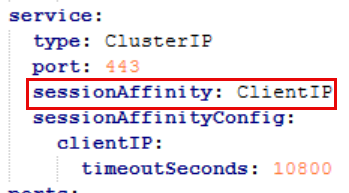
 | To disable Session Affinity, you can set the variable sessionAffinity to None. |
|---|
For portal, you can enable it as needed. Below are the steps to enable it.
Steps to enable Session Affinity in portal service:
- Go to the portal > sessionAffinityblock in the global values.yaml file.
- Remove the empty curly braces (representing no configurations for Session Affinity)
- Add the following Session Affinity configurations:
sessionAffinity:
  sessionAffinity: ClientIP
  sessionAffinityConfig:
    clientIP:
      timeoutSeconds: 600
Tolerations (tolerations)
In Adeptia Automate, the values.yaml file contains tolerations blocks for each microservice. These are used to define Tolerations, which allow pods to be scheduled on Kubernetes nodes that have specific Taints.
A Toleration enables a pod to "tolerate" a restriction (Taint) placed on a node. Without a matching Toleration, a pod will not be scheduled on a tainted node.
Why Tolerations are needed
In Kubernetes, a Taint is a key-value pair with an effect (NoSchedule, NoExecute, or PreferNoSchedule) that is applied to a node. It prevents pods from being scheduled on that node unless they have a matching Toleration.
This mechanism is typically used to dedicate nodes for specific workloads, such as reserving a node only for portal services or other high-priority components.
Example: Defining a Taint on a Node
To taint a node, run the following command:
kubectl taint nodes <node-name> key=value:NoSchedule
- This prevents pods without a matching Toleration from being scheduled on that node.
Example: Adding a Toleration in the global values.yaml
To allow a microservice to be scheduled on a tainted node, define a Toleration under its tolerations section in the global values.yaml file.
- Locate the microservice's tolerations section.
- Remove the empty square brackets ([]).
- Add the following configuration:
tolerations:
  - key: "key"
    operator: "Equal"
    value: "value"
    effect: "NoSchedule"
 | The values for key, value, and effect must match the Taint applied on the node. |
|---|