AC v4.6 release highlights
New features and improvements
-
Microsoft Office 365 Mail Integration via Graph API
Adeptia Connect now integrates Microsoft Office 365 mail services using the Microsoft Graph API. This provides users with improved connectivity to interact with Office 365 mailboxes via the following activities:-
Mail Source: for reading emails
-
Mail Targe****t: for sending emails
-
Mail Event: for managing mail events
-
Mail Notification: for sending notifications
-
Mail Account: for connecting to the mail server
-
-
Enhanced Dashboard usability
The Adeptia Connect Dashboard is now more intuitive, allowing you to:
-
Easily view the Process Flow type, with clear indication of parent-child relationships for better understanding of flow hierarchy.
-
Seamlessly switch between List View and Tree View for both Transactions and Process Flows, improving navigation and accessibility.
-
-
**Parameter reordering in Template
**You can now reorder Transaction/Template parameters while creating or editing a Template without needing to delete and re-add them, allowing better alignment with the intended business logic flow. -
Restricted RabbitMQ Operator's visibility for better security
You can now configure the RabbitMQ Operator to watch a specific namespace instead of all namespaces in the cluster. This enhancement improves security and isolation by restricting the operator's visibility and control to a defined namespace. -
Enhanced container security
Container security has been improved by enforcing key runtime security policies. These improvements have been enforced through OPA policies and they:-
Ensure that every container drops all default Linux capabilities. This significantly reduces the potential attack surface and limits what a compromised container can do.
-
Restrict the system calls that a container can make, preventing potentially dangerous kernel-level operations.
-
-
Improved edit context visibility
The application now displays the name of the Transaction or Template being edited or created, helping users clearly identify the one they are working on. -
Enhanced pod scheduling control via taints and tolerations
Taints and tolerations are now supported for all Jobs, StatefulSets, and Microservices. You can use this feature to control pod placement by preventing pods from being scheduled on specific nodes unless they have matching tolerations.
-
Integrated XSLT Rule Editor (Beta)
The application now offers an integrated XSLT Rule editor (Beta) within the Data Mapper to: -
Remove all invalid mappings
You now have the option to delete all potentially erroneous mapping rules in one go, helping prevent data mapping issues. Click here for more information. -
AIMap enhancements
-
Optimized mapping suggestions
The application now offers improved precision in AI-powered mapping by:
-
Providing you with better control over how AI-suggested matches are generated. You can now fine-tune (configure the property abpm.services.aimap.lowexactsuggestions.level) XPath matching levels between source and target schemas for more accurate and context-relevant mapping recommendations.
-
Deprecating Medium Confidence suggestions, keeping only the Confirmed and Suggested matches for the destination elements.

Confirmed matches were earlier termed as High confidence suggestions.
Suggested matches were earlier termed as Low confidence suggestions.
-
-
**Accelerated response time
**The response time for generating mapping suggestions using a Knowledge Base has been significantly improved, enabling faster and more efficient data mapping workflows.
-
-
Extended OAuth Support with Client Credentials Flow
Adeptia Connect now supports the Client Credentials OAuth flow for seamless integration with the following key applications. It enables secure, direct authentication between the application and the authorization server—without requiring user interaction. -
Password-based OAuth flow support for Salesforce
Adeptia Connect now supports Password as the OAuth flow type while creating an account for Salesforce integration. You can enter your Salesforce username and password during account setup to automate the authorization process and enable seamless access to the application resources.
-
Extended support for lookup in mapping
The lookup feature in mapping is now supported when using Dynamics CRM as the target. -
Enhanced control over logging and retention settings
In a Custom Template or Transaction, you can now set the Logging Level, Repository File Retention, and Activities Logging Retention based on the values configured in Process Flow associated with the Template. For more information, refer to this page.
Security enhancements
-
Vulnerable third-party jars have been upgraded to remove critical and high vulnerabilities.
-
The jar mentioned in the table below has been upgraded to remove critical and high vulnerabilities in it.
Old version Updated version ehcache-2.10.6.jar ehcache-3.10.8.jar -
Vulnerabilities in the following images have been fixed:
- adeptia-connect-cleanup
- adeptia-connect-rabbitmq-watcher
- adeptia-connect-rabbitmq
-
The users were able to access the following pages even when they were logged out of the application:
- https://<domain>/rest/aisresources/uploadjmsjar.jsp
- https://<domain>/rest/aisresources/uploadjasperfile.js
- https://<domain>/rest/aisresources/HITemplateNonForm.jsp
- https://<domain>/rest/aisresources/uploadjarfiles.jsp
-
The following vulnerabilities in the application have been fixed:
- Privilege Escalation
- IDOR - Insecure Direct object reference
- Email Flooding
- Improper implementation of reset password feature
- Username Enumeration
- No Rate limiting
Bug Fixes
-
The application allowed an unauthenticated user (with external access to the web-application) to access the heap dump file.
The application now secures the heap dump file using the secrets defined in the global values.yaml file under the apiGateway > environmentVariables and webappGateway > environmentVariables sections. You can define the secrets in the following two variables:
Variable Description Default value CUSTOMACTUATOR_SECURITY_USERS_0_USERNAME The username required to authenticate access to heap dump.
"user" CUSTOMACTUATOR_SECURITY_USERS_0_PASSWORD The password required to authenticate access to heap dump. "adeptia123" -
When users applied high confidence suggestions using AIMap for mapping, the application mapped fewer suggestions than were actually suggested.
-
The source activity in a Process Flow failed to process files having a space (%20) in its name.
-
When the composite separator defined in the EDI layout matched the ISA16 value in the target XML, the ISA16 value was incorrectly replaced with a blank in the output file.
-
An EDI file that contained an ANSI character immediately before a segment terminator could not be parsed and led to the failure of the EDI Transaction.
-
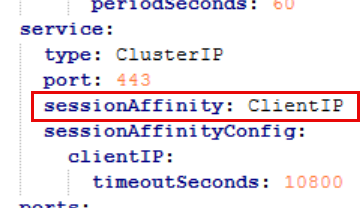
When using AIMap with an uploaded Knowledge Base to generate AI-based mapping suggestions, users encountered an error when multiple aimap pods were running. This issue was caused by inconsistent session routing across pods.
With this release, the required session affinity settings have been added to the service section of the aimap microservice in the global values.yaml file.
-
Email notifications are not sent to users when a new file is detected at the source and the associated Transaction is deactivated.
-
It was taking longer than expected to deactivate a Transaction.
-
When a Process Flow was bound to a Calendar Event with Trigger in Sequence enabled, a new execution was still initiated even while the previous execution was in progress.
-
Users other than admin were also able to pause/resume the scheduler.
-
When the include and exclude file criteria were modified in the copied Transaction, the changes were also reflected in the original Transaction and vice versa.
-
While creating an IDoc Layout, the list of IDoc Types began loading even when the user clicked anywhere against the IDoc Type field.
-
Users were able to create duplicate values in a Value map causing ambiguity.
-
The imported objects were always assigned to the admin group, even if the user importing the objects had additional roles (for example: IT User).
-
When an existing mapping was imported to create a new one, the original XPath references were retained for the mapped elements.
-
The Delete On Success feature failed to delete the source file after the execution of the Transaction/Process Flow when the source file name contained a special character.
-
In a Mapping, the users were not able to set a context variable when the Generate Stream field was set to false and the destination had a Layout.
-
The source file for an Excel layout failed to be processed when the header in the file contained \r or \n.
-
When the Text Layout with Dynamic Header Support enabled was processed and the source file did not contain a header, the AC application showed an incorrect number of records with no value in them at the destination.
-
Users encountered an error when they attempted to edit an Excel Layout created using a definition file containing special characters in their sheet names and had the Process All Sheets option checked.
-
Users were unable to select the sheet name while creating an Excel layout using the Default UI if the sheet included other content before the header row.
-
An Excel Layout created with Process All Sheets enabled failed to load in the Data Mapper when the layout was created using a file that contained multiple sheets and some field names included newline characters.
-
When users viewed the Client ID and Client Secret values for the Azure Service Bus account configuration, the values were displayed in plain text instead of being masked or encrypted.
-
Unused maintenance queues for a pod were not deleted from RabbitMQ.
We have now added the property MaintenanceQueueCleaner in the Tools > Maintenance > Scheduler section to delete the unused queues at 4:00:00 AM daily. Additionally, you can add a custom property to delete the unused queues at your preferred time. To do so,-
Navigate to Settings > Custom.
-
Expand Custom and click Settings.
-
In the Add Custom Property window,
- In the Group field, enter a Group name.
- In the Name field, provide maintenanceQueue.cleanup.cronexpression as the name of the property.
- Select the Encrypted checkbox if you want to encrypt the property values.
- In the Value field, provide a cron expression to set the time at which unused queues will be deleted.
- In the Microservice field, select Event.
- In the Description field, enter a description for the property.
-
Click Save.
-
-
When users edited a Transaction with an undefined non-mandatory Transaction parameter, the parameter was not visible on the Parameter Values screen.
-
When users viewed an EDI Partner, the Outbound Global Control Number****s section was incorrectly labeled as Inbound Global Control Numbers.
-
Theforeign key value was not auto-populated in the child table when Auto Increment Key Support was enabled in an Advanced Database layout created from database tables.
-
When an Event had Trigger in Sequence enabled and the polling frequency was set shorter than the time required to start the processing of a file, the Event picked up the next file before the previous execution was complete. This led to:
- File duplication, due to overlapping executions.
- File not found errors, if the Delete File on Success option was enabled.
-
Transaction parameters defined as not required and having no value were incorrectly hidden in the Edit mode of the Template.
-
Users could not apply validation rules on more than four values for a combo type Transaction parameter. This issue has now been fixed — you can now define validation rules for up to 20 values.
-
If DELFOR D96A Transaction in an EDI file set contained two UNS segment, the file could not be parsed and led to the failure of the Transaction.
-
When the user with Sys Admin as well as other roles was edited by an IT User, the Sys Admin role of the edited user was removed during the update.
-
Data Splitter activity with async mode enabled was not working as expected in a Process Flow.