What is new
Adeptia Connect v4.8 includes the following key enhancements, platform and security updates, and bug fixes:
Key highlights
-
Support for dynamic PDF form elements in PDF Layout
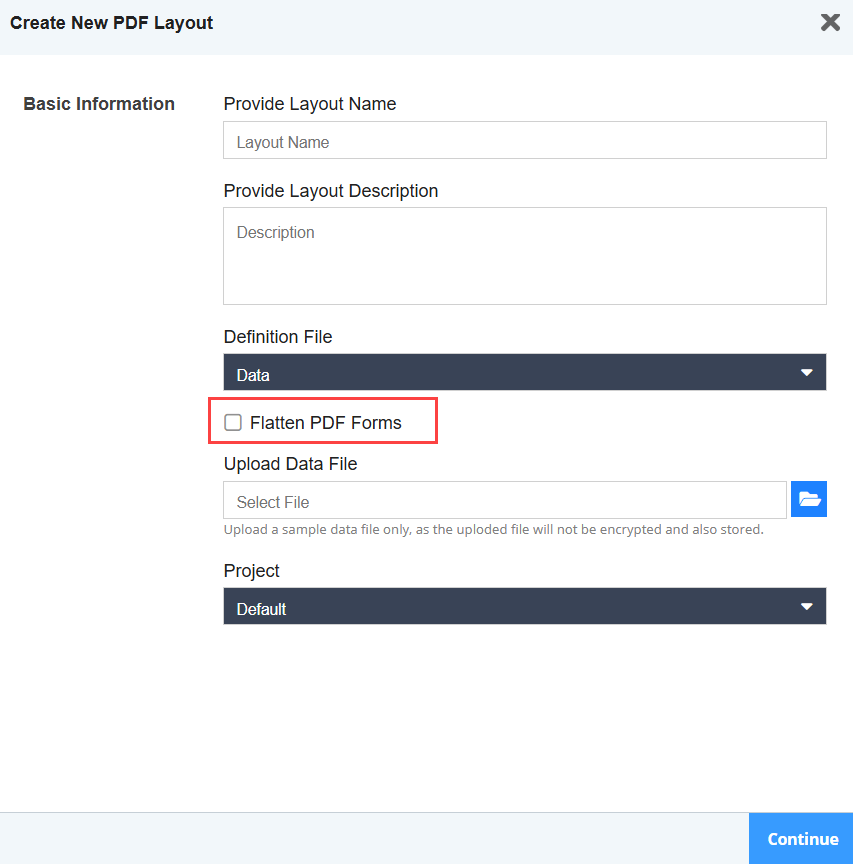
The PDF Layout now supports the use of PDF files that have dynamic form elements. To achieve this, select the Flatten PDF Forms checkbox in the PDF Layout wizard.
-
Configurable handling of delimiter characters in EDI source data
When characters defined as segment separators in an EDI Layout were also present in the source data, they were incorrectly replaced with spaces in the generated output file, resulting in data loss.
To address this, a new runtime configuration property, abpm.solution.edi.delimiter.replaceDelimiterWithSpaceInData, has been introduced for X12 and HIPAA processing. This property controls how delimiter characters appearing in the source data are handled during runtime EDI message generation.
Set this property to false by navigating to Settings > Microservice Settings > Runtime > EDI Solution Parameter section. For more details refer to the table below.Property value Bahavior true When set to true, the delimiter characters appearing in source data are replaced with spaces in the output file.
This is the default value.false When set to false, the delimiter characters in the output file are preserved exactly as they appear in the input data. -
Configurable HTTP Status Codes to Trigger Automatic OAuth Token Refresh
Users were unable to work with the API when the access token for the API expired, returning an HTTP status code other than 401.
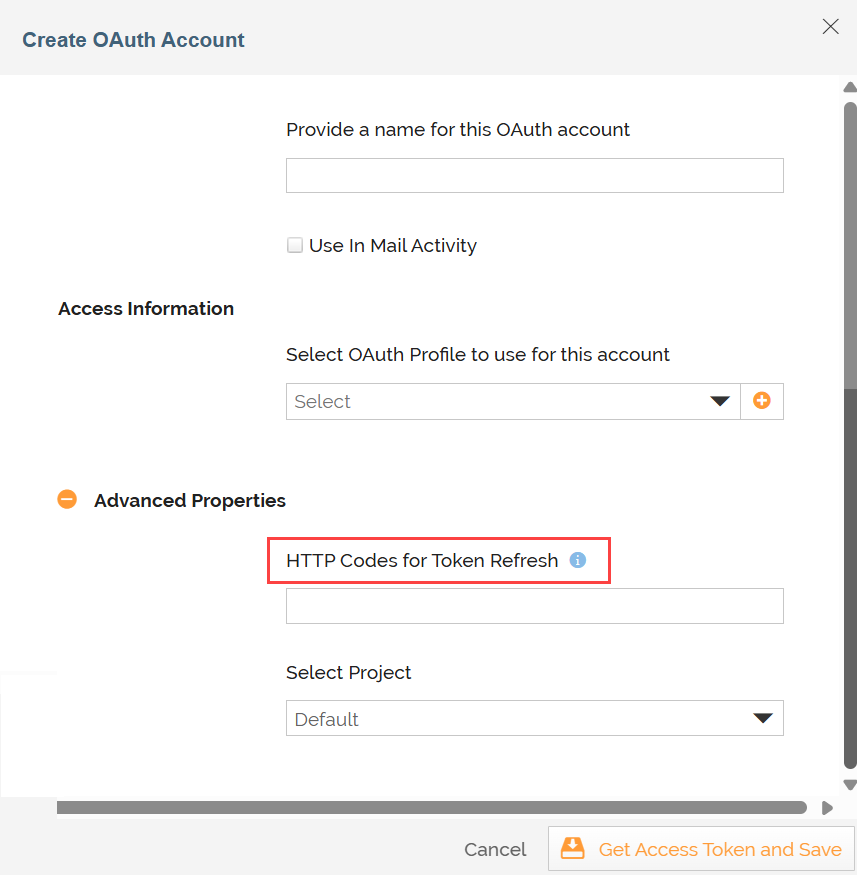
This has been fixed by adding a new field, HTTP Codes for Token Refresh, in the OAuth Account wizard (Under Advanced Properties). This field allows users to specify one or more HTTP status codes (for example, 403) that should trigger an automatic access-token refresh when returned by the API. Multiple status codes can be entered as a comma-separated list.
Additionally, the OAuth Account activity has been made editable, allowing users to configure these HTTP status codes for existing OAuth Accounts where automatic token refresh is required.
- The fix is applicable only for the OAuth Accounts created using an OAuth Profile.
- With this enhancement, the Select Project field in the OAuth Account wizard has now been moved under Advanced Properties section.
-
Improved Memory Management
Application memory management has been enhanced by resolving an issue where memory was not being released properly during large file processing.
This fix ensures:- Reliable job completion under high-volume processing conditions
- Prevention of intermittent failures caused by excessive memory consumption
-
Configuration updates (Related to Memory Fix)
-
Java Options Optimization
JVM configurations have been updated to improve memory handling and overall performance. -
Additional JAVA_OPTS Configuration:
- -XX:+UseZGC
- -XX:+ZUncommit
- -XX:ZUncommitDelay=60
- -XX:+UseContainerSupport
- -XX:MaxRAMPercentage=75.0
- -XX:MetaspaceSize=256m
- -XX:MaxMetaspaceSize=512m
- -XX:ReservedCodeCacheSize=256m
- -XX:MaxDirectMemorySize=2g
These configurations help to:
-
Optimize resource utilization
-
Improve memory release and garbage collection efficiency
-
Enhance performance in containerized environments
-
Migration behaviour control
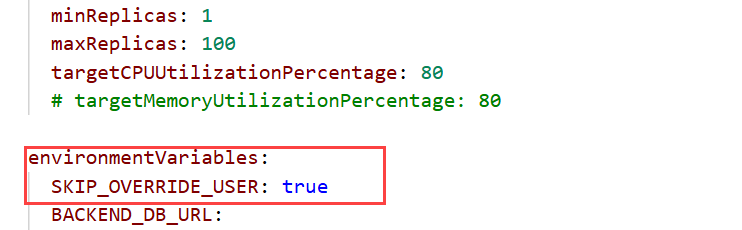
During object migration from AC v3.x to AC v4.x using the migration Helm chart, you now have greater control over activity ownership. If you prefer not to override activity ownership, configure the following environment variable in the environmentVariables section of your migration values.yaml:
SKIP_OVERRIDE_USER=trueBefore proceeding with this action, ensure that the same users in the source environment are also available in the target environment.
-
Enhanced control over XSLT message logging
You can now suppress xsl:message outputs generated by the Saxon XSLT engine during data mapping to avoid unnecessary log entries. To disable these messages, set the following property to true by navigating to Settings > Runtime > Data Mapper:
abpm.dataMapper.disableMessageEmitter.
Platform & security updates
- The version of the MySQL database has now been upgraded from v8.0 to v8.4.
- RabbitMQ Operator CRDs and RBAC manifests are now packaged as a Helm chart, replacing the previous manual kubectl apply workflow. This improves deployment consistency and aligns with standard Helm-based installation practices for Kubernetes environments.
- The version of moment.min.js has now been upgraded from 2.22.2 to 2.30.1 to mitigate the vulnerabilities in the previous version.
- Third-party library dependencies have been updated to address security vulnerabilities.
- We have pinned the following versions in the this release:
- Base image / UBI: 9.7
- Java: Amazon Corretto 17.0.17.10.1
- Python: 3.6 for AIMap
- AIMap runtime base image: 8.10
- AIMap Java: Amazon Corretto 8.482.08.1 / 1.8.0_482-b08
- The JasperReports dependency has been upgraded to address a known security vulnerability.
Bug fixes
-
When multiple JMS messages were processed concurrently across multi-pod runtime deployments using HashiCorp Vault for configuration, it caused intermittent Process Flow failures.
-
SFTP Events configured with HashiCorp Vault-based credentials would intermittently fail to connect with the SFTP server and automatically deactivate after a few failed retry attempts, requiring manual reactivation.
-
Non-transactional JMS Events configured with HashiCorp Vault-based credentials failed to re-activate after an event pod restart, displaying an invalid credentials error despite no credential changes.
-
The Azure Service Bus (ASB) Listener connection test failed when only one credential field (Client ID, Client Secret, or Tenant ID) was updated during credential rotation. Users were required to re-save all three fields together as a workaround.
-
For JMS Events running in non-transactional mode, email notifications were not sent during retry attempts or upon event deactivation after all retries were exhausted, even when a notification email address was configured. Users were not alerted when events went down, increasing response time during production failures. To fix this issue, the default value of the property, jms.connection.retry, under Setting > Microsevice Settings > Event > JMS has now been updated from -1 to 3.
-
Sometimes when a large number of transactions were triggered simultaneously, the system became unresponsive and stopped processing files entirely, with active workflows getting stuck indefinitely. A manual restart was required to recover. To address this issue, the Log4J framework has been enhanced to enable better fine-tuning and optimization. Additionally, a custom JDBC appender has been developed to remove the
**trace_id**and**span_id**fields injected by monitoring tools. -
An EDI Layout created using HL7 data dictionary failed to parse and threw a null pointer exception when tested.
-
When characters defined as segment separators in an EDI Layout were also present in the source data, they were incorrectly replaced with spaces in the generated output file, resulting in data loss.
To address this, a new runtime configuration property, abpm.solution.edi.delimiter.replaceDelimiterWithSpaceInData, has been introduced for X12 and HIPAA processing. This property controls how delimiter characters appearing in the source data are handled during runtime EDI message generation.
Set this property to false by navigating to Settings > Microservice Settings > Runtime > EDI Solution Parameter section. For more details refer to the table below.
Property value Bahavior true When set to true, the delimiter characters appearing in source data are replaced with spaces in the output file.
This is the default value.false When set to false, the delimiter characters in the output file are preserved exactly as they appear in the input data. -
The Advanced Database Layout containing column names with spaces failed to execute, resulting in a Process Flow failure.
-
An EDI Layout created using HL7 data dictionary failed to parse and threw a null pointer exception when tested.
-
When characters defined as segment separators in an EDI Layout were also present in the source data, they were incorrectly replaced with spaces in the generated output file, resulting in data loss.
-
When the "Resource Intensive" option was selected while creating a dedicated Queue for a partner, the Transactions dropdown would appear empty, preventing users from assigning transactions to the queue.
-
When editing an EDI transaction with transaction-level Group Sender and Group Receiver IDs configured, the edit screen incorrectly displayed the Partner-level values instead, causing those transaction-specific values to be unintentionally overwritten upon saving.
-
Users encountered the following issues with PDF Layouts:
- Creating a copy of the PDF Layout resulted in corruption of the original Layout from which the copy was created.
Note: This fix does not restore the Layouts that were already corrupted due to this issue. - The field names containing ligature characters for example, fi, ff, ffi, etc, in the PDF did not render correctly in the Table Data while creating a PDF Layout.
Note: For this fix to work, set the SQL DB URL parameter sendStringParametersAsUnicode to true while upgrading the application. - Sometimes, PDF Layouts were missing certain fields when opened in Edit mode.
- After editing and saving a page in a PDF Layout, reopening the Layout and navigating back to the same page caused the page content to not load on the first attempt.
- Creating a copy of the PDF Layout resulted in corruption of the original Layout from which the copy was created.
-
When FTP was used as a source in a Template/Automation and the Specify the folder location where you will put file to send field was left blank, a random file from the root directory was picked up for processing.
-
When sending large IDoc files to SAP, the SAP Client activity would intermittently fail with a ReadTimeout error after approximately 3 minutes, causing the process flow to abort even though the IDoc had successfully reached SAP. To address this, two new configurable properties have been introduced under Settings > Common > SAP:
sap.idoc.send.read_timeout— Allows users to increase the timeout duration beyond the default 180 seconds to accommodate larger files or slower SAP response times.sap.idoc.send.pool_size— Sets the maximum number of concurrent threads used for SAP IDoc send operations, with a default value of 20.
-
The AS2 Current Logs section displayed only one day of data, even though the log retention period was configured for more than a day, and the Archive Logs section did not display any logs despite historical data being present in the system.
-
The scheduled Log Cleanup job failed with a "Log Cleanup/Archival Error" when an AS2 log record referenced during archival was no longer present in the active log table, causing the entire cleanup process to abort.
-
Users with a custom role that had access to a network containing more than 2,100 partners—and consequently more than 2,100 projects—on a Microsoft SQL Server deployment encountered a critical failure when navigating to the Project Management or Project View pages. The page returned the error “Unable to fetch the requested data” and failed to load entirely.
-
When editing a role that had permissions assigned to multiple custom entities with similar names (e.g., VLM_TEST and VLM_TEST2), some permissions associated with the earlier custom entity would silently disappear when the role was updated to set permissions for custom entities created and saved later.
-
When a logged-in user attempted to change their default role from the My Profile page, the change was not saved, and the previous role was retained after refreshing the page.
-
The upgrade failed when immutability was enabled for the migration-chart-emb and runtime-chart-emb config maps, and configuration changes were attempted on them.
-
In clustered deployments with multiple License MS pods, users were repeatedly prompted to activate their license even after successful registration.
-
Sometimes the Kafka Target in a Process Flow failed when more than one dedicated runtime pod was running.
-
Editing one part of a process flow silently removed stream connections from other activities in the same flow, causing it to fail to execute completely.
-
The server configuration API, GET /fetchproperties/serverconfigure, was accessible without authentication, potentially exposing environment settings and posing a security vulnerability.