Changes in values.yaml
When compared to v4.6 the following changes are there in the values.yaml:
| Section in the values.yaml | Property | Value | Description |
|---|---|---|---|
| global > imagePullSecrets | create | true or false | Determines whether Helm should create a new Kubernetes secret for pulling images.
|
| secretName | adeptia-image-secret (Default value) | Name of the Kubernetes secret that stores the credentials for accessing the image repository. | |
| registry | The repository URL (For example, https://index.docker.io/v1/ or your private repository endpoint). Required only when you use a private repository to host the Adeptia docker images. | ||
| username | The username used to authenticate to the your private repository. Required only when you use a private repository to host the Adeptia docker images. | ||
| password | The password (or token) associated with your private repository username. Required only when you use a private repository to host the Adeptia docker images. | ||
| global > dbPullSecrets | create | true or false | Determines if Helm should create the secret containing the database credentials.
|
| secretName | adeptia-db-secret (Default value) | The name of the Kubernetes Secret that stores the DB credentials. | |
| global > envSecret | BACKEND_DB_USERNAME | Username for your Backend Database (To be provided by the infra team). Used only when you set global > dbPullSecrets > create to true. | |
| BACKEND_DB_PASSWORD | Password for your Backend Database (To be provided by the infra team). Used only when you set global > dbPullSecrets > create to true. | ||
| LOG_DB_USERNAME | Username for your Log Database (To be provided by the infra team). Used only when you set global > dbPullSecrets > create to true. | ||
| LOG_DB_PASSWORD | Password for your Log Database (To be provided by the infra team). Used only when you set global > dbPullSecrets > create to true. | ||
| LOG_ARCHIVE_DB_USERNAME | Username for your Log Archive Database (To be provided by the infra team). Used only when you set global > dbPullSecrets > create to true. | ||
| LOG_ARCHIVE_DB_PASSWORD | Password for your Log Archive Database (To be provided by the infra team). Used only when you set global > dbPullSecrets > create to true. | ||
| QUARTZ_DB_USERNAME | Username for your Quartz database. This value will be the same as that for the Backend Database. Used only when you set global > dbPullSecrets > create to true. | ||
| QUARTZ_DB_PASSWORD | Password for your Quartz database. This value will be the same as that for the Backend Database. Used only when you set global > dbPullSecrets > create to true. | ||
| global > environmentVariables | WEBAPP_DOMAIN_URL | Enter the URL in the format https:<domain> to be used for accessing the application. Ensure that you enter the URL in single quotes. | |
| global > deploymentmanager > runtimeEnvironmentVariables | API_GATEWAY_URL | https://ac-api-publisher-gateway (Default value) | URL to access API Gateway. |
| global > webrunner > environmentVariables | DEFAULT_WEBSERVICE_PROTOCOL | https (Default value), http, or ' ' (Empty) | Specifies the protocol used by the REST/SOAP Web Service Provider.
|
| global > apigateway > environmentVariables | DEFAULT_SERVICE_PORT |
| Specifies the port number for hosting REST/SOAP Web Service Provider. |
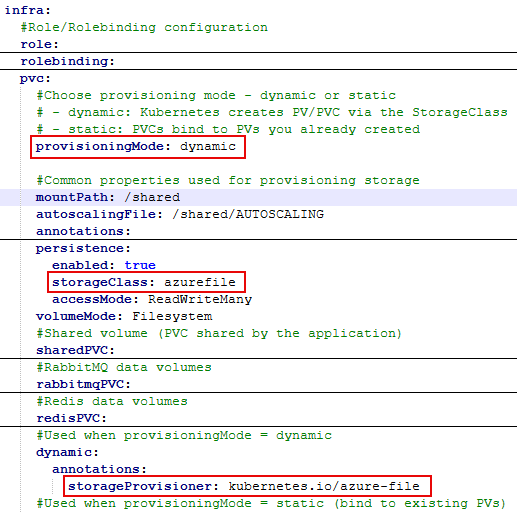
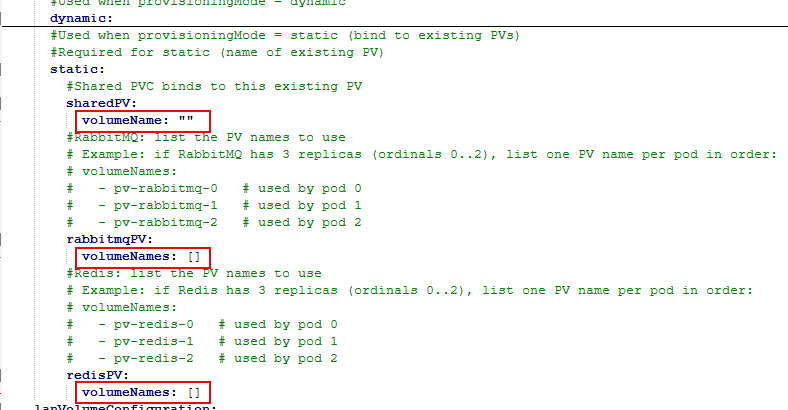
| global > infra > pvc | provisioningMode |
|
|
| global>deploymentmanager>runtime | cmName | runtime-chart-emb | The variables cmName and checksumBump are specific to the runtime external Helm chart. |
| checksumBump | "" | ||
| global>migration | cmName | migration-chart-emb | The variables cmName and checksumBump are specific to the runtime external Helm chart. |
| checksumBump | "" | ||
global>sapservice global>webrunner global>webappgateway | ports: name containerPort protocol | http443TCP | These values can change as per the user requirements. |
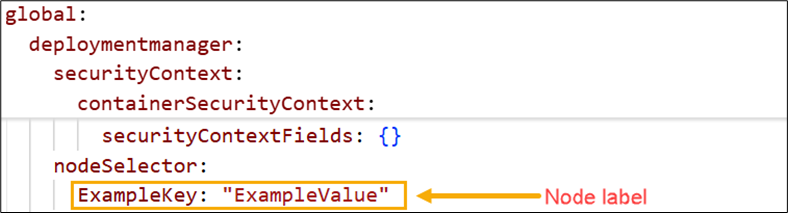
global > deploymentmanager global > deploymentmanager > runtime | nodeSelector | Node label | To schedule your Deployment Manager or Runtime pods on a specific node, locate the nodeSelector parameter in the respective sections of the values.yaml file and enter the node label as its value. Refer to the screenshot below for reference. |
| global > license > environmentvariables | MAINTENANCE_QUEUE_ENABLED | true | To ensure the activation state is properly synchronized across all license microservice pods. |