Manage a rule set
Adeptia's AI Business Rules facilitates efficient rule set management by allowing you to copy, delete, and access detailed information for rules you create.
The page contains the following information:
Copy a rule set
When you copy a rule set, it replicates the sequence of rule definitions as they were originally defined to another rule set.
To copy a rule set:
-
Click
 next to the rule set you want to copy.
 -
Click
 .
. This creates a copy of the rule set. You can view the copy of the source rule set in the Rules panel.
Delete a rule set
You can delete a rule set permanently from Adeptia's AI Business Rule.
To delete a rule set:
- Click next to the rule set you want to delete.
- Click
 .
. - Click Confirm, when prompted to proceed.
View rule set details
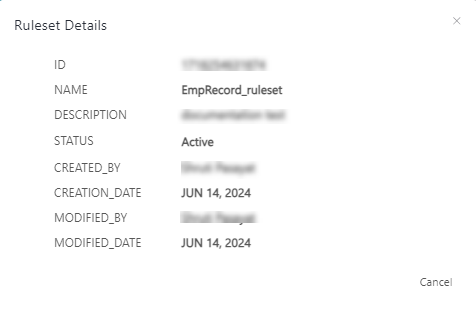
Adeptia's AI Business Rule provides a designated screen 'Ruleset details' for you to view the details about a rule set, including name, description, creation date, etc. The Ruleset details screen dynamically presents information based on the current metadata of the rule set.
To view rule set details, click next to the rule set for which you want to view the details.
The Ruleset details screen displays the details of the rule as shown below.