AI Business Rules examples
This section provides examples of business rule definitions based on two JSON files: one containing employee details and the other with comprehensive data for employee benefit management.
Business Rules examples set 1:
This example set contains AI business rules descriptions for the validation of employee information based on a JSON file including various employee-related fields, such as employeeId, firstName, salary, and others.
The fields in the JSON file are shown in the screenshot below.
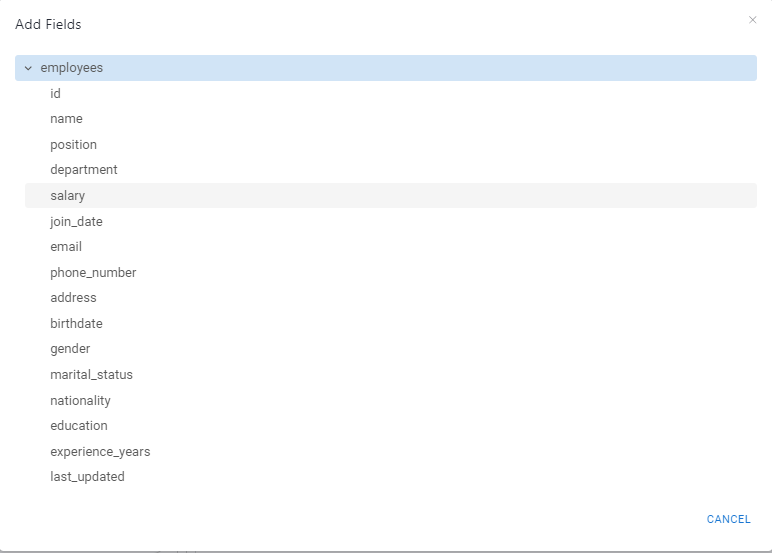
The following table contains the examples of rule definitions.
 |
|
| Rule description | Applicable Rule definition |
|---|---|
| The employee’s address is alphanumeric. | Check if the address of an employee is in alphanumeric format. |
The employee’s join date and birth date are in a valid date format. | Check if the join_date and birthdate of an employee is a valid date and consider all the possible date format. |
The employee’s phone number is of the provided length. | Check if the phone_number of an employee contains 10 digit. |
The employee’s marital status is one of the provided values. | Check if the marital_status of an employee is either "Single" or "Married". |
The employee's years of experience must adhere to the specified conditions. | Check If an employee’s department is Marketing and their salary is greater than $75,000, then their experience_years must be provided; otherwise, it should not be available. |
The employee's experience should be a whole number and must not exceed 15 years. | Check if the experience_years is not greater than 15 and should not contain a decimal value. |
Business Rules examples set 2:
This example set contains AI business rules description based on a JSON file structured to manage employee benefits, offering a comprehensive view of coverage details, employee-dependent relationships, and application statuses. The dataset includes details on employers, employees, dependents, and coverages. Each record captures information about individual employees and their dependents, along with associated insurance coverages and underwriting statuses. The audit record provides an overview of record quantities across employers, employees, dependents, coverages, and underwriting statuses, facilitating data integrity and record management for each transmission.
The fields in the JSON file are shown in the screenshot below.
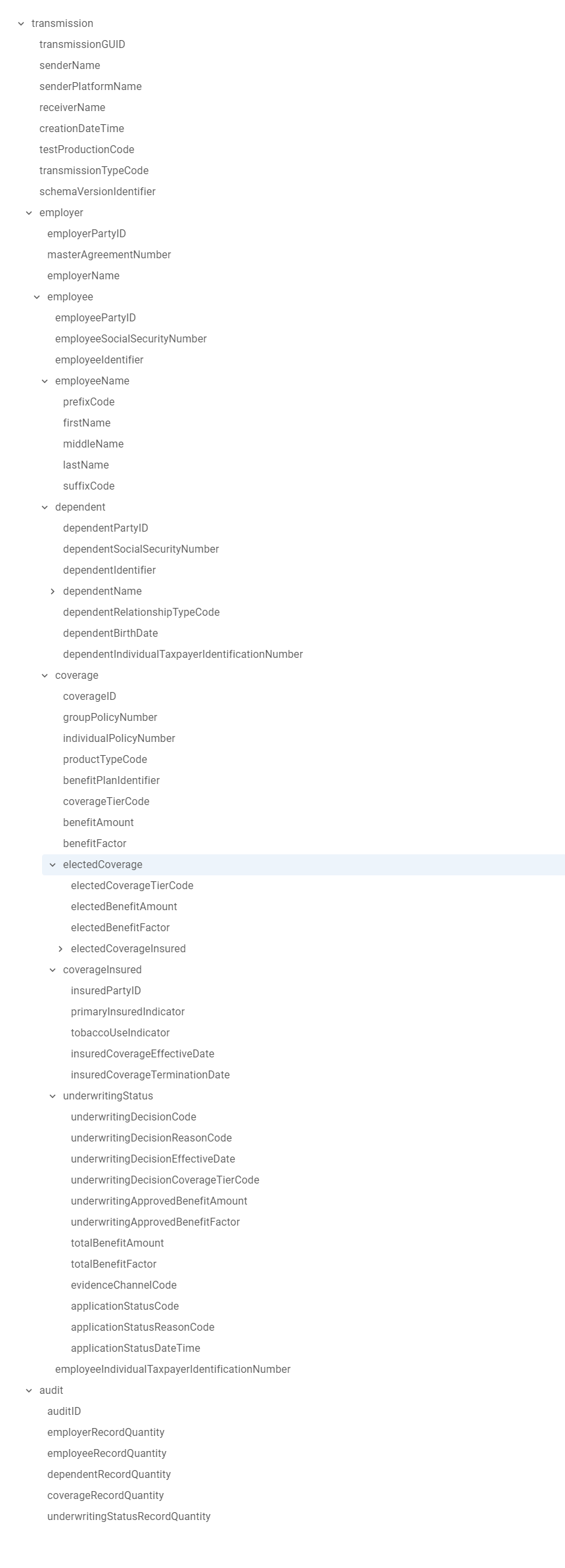
The following table contains the examples of rule definitions.
 |
| Rule description | Applicable Rule definition |
|---|---|
Every coverage must be linked to at least one employee or dependent; coverage entries cannot exist without an associated employee or dependent. | check if the insuredPartyID is equal to either the employeePartyID or the dependentPartyID. |
A dependent must have at least one of the following:
| Check if at least one of the following dependentIdentifier, dependentSocialSecurityNumber, or dependentIndividualTaxpayerIdentificationNumber has a value. |
| If the application status is pending, a valid reason must be provided to explain this status. | Check if applicationStatusCode is 'Pending' then applicationStatusReasonCode should be available. |
The coverage record quantity in the audit summary should match the actual number of coverage entries in the dataset. | Check if the number of occurrences of coverageID is equal to the value of coverageRecordQuantity. |
The Relationship of the dependent to the employee must be provided when dependents are covered under a benefit plan. | Check if insuredPartyID matches with the dependentPartyID then dependentRelationshipTypeCode must have value. |
If the transmission includes an UnderwritingDecisionCode—a code indicating the status of the underwriting decision for the coverage (e.g., "Approved," "Declined")—then the specific product type must also be provided. | Check if underwritingDecisionCode is available then productTypeCode must be specified. |
| The effective date of coverage must be provided in "YYYY-MM-DD" format when the UnderwritingDecisionCode value is "Approved." If the UnderwritingDecisionCode has any other value, the effective date field should remain blank. | Check if the underwritingDecisionCode = Approved then the value of underwritingDecisionEffectiveDate must be available in "YYYY-MM-DD" format. Else it should be blank. |
| The insured person associated with their respective elected benefit plans is required when UnderwritingDecisionCode is in the transmission. | Check if the underwritingDecisionCode is available, then the insuredPartyID must be provided. |
| Either a group policy number or an individual policy number is required when an UnderwritingDecisionCode is available. | Check if underwritingDecisionCode is available then either groupPolicyNumber or individualPolicyNumber must be available. Both should not be available at a time. |