Importing objects using DevOps pipeline
You can use a CI/CD pipeline for importing the Adeptia Connect objects to a new environment automatically. This CI/CD pipeline uses the Exported ZIP file that you must have created as a prerequisite for import operation, and imports the objects to the target environment.
 |
|
How the Import pipeline works
The diagram below represents how the import pipeline works, and automates the import process.

When triggered, the pipeline performs the following sequence of actions.
- Connects to the GitHub repository, pulls the Import XML and Exported ZIP files, and places them to a location in the PVC (shared folder).
- Pulls the retain XML from the GitHub repository (if specified in the import pipeline) to retain certain activities during the import process.
- Pulls and deploys the migration utility helm chart to import the objects.
- Creates a rollback ZIP file at the shared repository file location, and pushes it to the GitHub repository.
- Deletes the migration workspace created during the import process.
To start with importing the objects, you first need to create an import pipeline having all the required parameters for exporting the objects.
| Adeptia provides you with an import pipeline file that you can use to create the pipeline. |
After you create the pipeline, you need to trigger the pipeline to perform the import operation.
Creating and triggering the import pipeline
To create the pipeline in Jenkins using the import pipeline provided by Adeptia, follow the steps given below.
-
Log in to the Jenkins with admin privileges.
-
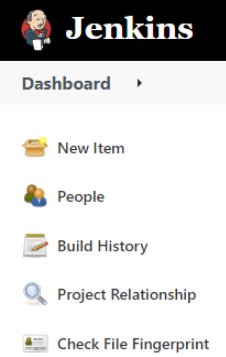
Select New Item.
-
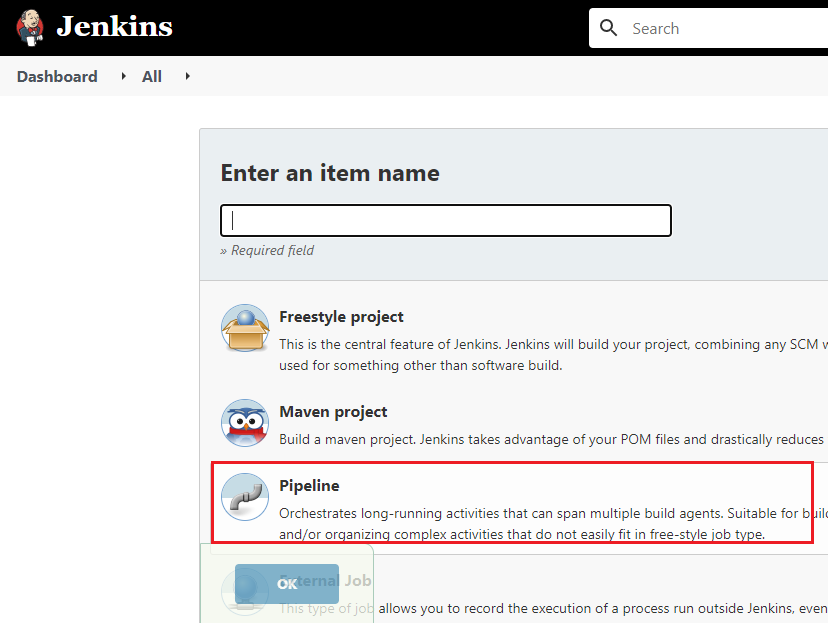
Enter a name for the Import pipeline, and then select Pipeline.
-
Click OK.
-
Copy the content from the provided import pipeline file.
[+] Import Pipeline
[-] Hide
-
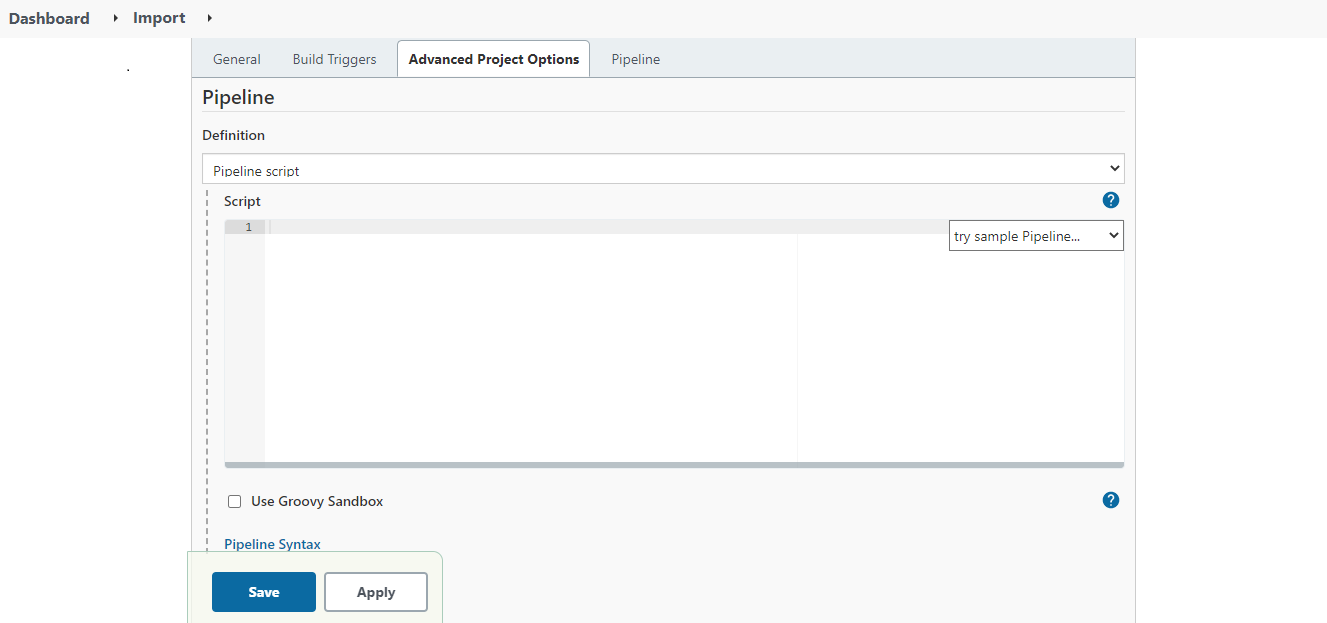
In the Pipeline Definition section, paste the copied content and uncheck the Use Groovy Sandbox checkbox.

If you are using Jenkins on Windows OS, and have created an agent on Linux OS, you need to do the followings in the export pipeline file.
1. Uncomment the following code snippet.
<ch:codesample>Where,
LinuxAgent is the name of the agent that you have created.
2. Comment the following lines of code.
<ch:codesample></ch:codesample></ch:codesample> -
Click Save.
-
On the screen that follows, click Build Now.
As you build the pipeline for the very first time, all the parameters get initialized. -
Refresh the page.
The Build Now option now changes to Build with Parameters. -
Click Build with Parameters.
You will see all the parameters inherited from the import pipeline file.
-
Enter the parameter values as per your requirement.
It is mandatory to provide a valid value for all the Jenkins parameters. [+] Click here to expand the list of Import parameters
[-] Hide
Parameters Value Description Helm Chart
HELM_REPO_URL https://adeptia.github.io/adeptia-connect-migration/charts Migration Helm
chart repository URL.
CHART_NAME migration Migration Helm chart name. GitHub GIT_CREDENTIALS_ID <credential ID generated by Jenkins>
Credential ID for GitHub in Jenkins.
Refer to the prerequisites for more details.
GIT_REPO_URL https://github.com/adeptia/migration-defination.git URL of the GitHub repository. GIT_BRANCH main GitHub branch name. GIT_SOURCE_ZIP_PATH test/SA_PF.zip Path of the exported ZIP in the GitHub repository. GIT_MIGRATION_XML_FILE_PATH test/import.xml Path of the import.xml file in the GitHub repository. GIT_RETAIN_XML_PATH xml/retain.xml Path of the retain XML file in the GitHub repository. GIT_ROLLBACK_ZIP_PATH test/Rollback_SA_PF.zip Path in the GitHub repository where you want to upload the rollback zip.
Though this parameter is also visible while performing the rollback operation, you are not required to provide a value for this parameter. Migration OPERATION import The type of operation for which deployment will be performed. SOURCE_ZIP_PATH /shared/migrationtest1/SA_PF.zip Path of the exported ZIP in the PVC. ROLLBACK_ZIP_PATH /shared/Rollback_SA_PF.zip Path in the PVC where you want to keep the rollback zip.
Though this parameter is also visible while performing the rollback operation, you are not required to provide a value for this parameter. MIGRATION_XML_FILE_PATH /shared/migrationtest1/import.xml Path of the import.xml file in the PVC. OVERRIDE_USER IndigoUser:127000000001107055536473900001 User Id or user name of an IT user with which all objects will be deployed.
In case of AC v4.1.3, apart from an IT user, you can also enter the User Id of any Admin user while importing the User type of objects from one environment to the other. OVERRIDE_MODIFIEDBY_USER IndigoUser:127000000001107055536473900001 User Id or user name which will be reflected in the modified by field of every activity after the deployment. RETAIN_XML_PATH /shared/migrationtest1/retain.xml Path of the retain XML file in the PVC. LOG_IDENTIFIER Test_Identifier_Tag Log identifier to capture logs from MS environment. Kubernetes Cluster CLUSTER_TYPE - Amazon Elastic Kubernetes Service (cluster in AWS)
- Azure Kubernetes Service (cluster in MS Azure)
Type of Kubernetes cluster.RESOURCE_GROUP Resource group name Resource group of Kubernetes cluster.

The field is available only if AKS is configured as the Cluster Type. K8_CREDENTIALS_ID <credential ID generated by Jenkins> Credential ID for Kubernetes in Jenkins.
Refer to the prerequisites for more details.
SERVER_URL https://<host name of the Kubernetes cluster>:<Port number> URL of the Kubernetes cluster. CLUSTER_CONTEXT test-dev Kubernetes cluster context. NAMESPACE namespace Kubernetes cluster namespace for deployment. Backend Database BACKEND_DB_URL jdbc:sqlserver://<DB Hostname>:<Port number>;database=<Backend Database Name> Backend database URL used in the deployment of migration Helm chart. Database info configured in value.yaml file. DATABASE_CREDENTIALS_ID <credential ID generated by Jenkins> Credential ID for database in Jenkins.
Refer to the prerequisites for more details.
BACKEND_DB_DRIVER_CLASS com.microsoft.sqlserver.jdbc.SQLServerDriver Backend database driver class used in the deployment of migration Helm chart. Database info configured in values.yaml file. BACKEND_DB_TYPE SQL-Server Backend database type used in the deployment of migration Helm chart. Database info configured in values.yaml file. Log Database LOG_DB_URL jdbc:sqlserver://<DB Hostname>:<Port number>;database=<log Database Name> Log database URL used in the deployment of migration Helm chart. Database info configured in value.yaml file. LOG_DATABASE_CREDENTIALS_ID <credential ID generated by Jenkins> Credential ID for database in Jenkins. LOG_DB_DRIVER_CLASS com.microsoft.sqlserver.jdbc.SQLServerDriver Log database driver class used in the deployment of migration Helm chart. Database info configured in values.yaml file. LOG_DB_TYPE SQL-Server Log database type used in the deployment of migration Helm chart. Database info configured in values.yaml file. Parameters used in rollback operation Helm Chart
HELM_REPO_URL https://adeptia.github.io/adeptia-connect-migration/charts Migration Helm chart repository URL. CHART_NAME migration Migration Helm chart name. GitHub GIT_REPO_URL https://github.com/adeptia/migration-defination.git URL of the GitHub repository. GIT_BRANCH main GitHub branch name. GIT_SOURCE_ZIP_PATH test/Rolllback_SA_PF.zip Location of the rollback ZIP in GitHub repository. GIT_MIGRATION_XML_FILE_PATH test/import.xml Location of the import.xml file in GitHub repository. Migration OPERATION rollback The type of operation for which deployment will be performed. SOURCE_ZIP_PATH /shared/migrationtest1/Rolllback_SA_PF.zip Path of the rollback ZIP in the PVC. MIGRATION_XML_FILE_PATH /shared/migrationtest1/import.xml Path of the import.xml file in the PVC. LOG_IDENTIFIER Test_Identifier_Tag Log identifier to capture logs from MS environment. Kubernetes Cluster CLUSTER_TYPE - Amazon Elastic Kubernetes Service (cluster in AWS)
- Azure Kubernetes Service (cluster in MS Azure)
Type of Kubernetes cluster.RESOURCE_GROUP Resource group name Resource group of Kubernetes cluster. K8_CREDENTIALS_ID <credential ID generated by Jenkins> Credential ID for Kubernetes in Jenkins.
Refer to the prerequisites for more details.
SERVER_URL https://<host name of the Kubernetes cluster>:<Port number> URL of the Kubernetes cluster. CLUSTER_CONTEXT test-dev Kubernetes cluster context. NAMESPACE namespace Kubernetes cluster namespace for deployment. Backend Database BACKEND_DB_URL jdbc:sqlserver://<DB Hostname>:<Port number>;database=<Backend Database Name> Backend database URL used in the deployment of migration Helm chart. Database info configured in value.yaml file. DATABASE_CREDENTIALS_ID <credential ID generated by Jenkins> Credential ID for database in Jenkins.
Refer to the prerequisites for more details.
BACKEND_DB_DRIVER_CLASS com.microsoft.sqlserver.jdbc.SQLServerDriver Backend database driver class used in the deployment of migration Helm chart. Database info configured in values.yaml file. BACKEND_DB_TYPE SQL-Server Backend database type used in the deployment of migration Helm chart. Database info configured in values.yaml file. Log Database LOG_DB_URL jdbc:sqlserver://<DB Hostname>:<Port number>;database=<log Database Name> Log database URL used in the deployment of migration Helm chart. Database info configured in value.yaml file. LOG_DATABASE_CREDENTIALS_ID <credential ID generated by Jenkins> Credential ID for database in Jenkins. LOG_DB_DRIVER_CLASS com.microsoft.sqlserver.jdbc.SQLServerDriver Log database driver class used in the deployment of migration Helm chart. Database info configured in values.yaml file. LOG_DB_TYPE SQL-Server Log database type used in the deployment of migration Helm chart. Database info configured in values.yaml file. -
Click Build to trigger the pipeline.
The objects are imported to the target environment.
The rollback ZIP is created and pushed to the GitHub repository.
All the log statements generated by the migration utility during the import process are tagged with a unique identifier. This allows you to search for this unique identifier in the centralized logging system, and fetch all the associated logs.
Rolling back the import operation
If you decide upon rolling back the import operation, use the rollback ZIP created during the import operation.
Here are the steps to perform the rollback operation.
-
Log in to Jenkins.
-
Click Build with Parameters.
-
Enter the values for the following parameters.
It is mandatory to provide a valid value for all the Jenkins parameters, except for GIT_ROLLBACK_ZIP_PATH and ROLLBACK_ZIP_PATH. [+] Click here to expand the list of rollback parameters
[-] Hide
Helm Chart
HELM_REPO_URL Migration Helm chart repository URL. CHART_NAME migration Name of the Migration Helm chart. GitHub GIT_CREDENTIALS_ID <credential ID generated by Jenkins>
Credential ID for GitHub in Jenkins.
Refer to the prerequisites for more details.
GIT_REPO_URL URL of the GitHub repository. GIT_BRANCH main GitHub branch name. GIT_SOURCE_ZIP_PATH test/Rolllback_SA_PF.zip Location of the rollback ZIP in GitHub repository.
GIT_MIGRATION_XML_FILE_PATH test/import.xml Location of the import.xml file in GitHub repository. Migration OPERATION rollback The type of operation for which deployment will be performed. SOURCE_ZIP_PATH /shared/migrationtest1/
Rolllback_SA_PF.zip
Path of the rollback ZIP in the PVC.
The rollback ZIP is created at the location where your Exported ZIP is located.
The format of rollback ZIP file name is Recovery_<EXPORT_ZIP_NAME>.zip.MIGRATION_XML_FILE_PATH /shared/migrationtest1/
import.xml
Path of the import.xml file in the PVC. LOG_IDENTIFIER Test_Identifier_Tag Log identifier to capture logs from MS environment. Kubernetes Cluster CLUSTER_TYPE - Amazon Elastic Kubernetes Service (cluster in AWS)
- Azure Kubernetes Service (cluster in MS Azure)
Type of Kubernetes cluster.RESOURCE_GROUP Resource group name Resource group of Kubernetes cluster.
The field is available only if AKS is configured as the Cluster Type. K8_CREDENTIALS_ID <credential ID generated by Jenkins> Credential ID for Kubernetes in Jenkins.
Refer to the prerequisites for more details.
SERVER_URL https://<host name of the Kubernetes cluster>:<Port number> URL of the Kubernetes cluster. CLUSTER_CONTEXT test-dev Kubernetes cluster context. NAMESPACE namespace Kubernetes cluster namespace for deployment. Database BACKEND_DB_URL jdbc:sqlserver://<DB Hostname>:<Port number>;database=<Backend Database Name> Backend database URL used in the deployment of migration Helm chart. Database info configured in value.yaml file. DATABASE_CREDENTIALS_ID <credential ID generated by Jenkins> Credential ID for database in Jenkins.
Refer to the prerequisites for more details.
BACKEND_DB_DRIVER_CLASS com.microsoft.sqlserver.
jdbc.SQLServerDriver
Backend database driver class used in the deployment of migration Helm chart. Database info configured in values.yaml file. BACKEND_DB_TYPE SQL-Server Backend database type used in the deployment of migration Helm chart. Database info configured in values.yaml file. Log Database LOG_DB_URL jdbc:sqlserver://<DB Hostname>:<Port number>;database=<log Database Name> Log database URL used in the deployment of migration Helm chart. Database info configured in value.yaml file. LOG_DATABASE_CREDENTIALS_ID <credential ID generated by Jenkins> Credential ID for database in Jenkins. LOG_DB_DRIVER_CLASS com.microsoft.sqlserver.jdbc.SQLServerDriver Log database driver class used in the deployment of migration Helm chart. Database info configured in values.yaml file. LOG_DB_TYPE SQL-Server Log database type used in the deployment of migration Helm chart. Database info configured in values.yaml file. -
Click Build to roll back the import operation.
RetainXmlLocation, OverRideuser, and OverrideModifiedByuser parameters are not applicable in case of rollback.