Spazio MFT/s Target
A Target service allows you to send the fetched data to your desired location. The Spazio Target service is the component that sends a specific file to Spazio MFT/s.
To create a spazio target:
-
Click Configure > TARGETS > Spazio MFT/s Target.
-
Click Create Spazio MFT/s Target.
-
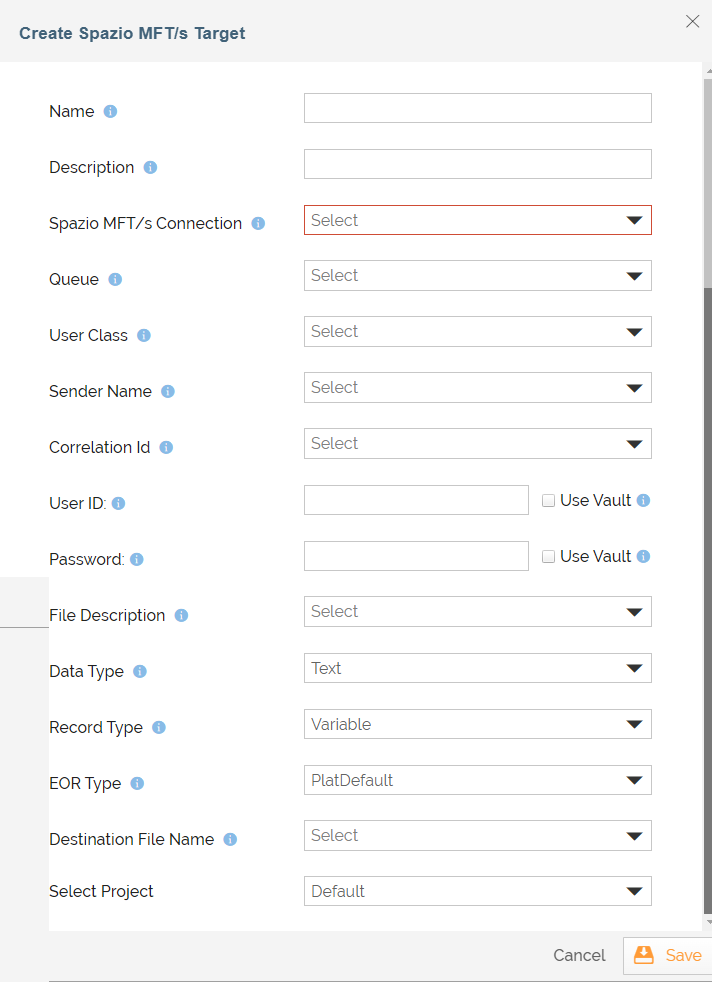
Provide the Spazio Target details:
Field Name
Description
Name Name of the Spazio target activity. Description Description of the Spazio target activity. Spazio Connection Select the Spazio MFT Server Connection from the drop-down list under which you want to create MFT File Target. Queue Name of the default Spazio MFT/s Queue where files are queued. User Class Name Name of the Spazio MFT/s user class. Sender Name Name of Spazio MFT/s sender. The sender in this context is a logical MFT level sender identifier (not the actual userid/subject in AuthN/AuthZ terms) and can be used for filtering. Correlation Id Name of Spazio MFT/s correlation identifier. Correlation identifier is a logical tag that can be associated with Spazio MFT/s files having some business level affinity (for example, "PAYROLL.FILES") and can be used for filtering.
User Id Spazio MFT/s connection user id. Password Spazio MFT/s connection password. File Description Description of the Spazio MFT/s file.
Data Type Nature of the data contained in the file either Text or Binary. Record type File record structure either Fixed or Variable. Stream means no record structure and is the only supported option for binary files.
Most files will be either binary/stream or text/variable. In case of fixed record structure, the record length will be automatically determined based on the length of the first record.
EOR Type End-of-record type for record structured text files. The options are PlatDefault, CRLF, and LF. PlatDefault means that the EOR value will be set to the actual platform specific default EOR for the platform where the process flow is running. For Linux, EOR will be LF. Destination File Name File name, without the path, used for rendering files on Spazio MFT/s managed by a virtual file system and as a suggested file name for file consumer applications/CLIs. Select Project Select the project from the drop-down box. 
You can also use HashiCorp Vault to fetch the following secrets (credentials): - User Id
- Password
Each secret is maintained as a key-value pair in Hashicorp Vault. Select the checkbox against the respective fields to use Vault to fetch secrets for the fields. Enter the variable in the following format in the field:
${Vault:<Key1>}Where, <Key1> is the key in Hashicorp Vault that is defined for the field.
For example, you need to enter ${Vault:spazioTargetUserId} in the User Id field, if you have defined spazioTargetUserId as the key for this field in the Vault.
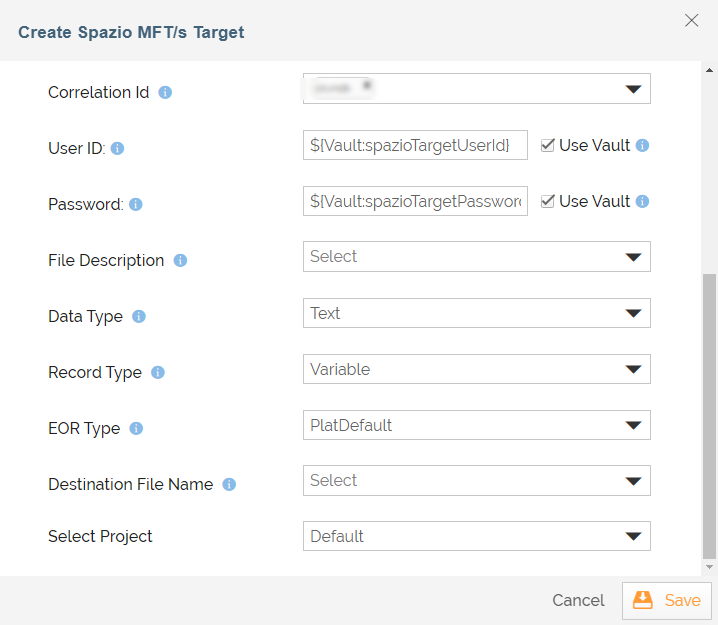
For more details, refer to this page.
-
Click Save.