HTTP Source
HTTP Source service provides an ability to fetch data from an HTTP server. This section describes how to create an HTTP source service.
 | As this HTTP Source service has now been deprecated in Connect, it is recommended that you use REST Consumer with Get Method instead of this. Click here to know how to create REST consumer with Get method. |
To create an HTTP Source:
-
Click Configure > SOURCES > HTTP Source.
-
Click Create HTTP Source.
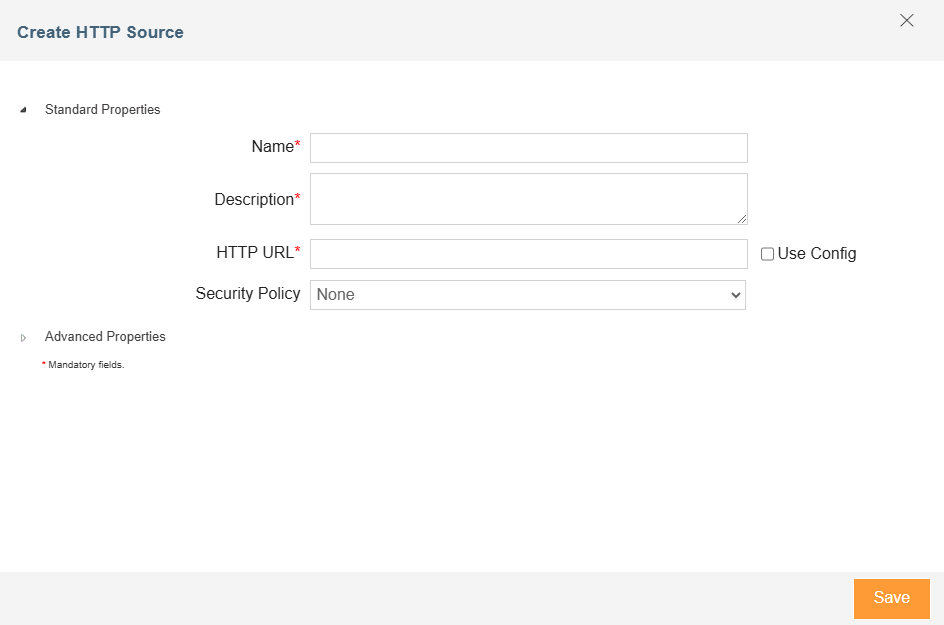
-
Type the name and description of the new HTTP Source in the Name and Description text boxes respectively.
-
In the HTTP URL field, enter the URL of the HTTP Server, or select the Use Config checkbox to dynamically fetch it from a Git repository at runtime through a variable.
-
Select the policy from the Security Policy drop-down box.

To learn how to create a security policy, click here. -
Expand Advanced Properties.
-
Select the Project from the drop-down list of Project.
-
Click Save.