Calling a Stored Procedure from Templates or Transactions
This page guides you on how to use a stored procedure in a template or transaction.
A stored procedure cannot serve as a source or destination in a template or transaction. You can, however, use a stored procedure which is a part of a process flow, in a custom template.
Follow the steps below to use a stored procedure in a custom template:
-
Create a custom template.

Click here to know how to create a custom template. -
At the Select Process Flow step during the creation of the custom template, select a process flow that contains a stored procedure activity.
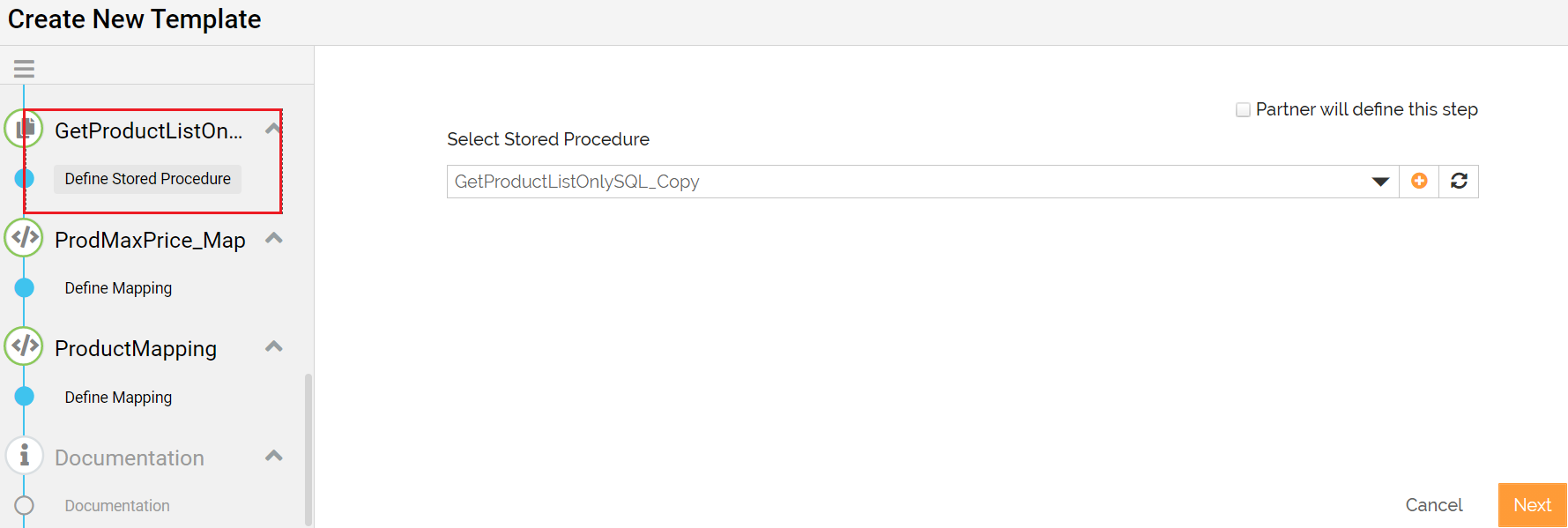
As you complete the previous step, a step with the stored procedure name starts appearing in the template/transaction creation wizard. See an example below.
-
At Select Stored Procedure Step:
-
- You can select, add, edit or copy a stored procedure.
- You can choose this step to be defined by the Partner by selecting Partner will define this step check box.
| If you select the Partner will define this step check box
Once the stored procedure is selected, at the Mapping steps, the layout defined in the stored procedure will be automatically loaded in the mapping. |