Adding Namespace Prefix
You can add a namespace prefix to a target element. This prefix is displayed next to the target element in the target schema, and is automatically displayed in the Output section on the Debugger screen.
Steps to add a namespace prefix to a target element
-
Ensure that the source and destination layout are loaded and all their elements are listed under their respective nodes.
-
Select the element of the target schema for which you want to add a namespace prefix.
-
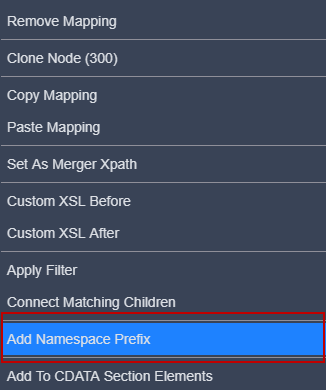
Click the more icon and then select the Add Namespace Prefix option from the list.
-
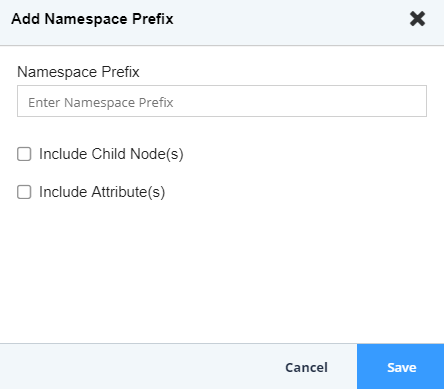
The Add Namespace Prefix screen is displayed.
-
Enter the namespace prefix and click Save. This adds the prefix and displays it next to the selected target element in the target schema.

Once you add a namespace prefix for a target element, you need to add a namespace for it. To do this, refer to Adding Namespace section. -
Select the checkbox(s) for Include Child Node(s) and Include Attribute(s) if you want to add the Namespace Prefix for child node and attributes.