Understanding Validation
Validation is a mechanism to ensure that the process flow created in Graph Canvas is correct as per the BPMN standard and Connect Server. If the process flow is incorrect, an error message is displayed in the Alerts Panel.
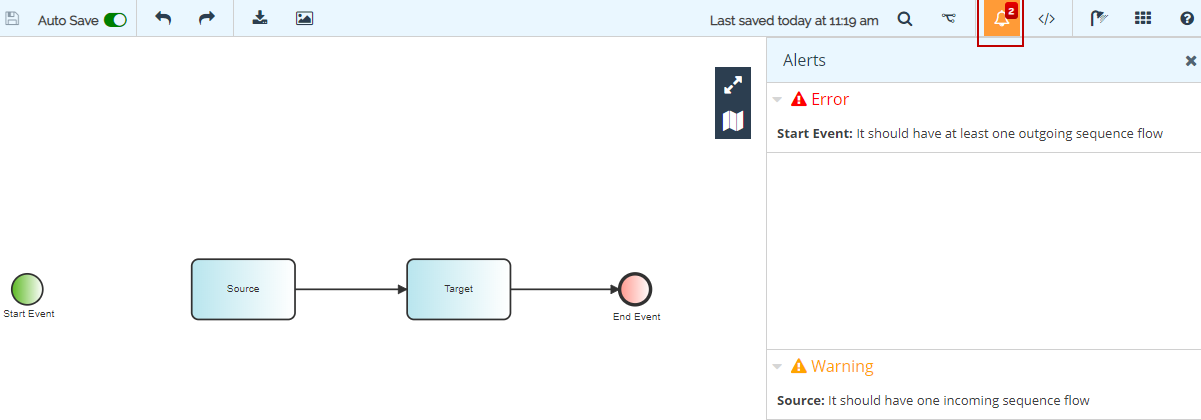
In the above figure, you can see that the Start Event is not connected with the Source activity and has no outgoing sequence flow and the Source activity has no incoming sequence flow. The validation message is displayed in the Alerts option of the toolbar.
There are two categories of validations:
- BPMN Server Specific Validation: This includes Connect Server validations, for example, File Target has no input source stream. This is displayed as "BPMNServer" in the Category column of the Alerts option.
- BPMN Specific Validation: This includes BPMN specific validations, for example, the end event cannot have outgoing sequence flow. This is displayed as "BPMN" in the Category column of the Alerts option.
Validation messages are further divided into two types:
- Error: These are displayed in the Alerts menu with type (
 ) along with the error message and the corresponding user action is reverted if possible. If the revert action takes place successfully then a warning message is displayed explaining the reason of the revert operation. For example, the start event cannot have incoming sequence flow, hence removed.
 - Warning: These are displayed in the Alerts menu with type (
 ) and the corresponding warning message is displayed. For example, the start event has no outgoing sequence flow.