Creating Variables in a Process Flow
A variable is declared when the action is executed while running the process flow. Variable is generally used to set the value of any field of an activity used in a process flow, during the execution of the process flow.
You can create variables in a process flow using these methods.
[+] Process Flow Variable
[-] Hide
A variable is declared when the action is executed while running the process flow. Variable is generally used to set the value of any field of an activity used in a process flow, during the execution of the process flow. For example, if you want to specify an algorithm/cipher for file encryption in a Process Flow, you can define a Process Flow variable, encryptionAlgorithm, and set its value to any of the following algorithms/ciphers that you want to use.
-
- IDEA
- TRIPLE_DES
- CAST5
- BLOWFISH
- DES
- AES_128
- AES_192
- AES_256
- TWOFISH
- CAMELLIA_128
- CAMELLIA_192
- CAMELLIA_256
You can create and use a Process Flow Variable throughout the execution of a process flow.
Steps to create a Process Flow variable
-
Open Process Designer.
-
Click the View Process Flow Properties option in toolbar.

-
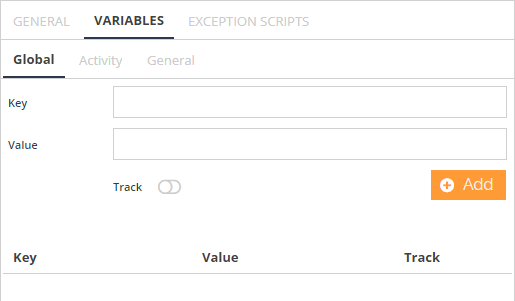
Select VARIABLES in the Process Flow Properties Panel.
-
Enter the name and value of the process flow variable in the Key and Value textbox of the Global tab.

Select the Track Toggle button to track all changes made to the Process Flow variable. -
Click Add.
-
Once a new process flow variable is created, it is added to the list in the Process Flow Variables tab.
[+] Activity Variable
[-] Hide
Steps to create Variables
-
Click the activity for which you want to create the variables, and select the View Properties option from the context pad to open the Activity Properties panel.
-
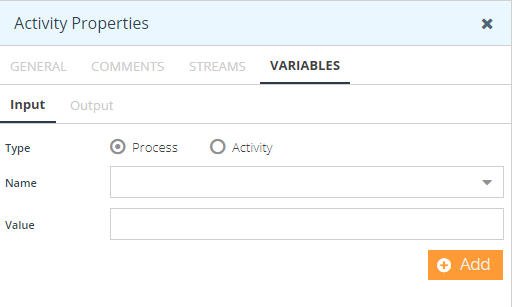
Select the VARIABLES tab from the Activity Properties panel.
-
Select the type of variable Process or Activity for Input. For example, creating a Process variable for Input.
-
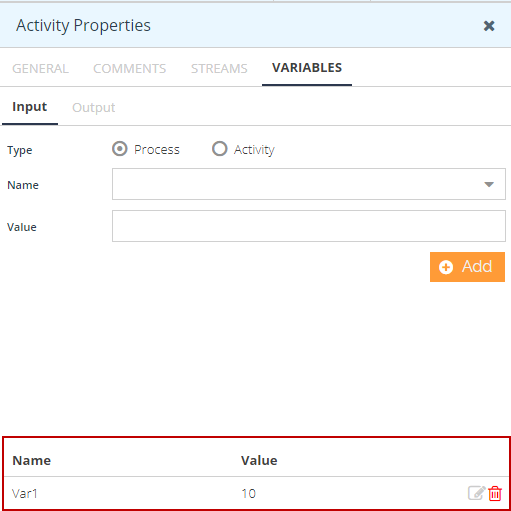
Enter the Name and value of the variable in the Name and Value text box. Alternatively, you can select the name from drop-down list. Click Add.
-
The variable is added.
-
Follow the same step for creating a Process variable for output.
To create an Activity variable for Input, select the type of variable as Activity.
-
Enter the Name and value of the variable in the Name and Value text box. Alternatively, you can select the name from the drop-down list. Click **Add.
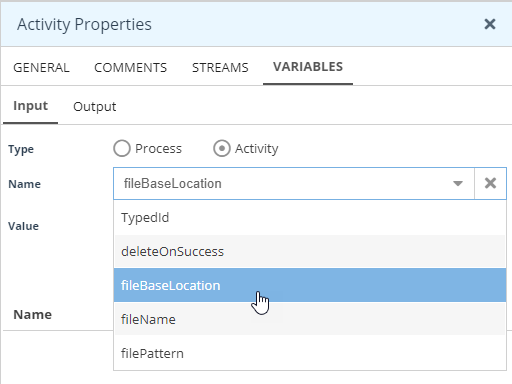
**In case you are defining the fileBaseLocation or fileName variables for Google Drive, ensure that you enter the folder Id or the file Id in the respective Value field as the folder name or file name is not supported. -
Click Add to add the variable.
-
Follow the same step for creating an Activity variable for output.
Steps to create Variable from Parent Process Flow to Child Process Flow
The variable for the Child Process Flow is used to set the value of the Process Flow Variable or Activity Variable from the parent process flow to the child process flow.
- Click the Call Action and select the View Properties option from the context pad to open the Activity Properties panel.
- Select the VARIABLES tab from the Activity Properties panel.
- Select the Child PF as a type of variable Process for Input.
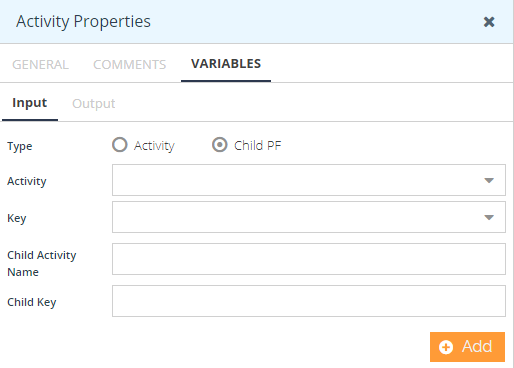
- Specify the properties of each field to define the variable.
- Activity: Select the Name of the activity in the parent process flow, whose 'Activity Variable' value will be used to set the child variable specified by the Child Key. If the name of the activity is not specified, then the 'Process Flow Variable' specified by the Key will be used.
- Key: Name of the variable of the parent process flow whose value will be used to set the child process variable specified by the Child Key.
- Child Activity Name: Name of the activity in the child process flow, whose variable value will be defined. Child PF uses the Child Name to find out the call or spawn action and the corresponding process flow to set the variable.
- Child Key: Name of the Variable of the child process flow whose value will be set.
- Click Add.
| Variable for Child Process Flow is applicable only for Call and Spawn actions. |
Steps to create Variable from Child Process Flow to Parent Process Flow
Variable for the Parent Process Flow is used to set the value of the 'Process Flow Variable' or 'Activity Variable' from the child process flow to the 'Process Flow Variable' or 'Activity Variable' of the parent process flow, which initiated the child process flow by the call/spawn action.
- Click the activity for which you want to create the variables and select the View Properties option from the context pad to open the Activity Properties panel.
- Select the VARIABLES tab from the Activity Properties panel.
- Select the Output tab and provide the details of each field to define the variable.
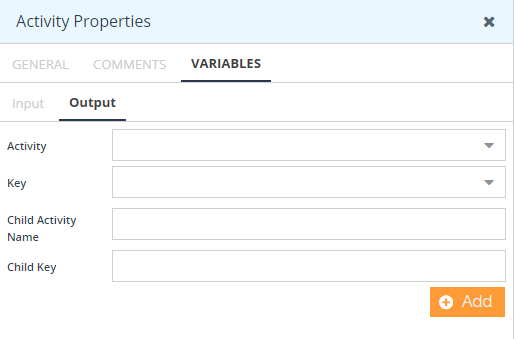
- Activity: Select the name of the activity of the child process flow, whose 'Activity Variable' value specified by the Key will be used to set the parent process flow variable specified by the Parent key. If the name of the activity is not specified, then the 'Process Flow Variable' specified by the Key will be used.
- Key: Select the name of the variable of the child process flow whose value will be used to set the parent process variable specified by the Parent Key.
- Child Activity Name: Select the name of the activity of the parent process flow whose 'Activity Variable' specified by the Parent Key will be set. If the name of the activity is not specified, then the 'Process Flow Variable' specified by the Parent Key will be set
- Child Key: Name of the Context Variable of the parent process flow whose value will be set.
- Click Add.