Storing the Parent context in Child context
This section discusses the caching of Parent context in the Child context which can be used by the Child Process Flows for their distributed execution.
To enable the caching of Parent context a variable, initializeParentContextInChild, has been added for Call and Spawn Actions in Process Flow with its default value set to false.
 | This variable is not exposed in the UI by default. To expose and configure it, follow the steps given here. |
When the variable is set to false:
- Parent Process Flow context is not cached in the Child context.
- Child Process Flows always retrieve the context directly from Redis ensuring the context info being used is up to date.
When the variable is set to true:
- Parent Process Flow context is stored in the Child context.
- Child Process Flows retrieve and use the Parent Process Flow context cached in the Child context which sometimes may be outdated.
Steps to expose and configure the variable initializeParentContextInChild:
-
Open the Parent Process Flow.
-
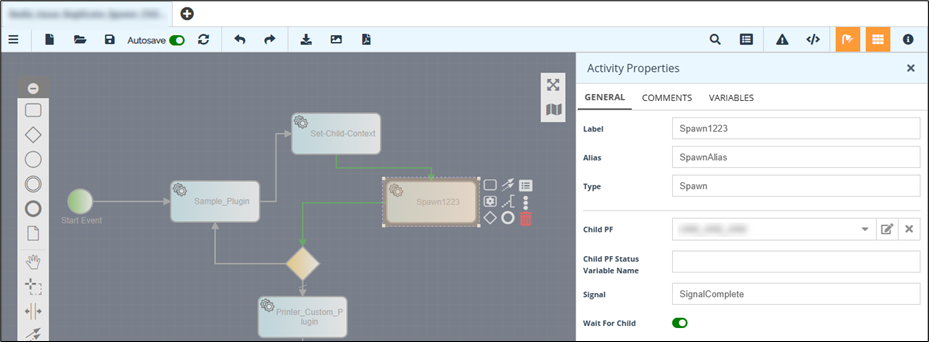
Open the Activity Properties panel of the Call or Spawn Action you used in the Parent Process Flow.
-
On the Activity Properties panel, go to the General tab, copy the Alias of the Call or Spawn Action, and save it for future use.
-
Close the Activity Properties panel.
-
Open the Parent Process Flow properties panel.
-
Select the Variables tab.
-
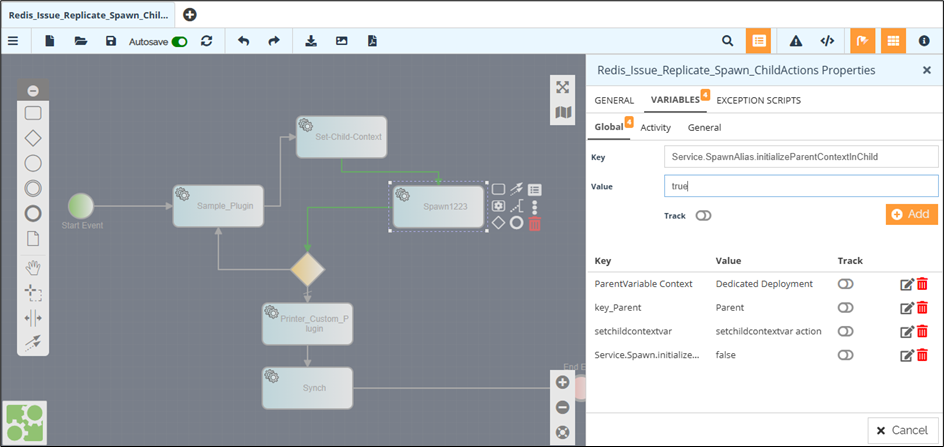
On the Variables tab, in the Global tab, do the following:
-
Provide a value for the Key field in the following format:
Service.<Alias of the Call or Spawn Action you copied in step3>.initializeParentContextInChild
-
In the Value field, enter either true or false as the value for the variable according to your requirement.
-
Click Add.
-