Configuring Horizontal Pod Autoscaling
Horizontal Pod Autoscaling (HPA) governs the spinning up of additional pods when the existing resources (CPU and memory) of the microservice are exhausted or the message count threshold (runtime) for the queue is exceeded. The deletion of the additional pods occurs as and when the resources and the message count values are below their threshold values.
In Adeptia Connect, you can configure and use either Kubernetes HPA (default) or Kubernetes Event Driven Autoscaler (KEDA) for autoscaling of the microservices' pods. If you want to autoscale the runtime pods based on Message Queue, including CPU, and memory, you need to use KEDA.
To install KEDA, refer to the Deploying KEDA page.
When you use KEDA,
-
The autoscaling of runtime pods can happen based on the threshold values for Message Queue or CPU or memory, or any combination of these three parameters. You can make these configurations in the global values.yaml file.
To use KEDA, you first need to enable it by setting the value for the type variable to keda under global > config > autoscaling section in the values.yaml file as shown in the following screenshot. To set the other relevant parameters, for example, the threshold number of messages in the Message Queue, refer to this section.


For a dedicated runtime (Deployment) pod, you need to set the threshold values for the Message Queue, CPU, and memory while creating the Deployment. For more details, refer to this page. -
The autoscaling of other microservices' pods can happen based on the threshold values for CPU or memory, or both. You can make these configurations in the global values.yaml file. For more details, refer to this section.
When you use Kubernetes' HPA,
-
The autoscaling of runtime pods can happen based on the threshold values for CPU or memory, or both. You can make these configurations in the global values.yaml file. To set the relevant parameters in the values.yaml file, refer to this section.
Ensure that the value for the type variable under global > config > autoscaling section in the values.yaml file is set to hpa. For a dedicated runtime (Deployment) pod, you need to set the threshold values for CPU and memory while creating the Deployment. For more details, refer to this page. -
The autoscaling of the other microservices' pods can happen based on the threshold values for CPU or memory, or both. You can make these configurations in the global values.yaml file. To set the relevant parameters in the values.yaml file, refer to this section.
Configuring autoscaling for runtime microservice
The parameters for configuring the runtime microservice for autoscaling slightly differ from those for the rest of the microservices. The following table describes the autoscaling parameters for runtime microservice. You can find these parameters in the runtimeImage: section in the global values.yaml file.
| Parameter: RUNTIME_AUTOSCALING_ENABLED | ||
| Description: Parameter to enable autoscaling by setting its value to true. | ||
| Default value: true | ||
| Parameter: RUNTIME_MIN_POD <ch:anchor> </ch:anchor> | ||
| Description: Minimum number of pods. | ||
| Default value: 1 | ||
| Parameter: RUNTIME_MAX_POD | ||
| Description: The maximum number of pods the runtime microservice can scale up to. | ||
| Default value: 1 | ||
| Parameter: RUNTIME_AUTOSCALING_CRITERIA_MESSAGE_COUNT | ||
| Description: Variable to define whether you want the autoscaling to happen based on Message Queue count. Setting the value for this variable to true denotes that the autoscaling of the runtime pod happens based on the number of messages in the queued state in the Message Queue.
| ||
| Default value: true | ||
| Parameter: RUNTIME_AUTOSCALING_CRITERIA_CPU | ||
| Description: Variable to define whether you want the autoscaling to happen based on CPU usage. | ||
| Default value: true | ||
| Parameter: RUNTIME_AUTOSCALING_CRITERIA_MEMORY | ||
| Description: Variable to define whether you want the autoscaling to happen based on memory usage.
| ||
| Default value: false | ||
| Parameter: RUNTIME_AUTOSCALING_TARGETCPUUTILIZATIONPERCENTAGE | ||
| Description: Value in percentage of CPU requests set in the global values.yaml for the runtime pods at which a new pod spins up. | ||
| Default value: 400 | ||
| Parameter: RUNTIME_AUTOSCALING_TARGETMEMORYUTILIZATIONPERCENTAGE | ||
| Description: Value in percentage of memory requests set in the global values.yaml for the runtime pods at which a new pod spins up. | ||
| Default value: 400 | ||
| Parameter: RUNTIME_AUTOSCALING_QUEUE_MESSAGE_COUNT | ||
Description: The threshold value of the number of messages in the queued state in the Message Queue at which KEDA spins up a new pod.
| ||
| Default value : | ||
| Parameter: RUNTIME_SCALE_UP_STABILIZATION_WINDOW_SECONDS | ||
| Description: The duration (in seconds) for which the application keeps a watch for drop in resource utilization by the currently running pods. This helps in determining whether scaling down is required or not. | ||
| Default value: 300 | ||
| Parameter: RUNTIME_MAX_POD_TO_SCALE_UP | ||
| Description: The maximum number of pods the runtime microservice can scale up to at a time. | ||
| Default value: 1 | ||
| Parameter: RUNTIME_SCALE_UP_PERIOD_SECONDS | ||
| Description: The time duration (in seconds) that sets the frequency of tracking the spikes in the resource utilization by the currently running pods. | ||
| Default value: 60 | ||
| Parameter: RUNTIME_SCALE_DOWN_STABILIZATION_WINDOW_SECONDS | ||
| Description: The duration (in seconds) for which the application keeps a watch for drop in resource utilization by the currently running pods. This helps in determining whether scaling down is required or not. | ||
| Default value: 300 | ||
| Parameter: RUNTIME_MAX_POD_TO_SCALE_DOWN | ||
| Description: The maximum number of pods the runtime microservice can scale down to at a time. | ||
| Default value: 1 | ||
| Parameter: RUNTIME_SCALE_DOWN_PERIOD_SECONDS | ||
| Description: The time duration (in seconds) that sets the frequency of tracking the drop in resource utilization by the currently running pods. | ||
| Default value: 60 |

Configuring autoscaling for other microservices (excluding runtime)
To enable HPA, you need to set the parameters as described below for each of the microservices individually. You can find these parameters in the respective section of each microservice in the global values.yaml file.
| Parameter | Description | Default value |
|---|---|---|
autoscaling: <ch:anchor></ch:anchor> | ||
enabled: | Parameter to enable autoscaling by setting its value to true. | true |
| criteria: | ||
cpu: | Variable to define whether you want the autoscaling to happen based on CPU usage. Setting the value for this variable to true denotes that the autoscaling of the microservices pods happens based on the CPU usage. | true |
memory: | Variable to define whether you want the autoscaling to happen based on memory usage. Setting the value for this variable to true denotes that the autoscaling of the microservices pods happens based on memory usage. | false |
| minReplicas: | Minimum number of pods for a microservice. | 1 |
| maxReplicas: | The maximum number of pods a microservice can scale up to. | 1 |
| targetCPUUtilizationPercentage: | Value in percentage of CPU requests set in the global values.yaml for the pods at which the HPA spins up a new pod. | 400 |
| targetMemoryUtilizationPercentage: | Value in percentage of memory requests set in the global values.yaml for the pods at which the HPA spins up a new pod. | 400 |
| behavior: | ||
| scaleUp: | ||
| stabilizationWindowSeconds: | The duration (in seconds) for which the application keeps a watch on the spikes in the resource utilization by the currently running pods. This helps in determining whether scaling up is required or not. | 300 |
| maxPodToScaleUp: | The maximum number of pods a microservice can scale up to at a time. | 1 |
| periodSeconds: | The time duration (in seconds) that sets the frequency of tracking the spikes in the resource utilization by the currently running pods. | 60 |
| scaleDown: | ||
| stabilizationWindowSeconds: | The duration (in seconds) for which the application keeps a watch for a drop in resource utilization by the currently running pods. This helps in determining whether scaling down is required or not. | 300 |
| maxPodToScaleDown: | The maximum number of pods a microservice can scale down to at a time. | 1 |
| periodSeconds: | The time duration (in seconds) that sets the frequency of tracking the drop in the resource utilization by the currently running pods. | 60 |
Load balancing among the runtime pods
Kubernetes internally handles the load balancing of requests from a Queue to the runtime pods of the corresponding Deployment. There are two types of requests – Synchronous, and Asynchronous – that are processed by the runtime pods.
Synchronous requests are processed by any random runtime pod that is selected by Kubernetes Service when set to its default iptables proxy mode.
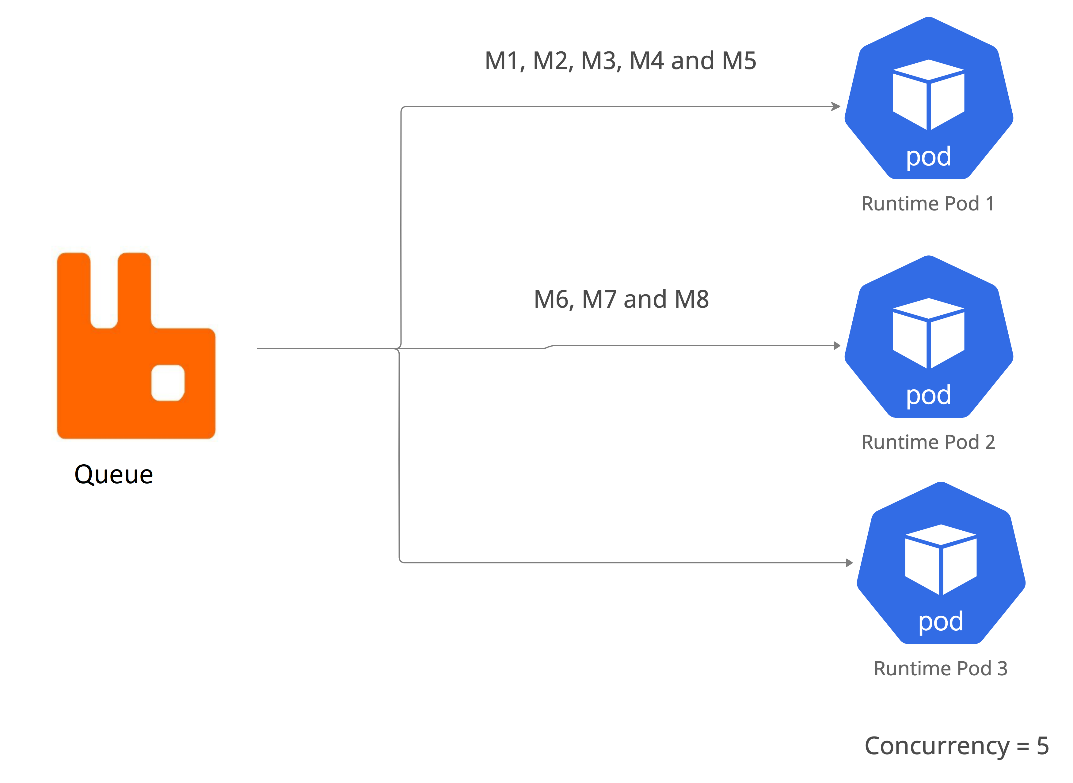
The Asynchronous requests are processed based on the concurrency level you set for the runtime pods of the Deployment. For example, if there are three (3) runtime pods (each having a concurrency of 5) and eight (8) messages in the Queue, here is how they will be routed:
- The first runtime pod will take up five (5) of the eight (8) messages.
- The second runtime pod will take the rest of the three (3) messages.
- The third runtime pod will remain unoccupied until there are more than ten (10) messages at a time.
When all the three runtime pods are completely occupied, the other messages in the queue are prioritized and routed to a runtime pod when it gets free and has a vacancy.