Additional steps for deploying on EKS
This document discusses the parameters you need to set in the global values.yaml before deploying the application.
Additional steps for deploying on EKS
Follow the steps given below to set the other required properties in the values.yaml:
- Go the global > infra > pvc section.
- Set the provisioningMode either to dynamic or static.
- If you set the provisioningMode to dynamic, do the following:
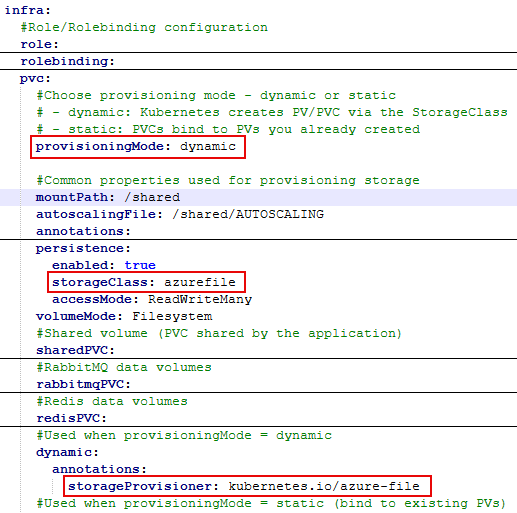
- Go to global > infra > pvc > persistence section and then set the storageClass.
- Go to global > infra > pvc > dynamic > annotations section and then set the storageProvisioner.
- If you set the provisioningMode to static, you need to create Shared, RabbitMQ, and Redis PVs, and thereafter, enter their names in the respective variables as shown below:
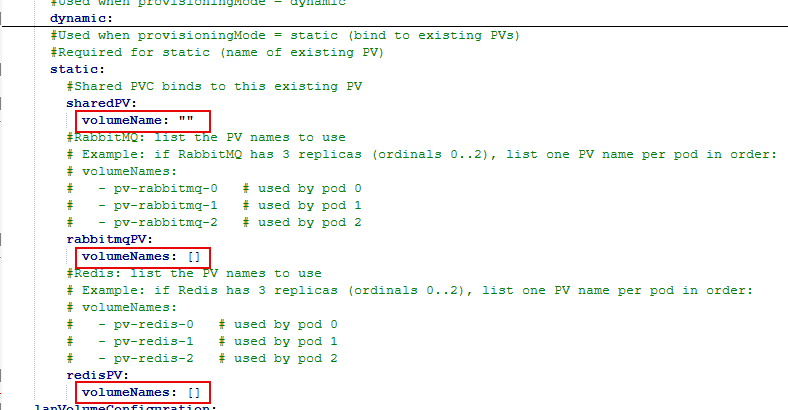
- Go to global > infra > pvc > static > sharedPV section, and then enter the sharedPV volumeName.
- Go to global > infra > pvc > static > rabbitmqPV section, and then enter the rabbitmqPV volumeNames. If you want to deploy RabbitMQ in HA mode, the number of PVs must be equal to the number of RabbitMQ replicas you want to use.
- Go to global > infra > pvc > static > redisPV section, and then enter the redisPV volumeNames. This is required only if you want to deploy redis. You must have three PVs created for redis.
After configuring the parameters, refer to this page to continue with the application deployment steps.