ServiceNow
ServiceNow helps in tracking configuration item relationships, automatically define IT services, and manage IT processes in one system. It gives you a powerful platform for managing ITIL processes, helping you to rapidly reduce costs, lower risk, improve business agility, and boost IT innovation.
For more information, click here.
Field (Account) Information
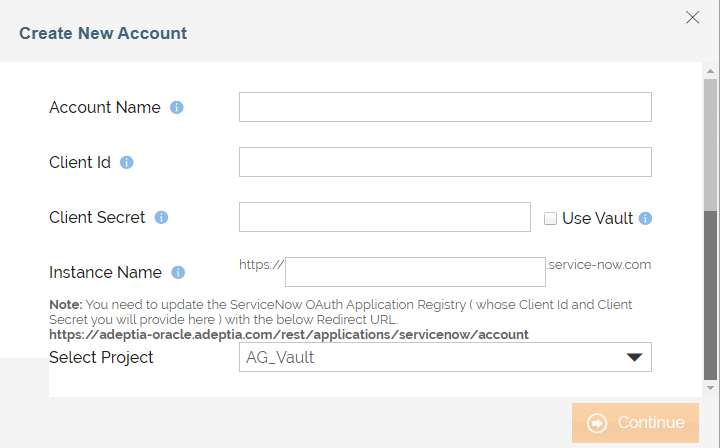
While configuring the Source or Destination of a Template or Transaction, you need to create an account to connect ServiceNow with Adeptia Connect. While creating an account, you need to specify the location from where Adeptia Connect will access the data.
Click  to add an account.
Specify the following information for ServiceNow:
| Field Name | Description | ||
|---|---|---|---|
| Account Name | A short, descriptive name that helps you re-use this account in future. | ||
| Client Id | Do the following to know Client Id:
| ||
| Client Secret | Do the following to know Client Secret:
| ||
| Instance Name | Provide the Service Now account instance name. To dynamically fetch the Instance Name from a Git repository at runtime using a variable, select the Use Config checkbox next to this field. |
 ) from the left menu.
 corresponding to the Client Secret to reveal Client Secret. The Client Secret will appear in a text box.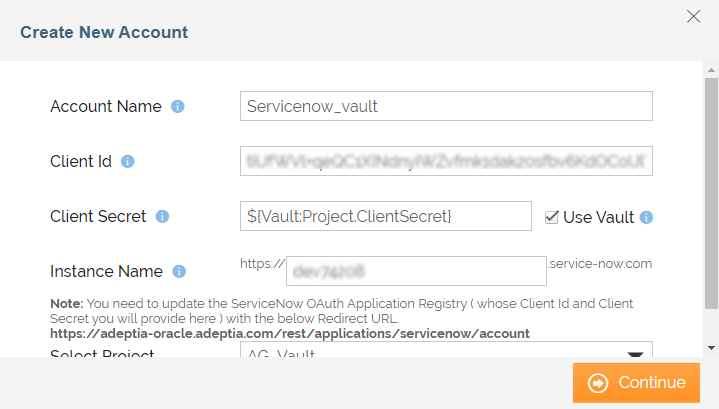
Triggers
A Trigger specifies when a particular Transaction will start executing. While configuring the Source of a Template, you need to choose an event.
Following triggers are available for ServiceNow at Source.
| Trigger Name | Description |
|---|---|
| New Record | Triggers when a new record is added to a table. |
| New or Updated Record | Triggers when a new record is added or an existing record is updated to a table. |
| All Records | Retrieves the list of all records of a table. |
Actions
An Action specifies how the data will be transferred at the destination location. While configuring the Destination (Target) of a Template, you need to choose an action.
Following actions are available for ServiceNow at Destination.
| Action Name | Description |
|---|---|
| Create Record | Creates a new record. |
| Update Record | Updates an existing record. |
| Delete Record | Deletes an existing record. |