Default sizes for microservices containers
Adeptia Connect allows you to configure the CPU and memory for a microservice by setting the following parameters in the values.yaml file.
- CPU and Memory limit - The maximum number of CPU cores and the memory a microservice pod can consume.
- CPU and Memory Request - The minimum number of CPU cores and the memory required by a microservice pod.
- Minimum Replicas - The minimum number of replicas (pods) of a microservice that will run.
- Maximum Replicas - The maximum number of replicas (pods) to which a microservice can scale up.
The table below details the technology stack and resource requirements for each microservice in the deployment. It helps you plan the CPU and memory strategies based on individual service needs.
Key information includes:
-
Technology Stack used for each service (e.g., Java Spring Boot, RabbitMQ, Python).
-
Java options (Java opts) like heap size (
Xms,Xmx) and runtime flags for JVM-based services. -
CPU and Memory specifications:
-
CPU RequestandCPU Limit -
Memory RequestandMemory Limit
-
-
Replicas defined for:
-
Default setup
-
High Availability (HA) setup
-
| Service | Technology Stack | Java opts | CPU Request | CPU Limit | Memory Request | Memory Limit | Replicas (default) | Replicas (HA) | |
|---|---|---|---|---|---|---|---|---|---|
| runtime | Java Spring Boot v3.5.12 (Embedded Tomcat) | Xms1024M -Xmx4096M -Djdk.tls.useExtended MasterSecret=false | 0.4 CPU | 2 CPU | 1638Mi | 8192Mi | Min: 2 | Min: 2 | |
| Max: 2 | Max: 2 | ||||||||
| rabbitmq | RabbitMQ v3.13.7 | Not applicable | 0.2 CPU | 1 CPU | 820Mi | 4096Mi | Min: 1 | Min: 1 | |
| Max: 1 | Max: 3 | ||||||||
| event | Java Spring Boot v3.5.12 (Embedded Tomcat) | Xms1024M -Xmx2048M -Djdk.tls.useExtended MasterSecret=false | 0.2 CPU | 1 CPU | 820Mi | 4096Mi | Min: 1 | Min: 2 | |
| Max: 1 | Max: 2 | ||||||||
| listener | Java Spring Boot v3.5.12 (Embedded Tomcat) | Xms1024M -Xmx2048M -Djdk.tls.useExtended MasterSecret=false | 0.1 CPU | 1 CPU | 410Mi | 4096Mi | Min: 1 | Min: 1 | |
| Max: 1 | Max: 1 | ||||||||
| api-gateway | Java Spring Cloud Gateway | Xms512M -Xmx1024M -Djdk.tls.useExtended MasterSecret=false | 0.1 CPU | 1 CPU | 410Mi | 4096Mi | Min: 1 | Min: 2 | |
| Max: 1 | Max: 2 | ||||||||
| soap-api | Java Spring Boot v3.5.12 (Embedded Tomcat) | Xms512M -Xmx2048M -Djdk.tls.useExtended MasterSecret=false | 0.1 CPU | 0.8 | 410Mi | 3276Mi | Min: 1 | Min: 2 | |
| Max: 1 | Max: 2 | ||||||||
| rest-api | Java Spring Boot v3.5.12 (Embedded Tomcat) | Xms512M -Xmx2048M -Djdk.tls.useExtended MasterSecret=false | 0.1 CPU | 1 CPU | 410Mi | 4096Mi | Min: 1 | Min: 2 | |
| Max: 1 | Max: 2 | ||||||||
| webapp-gateway | Java Spring Cloud Gateway | Xms512M -Xmx1024M -Djdk.tls.useExtended MasterSecret=false | 0.1 CPU | 0.8 | 410Mi | 3276Mi | Min: 1 | Min: 2 | |
| Max: 1 | Max: 2 | ||||||||
| portal | Ext-JS v7.3.0 (JavaScript library) | Xms512M -Xmx2048M -Djdk.tls.useExtended MasterSecret=false | 0.2 CPU | 1 CPU | 820Mi | 4096Mi | Min: 1 | Min: 2 | |
| Max: 1 | Max: 2 | ||||||||
| web-runner | Java Spring Boot v3.5.12 (Embedded Tomcat) | Xms512M -Xmx2048M -Djdk.tls.useExtended MasterSecret=false | 0.1 CPU | 1 CPU | 410Mi | 4096Mi | Min: 1 | Min: 2 | |
| Max: 1 | Max: 2 | ||||||||
| license | Java Spring Boot v3.5.12 (Embedded Tomcat) | Xms512M -Xmx2048M -Djdk.tls.useExtended MasterSecret=false | 0.1 CPU | 0.8 | 410Mi | 3276Mi | Min: 1 | Min: 2 | |
| Max: 1 | Max: 2 | ||||||||
| archival-and-cleanup | Java Spring Boot v3.5.12 (Embedded Tomcat) | Xms512M -Xmx2048M -Djdk.tls.useExtended MasterSecret=false | 0.1 CPU | 0.8 | 410Mi | 4096Mi | Min: 1 | Min: 2 | |
| Max: 1 | Max: 2 | ||||||||
| deploymentmanager | Shell Script | Not applicable | 0.3 CPU | 1.5 CPU | 410Mi | 3276Mi | Min: 1 | Min: 2 | |
| Max: 1 | Max: 2 | ||||||||
| aimap | Python v3.6 | Not applicable | 0.1 CPU | 1 CPU | 410Mi | 3276Mi | Min: 1 | Min: 1 | |
| Max: 1 | Max: 2 | ||||||||
| redis (optional) | Redis v7.4.1 | Not applicable | 0.4 CPU | 0.8 | 400Mi | 1Gi | Min: 3 | Min: 3 | |
| Max: 3 | Max: 3 | ||||||||
| sapservice (optional) | Java Spring Boot v3.5.12 (Embedded Tomcat) | Xms512M -Xmx2048M -Djdk.tls.useExtended MasterSecret=false | 0.1 CPU | 1 CPU | 410Mi | 4096Mi | Min: 1 | Min: 2 | |
| Max: 1 | Max: 2 | ||||||||
Total resource requirements
This section summarizes the total resource requirements for deploying the application in both Default and High Availability (HA) configurations.
Key highlights:
-
Covers both Default and HA setup scenarios.
-
Includes resource requirements for:
-
Core microservices
-
Core microservices with Redis service enabled
-
Core microservices with SAP service enabled
-
Core microservices with both Redis and SAP service enabled
-
-
Includes requirement details for:
-
CPU Cores: Total number of recommended CPU cores
-
VMs: Total recommended number of VMs, calculated based on the total recommended CPU cores
-
Memory Request: Total minimum memory required
-
Memory Limit: Total maximum memory that can be consumed
-
CPU Request: Total minimum number of CPU cores required
-
| Total resources requirements | Default /HA setup | Core microservices | With Redis enabled | With SAP service enabled | With both Redis and SAP service enabled |
|---|---|---|---|---|---|
| CPU Cores (Calculated as: Sum of [CPU Limit x Min Replicas]) | Default | 16.7 | 19.1 | 17.7 | 20.1 |
| HA | 26.4 | 28.8 | 28.4 | 30.8 | |
| VMs | Default | 3 VMs each with 8 CPU cores (Using 8-core CPU Recommended) | |||
| HA | 4 VMs each with 8 CPU cores (Using 8-core CPU Recommended) | ||||
Memory Request | Same for default and HA setup | 8198Mi | 8598Mi | 8608Mi | 9008Mi |
Memory Limit | Same for default and HA setup | 57340Mi | 58364Mi | 61436Mi | 62460Mi |
| CPU Request | Same for default and HA setup | 15.5 | 15.9 | 15.6 | 16 |
 | <ch:anchor>It is recommended that you use the 8-core VMs for the following reasons:</ch:anchor>
|
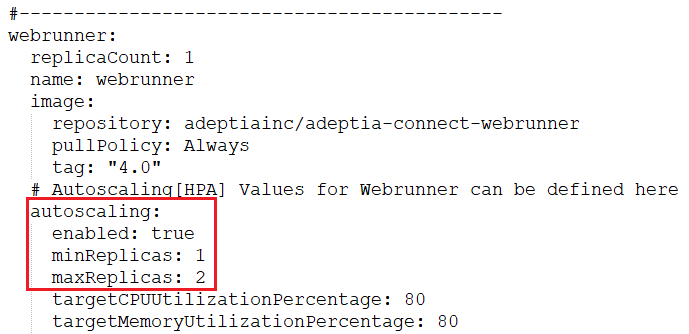
You can set the maximum number of replicas for a microservice only after enabling its autoscaling property by setting the value for enabled to true in the values.yaml file. By default, autoscaling is disabled. After enabling the autoscaling, you can set the value for maxReplicas variable based on your requirement. Given below is an example showing autoscaling settings for the webrunner microservice.
 | The maximum number of replicas for the listener and license microservices cannot be more than what has been specified in the respective table discussed above. |
Though Adeptia recommends the maximum number of replicas for each microservice, it may vary (except for the listener and license microservices) based on your requirement.
Microservices at a glance
Component | Description |
|---|---|
webapp-gateway |
|
portal |
|
web-runner |
|
event |
|
runtime |
|
rest-api |
|
soap-api |
|
listener |
|
ai-map |
|
license |
|
api-gateway |
|
archival-and-cleanup |
|
rabbitmq |
|
| sapservice (Optional) |
|
| redis (Optional) |
|