Microsoft SharePoint trigger and action conditions
All the app connectors in Adeptia Connect have a set of fetch actions such as Get Group, to fetch data from their respective applications. For a fetch action, you can use a condition to set filters based on which you may want to fetch specific data from the API.
This has been illustrated below by using the Get Group fetch action in a Template/Transaction as an example.
 | In case of a Process Flow:
|
-
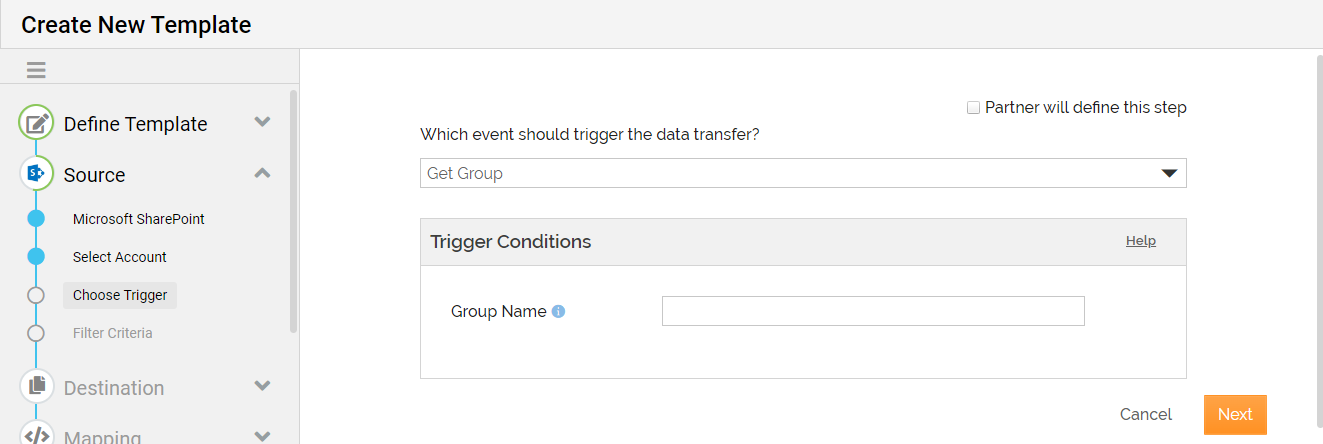
While defining the Source in a Template or Transaction, at the Choose Trigger step, select a Trigger based on which the AC application fetches the data from Microsoft SharePoint.
-
In the Trigger Conditions section, define the conditions.
For example, if you have used Microsoft SharePoint as the Source and selected Get Group as the Trigger, you can enter the group name in the Group Name field to fetch the group specific details corresponding to the specified Id.
-
Click Next.
-
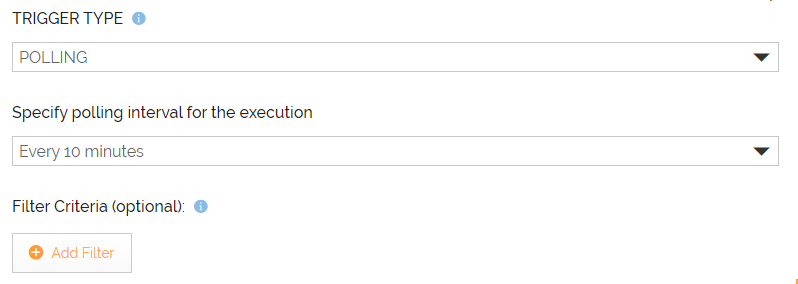
At the Filter Criteria step, define the filter criteria to further filter the fetched data.
-
Define the Destination.

The steps given in this section help you define Microsoft SharePoint as the Destination in a Template/Transaction. -
Follow the instructions in the wizard to complete the creation of the Template/Transaction.