Key features
In the context of an app connector based on the OpenAPI Specification (OAS), various key features play a crucial role in enhancing functionality and usability. Key features in an OpenAPI specification file define the presentational and functional characteristics of an app connector. Each of the features governs a specific trait of the connector, for example, the type of Pagination defines how many records are fetched per page.
This document provides an overview of key features -- authentication, triggers, pagination, incremental data strategy, actions, batch processing, field references, and API-based data filtering -- in the context of an OpenAPI specification-based app connector.
Authentication
Authentication refers to the process of verifying and confirming the identity of a user, system, or application before granting access to the connected application or service. Authentication is a crucial security measure implemented to ensure that only authorized entities are able to interact with the connected app and its data. The authentication process typically involves presenting valid credentials, such as usernames and passwords, API keys, or tokens.
Trigger
Triggers are mechanisms that initiate the execution of a workflow or integration between two or more applications. Triggers act as the starting point for the connector to perform a specific action or set of actions, facilitating the automation of processes and data exchange between connected systems.
The trigger essentially signals the connector to begin its predefined sequence of tasks.
Key characteristics of actions in app connectors include:
- Pagination
- Incremental data strategy
- API-based data filtering
Pagination
The connector dynamically handles pagination based on parameters specified in the OAS file, allowing for efficient retrieval and processing of large datasets. It ensures consistent ordering of paginated data across multiple requests, maintaining data integrity and supporting seamless navigation through datasets.
Incremental data strategy
The connector supports incremental data extraction by utilizing mechanisms outlined in the OAS file. This allows for efficient retrieval of only the data that has been added or modified since the last extraction.
API-based data filtering
Filter conditions specified in the OAS file are dynamically incorporated into the connector, allowing you to define conditions for manipulating and extracting specific data from the API.
Actions
Actions refer to specific tasks or operations that the connector can perform within or between connected applications. Actions are the building blocks of workflows, allowing users to automate and orchestrate sequences of tasks across different systems. These tasks can range from creating, updating, or deleting data to triggering specific events or operations within the integrated applications.
 | In the context of using an Application Action in a Process Flow in Adeptia Connect, the fetch operations such as, Get All, are treated as actions. Such actions support API-based data filtering to fetch data from an API based on certain conditions (Action Conditions). |
Key characteristics of actions in app connectors include:
- Batch processing
- Field references
Batch processing
Batch processing refers to the execution of a series of actions or tasks as a group or batch, rather than individually or in real-time. It involves the automated processing of a collection of data or tasks in a batch mode, allowing for the efficient handling of multiple operations in a single execution.
 | Batch processing is available only for the actions that are configured in the OAS file to perform multiple operations using a batch endpoint supported by the API. |
Field references
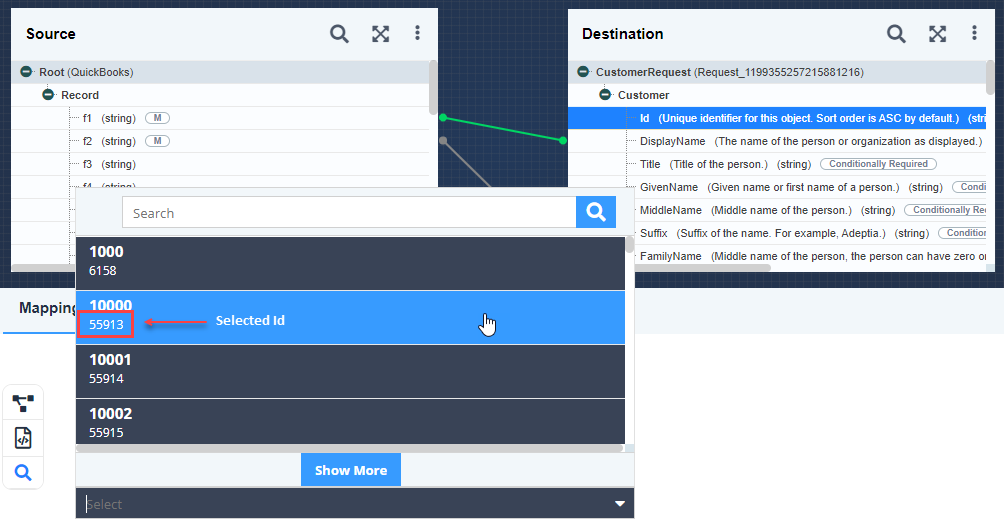
Field references refer to defining the required destination fields of an entity (For example, vendor) in the OAS file as reference fields to set or update the value for any other field of that entity dynamically.
Consider a destination field Id (defined as the reference field in OAS file) of an entity Customer in a Mapping. To use this reference field for updating the Display Name of a specific customer, you can select it and then select the required customer Id in the Mapping Expression. The Display Name for the customer whose Id you have selected will be updated dynamically based on the value coming from the source field f1 as shown in the screenshot as an example.