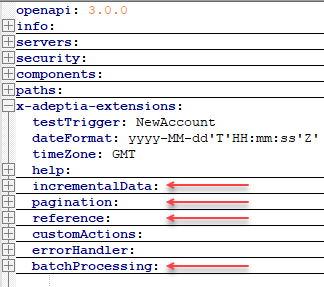
Adeptia helps you create a custom app connector by using OpenAPI Specification (OAS 3.0 and above) in YAML format.
 | OAS (previously known as Swagger) is an open standard used for describing RESTful APIs and it provides a comprehensive way to document and define how an API works, including its endpoints, data models, request methods, and more. For more details, refer to the OpenAPI Specification. |
The YAML file has the following major objects that you need to define to create a custom app connector.

Adding connector details
The creation of a custom app connector in Adeptia Connect requires you to provide specifications that define the functional behavior of the connector. These specifications are documented in YAML format, which is both human-readable and machine-readable and makes it easier to understand, consume, and interact with the APIs.
| The following sections guide you on how to build a custom app connector by considering QuickBooks specifications file as an example. |
Defining info
The info object provides metadata, including the version, title, and description of the specification file. The following screenshot is an example that shows the structure and some key properties of the info object.

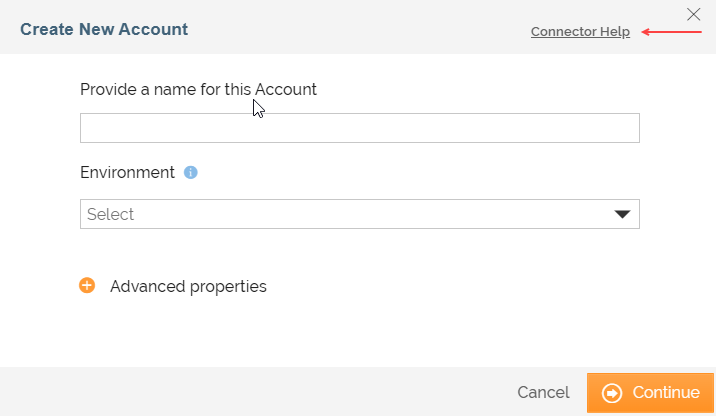
In the info object, you can also incorporate the parameter, x-adeptia-helpLink, to define the help link for creating an account for the custom app connector in Adeptia Connect. This help link is created on the Create New Account screen for the connector in Adeptia Connect. The text for the help link you provide here is in the format <Name of the connector> Help. Given below is the screenshot showing the link in Adeptia Connect UI.
| The name of the connector is defined while adding the connector to Adeptia Connect. |
Defining servers (environments)
Servers object defines the path of the Server you want to connect to. This definition includes the base URL of the Server (environment) and the description of the environment.
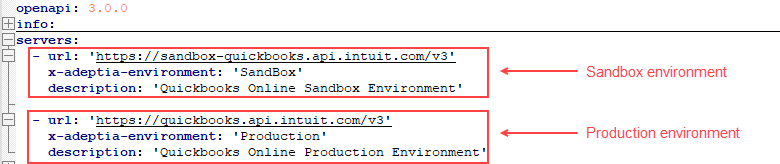
You can define the path for either a single environment or multiple environments, for example, Sandbox, and Production. If you want to define multiple environments, you need to set an additional parameter x-adeptia-environment for each environment apart from their base URLs and descriptions as shown in the following screenshot.
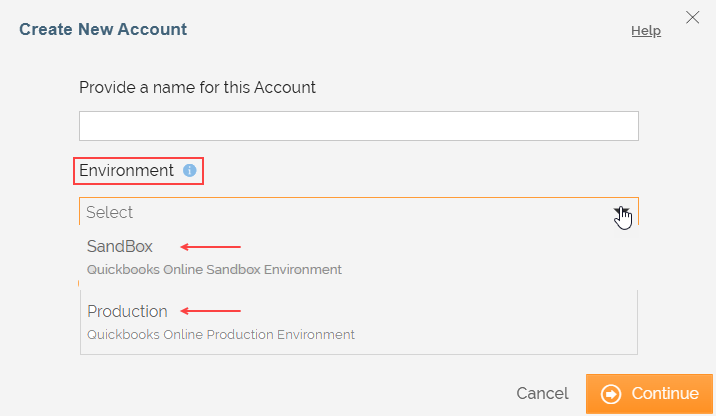
In the Adeptia Connect UI, you can see the defined environments to choose from while you create an account to connect to the third-party application. The following screenshot gives you an idea of how it is rendered in the Adpetia Connect UI.
 | If you have defined only a single environment, you will not see the option to select an environment while creating the account. |
Defining security
A security object is used to set the security requirements for a given API operation. The security requirements include an authentication mechanism that must be satisfied for the client to access the specific operation.
You can use the following authentication mechanisms:
| You can use only the authentication mechanism supported by the third-party application you want to connect to. |
- Basic
- API Key
- Bearer
- OAuth2
Before you can set an authentication mechanism in the security object, you need to define the security requirements in the components > securitySchemes section as shown in the following screenshot.
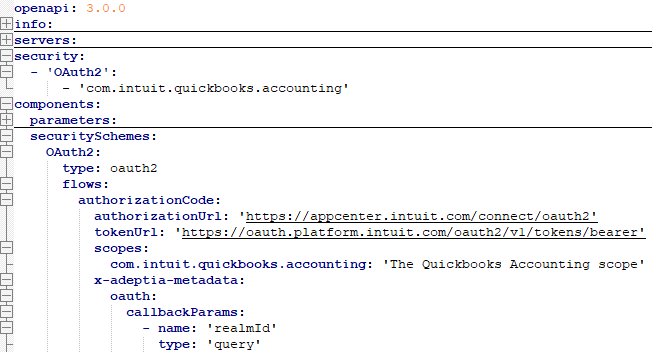
Defining components
Components object serve as a container for reusable definitions, such as schemas (data models), securitySchemes, parameters, etc. For instance, securityScheme is the reusable definition that serves as the authentication mechanism for all the APIs, eliminating the need for defining it for each API endpoint individually.

Defining paths
Paths are endpoints (resources), such as /company/{companyId}/query or /company/{companyId}/reports/AccountList, that the third-party application exposes. You can define the endpoints associated with your required triggers and actions in the paths section.
Triggers
A trigger listens to an event and initiates a workflow. A trigger may respond to an event in real time, for example, when a new file is created at the source. It may also be set off periodically at a certain time or interval.
To know how to define triggers and set the value for their respective key properties in the specification file, refer to Defining a trigger in specification file page.
Actions
An action, for example, creation of a user account, is a step reciprocating to a trigger and occurs at the destination application.
To know how to define actions and set the value for their respective key properties in the specification file, refer to Defining an action in specification file.
x-adeptia-extensions
All the key features of triggers and actions are defined in the x-adeptia-extensions object.