Exporting the activities based on their last modified date
You can export the activities based on their last modified date during non-interactive migration. To do this, you need to set the value of the tag ModifiedDate in the format, <![CDATA[> YYYY-MM-DD hh:mm:ss**]]>. For example, <![CDATA[<= 2021-05-24 16:39:17]]>.**
The following types of comparison operators can be used for the ModifiedDate tag.
| Operator | Description | Example |
|---|---|---|
| > **** | Greater than | <![CDATA[> 2021-05-24 16:39:17]]> |
| < **** | Less than | <![CDATA[< 2021-05-24 16:39:17]]> |
| >= | Greater than equal to | <![CDATA[>= 2021-05-24 16:39:17]]> |
| <= | Less than equal to | <![CDATA[<= 2021-05-24 16:39:17]]> |
To set the value of the ModifiedDate tag in the connect_export.xml file:
-
Navigate to .../<AdeptiaInstallFolder>/AdeptiaServer/ServerKernel/MigrationUtility folder.
-
Open connect_export.xml in a text editor.
-
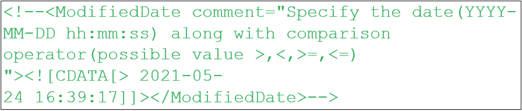
Uncomment the following section by removing the <!-- before and --> after the ModifiedDate tag.
-
Set the value of the ModifiedDate tag.

Ensure that the comparison operator and the date are mentioned within the CDATA tag.
If you further want to apply ModifiedDate criteria on a specific activity of a particular activity type, you need to do the followings:
-
Follow the steps 1 through 4 given for setting the value of ModifiedDate tag.
-
Use the checkModifiedDate attribute and set its value to yes for the parent activity element.
-
Specify the name(s)/id(s) of the activities as child element(s).
-
Save the file.
If you do not set the checkModifiedDate attribute, the ModifiedDate criteria doesn’t apply on the activity