Advanced Search
Advanced Search allows you to filter your search to find apt results.
Following table lists the entities where you can perform the Advanced Search and the table shows various supported entities with attributes that can be used used to filter your search.
| Supported Entity | Supported Entities | Supported Attributes | Supported Operators | Supported Conditions |
|---|---|---|---|---|
| Template | • Template Name • Template Description • Source App • Status • Target App • Direction (Inbound/Outbound) • Type (File, App, EDI, Custom) | • Network Name • Transaction Name | • EQUALS • LIKE • NOT LIKE • NOT EQUALS • IN | • AND |
| Transaction | • Transaction Name • Transaction Description • Source Apps • Status • Target Apps • Direction (Inbound/Outbound) • Type (File, App, EDI, Custom) | • Partner Name • Template Name • Template Description • Partner Parameters • Transaction Parameters • Template Status • Partner Status • Network Name | • EQUALS • LIKE • NOT LIKE • NOT EQUALS • IN | • AND |
| Network | • Network Name • Published • Parameter name | • Partner Name | • EQUALS • LIKE • NOT LIKE • NOT EQUALS • IN | • AND |
| Partner | • Partner Name • Partner Email id • Partner Status • Partner Type(Internal/External) | • Network Name • Partner Parameters | • EQUALS • LIKE • NOT LIKE • NOT EQUALS • IN | • AND |
| Dashboard | • Transaction Name • Template Name • Partner Name • Direction of Transaction | • Partner Parameters • Transaction Parameters | • EQUALS • LIKE • NOT LIKE • NOT EQUALS • IN | • AND |
Accessing Advanced Search
To access Advanced Search for any of the listed entity (as mentioned in the table above):
- Click Advanced Search
 icon from the search box. For example, searching Template entity using Advanced Search.
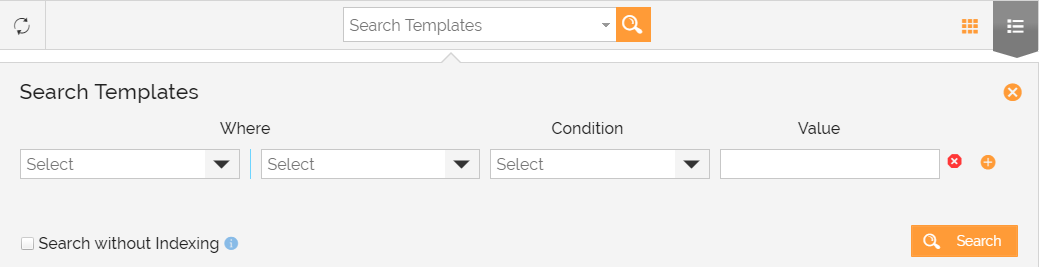
- Search Templates box will open. Provide the Where, Condition with values and click Searchto fetch results for a specific entity. For example, in the below image user is trying to search EDI Outbound Template.

- ClickSearch.
You may be interested in...