Configuring Adeptia Connect as a Linux service for automatic startup
You can also start the entire application automatically by configuring it as a Linux service on your Linux system. To achieve this, follow the steps given below that set up automatic startup for both the Adeptia Connect Server and Portal.
 | You can add Adeptia Connect services – ConnectServer****and ConnectPortal – as Linux services only on Red Hat Enterprise Linux Server 7.9 or a higher version of Linux. Make sure that the chkconfig command is installed on your Linux system. |
|---|
-
Download the zip AdeptiaConnect.zip and extract it. The zip contains two service files – ConnectServer*,* and ConnectPortal.
-
Stop Adeptia services.
-
Place the extracted ConnectServerand ConnectPortalfiles in the**\etc\init.d** folder.
-
Open ConnectServer****file in edit mode.
-
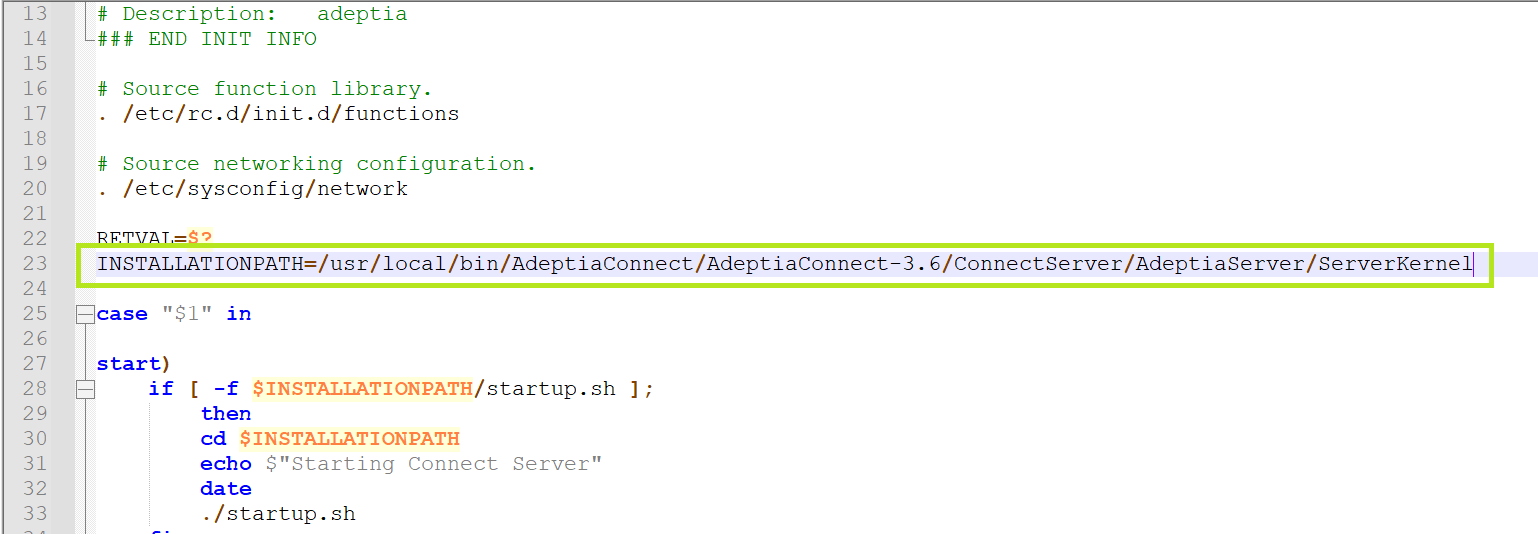
In the INSTALLATIONPATH field, enter the Adeptia installation directory path up to ServerKernel as shown in the example below.
-
Save the file.
-
Open ConnectPortal file in edit mode.
-
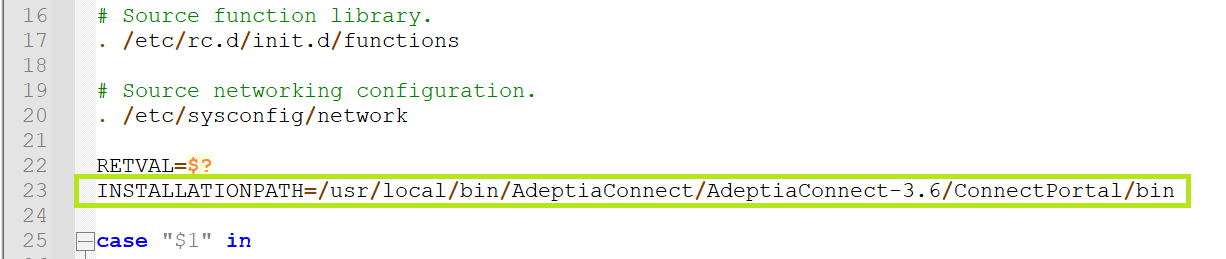
In the INSTALLATIONPATH field, enter the Connect Portal installation directory path up to the "bin" folder as shown in the example below.
-
Save the file.
-
Grant permissions to ConnectServer and ConnectPortal files to be executed by running the following commands. chmod +x ConnectServerchmod +x ConnectPortal
-
Run the following command to add the ConnectServer and ConnectPortal services in run levels. chkconfig --add ConnectServerchkconfig --add ConnectPortal
-
Check the status of the services by runningthe following command.

To check the status of a specific service, for example, ConnectServer,****use the following command.
sudo systemctl status ConnectServer.service -
Run the following commands to start the Adeptia services (if not started yet), enabling automatic startup of the application. chkconfig ConnectServer on chkconfig ConnectPortal on You can also use following command to start the services. service ConnectServer startservice ConnectPortal start

To stop or restart the services, use the following commands.
• service <Service Name> stop
• service <Service Name> restart -
Restart the system. After the system restarts, the ConnectServer service starts the java instances of Kernel, WebRunner, and AIMap services, and the ConnectPortal service starts the java instance of Portal.
Adding ConnectServer service without AIMap
If you wish to add Adeptia Connect services without AIMap, do the followings.
-
Download the zip AdeptiaConnectWithoutAIMap.zip and extract it. The zip contains three files – ConnectServer*,* **ConnectPortal,**and startup.sh
-
Stop Adeptia services.
-
Place the extracted startup.shfile at ../AdeptiaConnect/ConnectServer/AdeptiaServer/ServerKernel location.
Make sure that you have granted the required set of permissions to startup.sh file for its execution. -
Follow the steps from 3 through 14 in the section above. After the system restarts, the ConnectServer service starts the java instances of Kernel, and WebRunner.
To add the AIMap service at any later point in time, you can execute the startupAIMap.sh file located at ../AdeptiaConnect/ConnectServer/AdeptiaServer/ServerKernel. To remove the AIMap service again, you can execute the stopAIMap.sh file placed at the same location.