Setting up and retaining the activity logs and repository files
Adeptia Connect enables you to set the logging level, repository file retention, and activities logging retention level for a Transaction. These settings aid in configuring the extent of details captured in logs, managing the retention of repository files and activity logs, enhancing the analysis of a Transaction's information. You can configure the logging level and the activity logs and repository retention in the fields that are visible under the Advanced Settings option present on the Transaction Settings (Transaction) and Settings (Template) screen.
 | Visibility of the fields under Advanced Settings may vary based on the Routing Type you select. |
|---|
The following is an overview of each field:
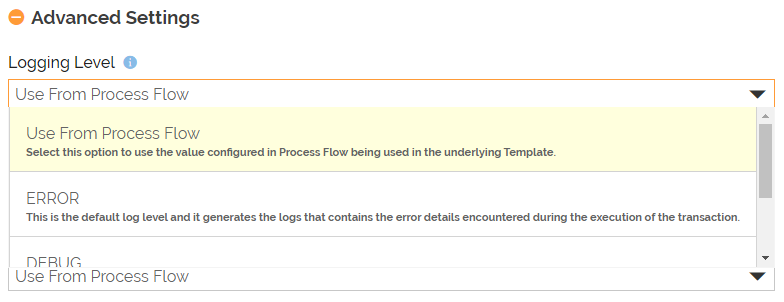
1. Logging Level: This field sets the type of activity logs that should be produced in the log file. These logs are created at the application level and can be viewed in the Dashboard. You can select from either of the following options described in the given table:
| Options | Description |
|---|---|
| Use From Process Flow | • This option is visible only in case of a Custom Template or Transaction. • Selecting this option sets the Logging Level based on the value configured in Process Flow associated with the Custom Template. |
| INFO | An intermediate logging level that captures important information about the transaction, such as when it started and ended, number of records processed, execution details, etc. |
| DEBUG | The most detailed logging level, which generates information for each activity that you can use for tracing errors and troubleshooting. |
 | |
| ERROR | This is the default log level. it generates the logs that contains the error details encountered during the execution of the Transaction. |
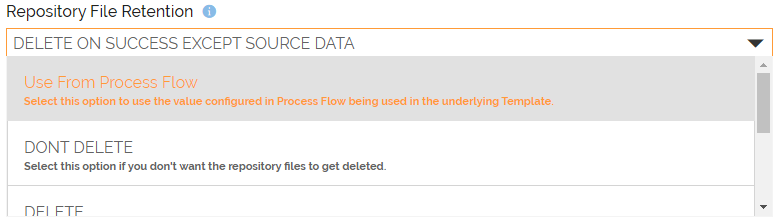
- Repository File Retention: This field sets the retention level for the generated repository files (intermediate data such as source data, mapping output, target data, etc.). You can select from either of the following options described in the given table:
| Options | Description |
|---|---|
| Use From Process Flow | • This option is visible only in case of a Custom Template or Transaction. • Selecting this option sets the Repository File Retention based on the value configured in Process Flow associated with the Custom Template. |
| DONT DELETE | Select this option if you want the repository files to not get deleted after execution of a Transaction. |
| DELETE | Select this option if you want the repository files to get deleted after execution of a Transaction. |
| DELETE ON SUCCESS | Select this option if you want the repository files to get deleted on successful execution of the Transaction. |
| DELETE ON SUCCESS EXCEPT SOURCE DATA | This is the default logging level for Repository File Retention. If you select this option then the repository files, except for the source data, gets deleted on successful execution of the Transaction. |
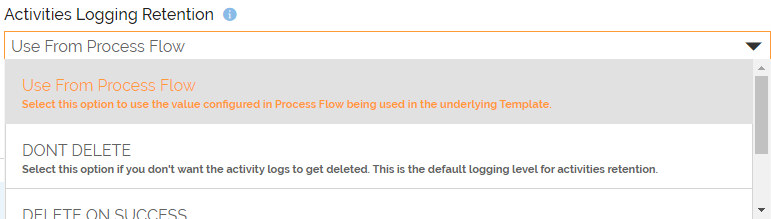
- Activities Logging Retention: This field sets the logs retention level for each activity such as its execution time, error records, processed data (Bytes/Records), etc. You can select from either of the following options described in the given table:
| Options | Description |
|---|---|
| Use From Process Flow | • This option is visible only in case of a Custom Template or Transaction. • Selecting this option sets the Activity Logging Retention based on the value configured in Process Flow associated with the Custom Template. |
| DONT DELETE | This is the default retention level for activities' logs. If you select this option the activity logs do not get deleted. |
| DELETE ON SUCCESS | Select this option if you want the activity logs to get deleted on successful execution of the Transaction. |
| NO LOGGING | Select this option if you don't want to create the activity logs. |