Using Context Variable Based Routing in REST and SOAP Webhook
You can execute a Transaction with REST or SOAP Webhook at Source, based on Query and Header parameters defined in the corresponding Template with Context Variable Based Routing.
The following section guides you on how to define and pass the parameters in REST and SOAP Webhook Transaction.
Query and Header parameters in REST/SOAP Webhook
While creating a Template with REST/SOAP Webhook as a Source and Context Based routing as the routing type, you can define and pass the parameters by following the steps given below.
At the Routing Criteria step in the Template, do the followings:
-
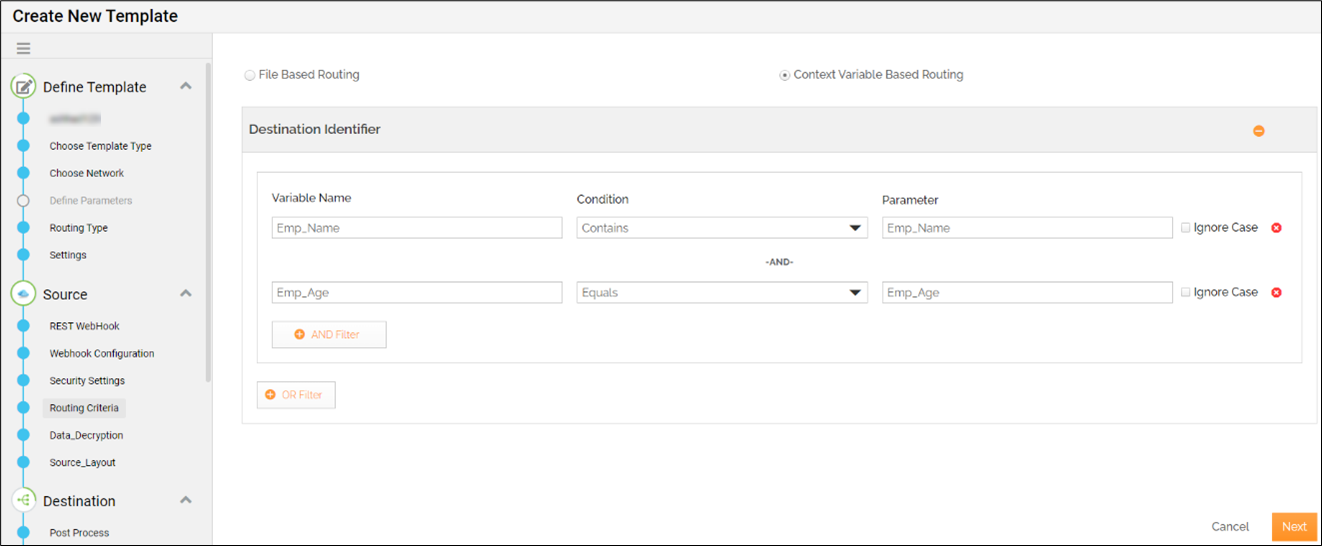
Select Context Variable Based Routing.
-
In the Variable Name field, enter the name of a variable that you want to define.

Variable Name is the name of Query or Header parameter. -
In the Condition field, select a condition (Equals or Contains).
-
In the Parameter field, enter a parameter name for which you want to pass the value in the Transaction.
-
Click Next and complete rest of the steps to create the Template.
You can define multiple variables and filter criteria using the AND Filter and OR Filter buttons. -
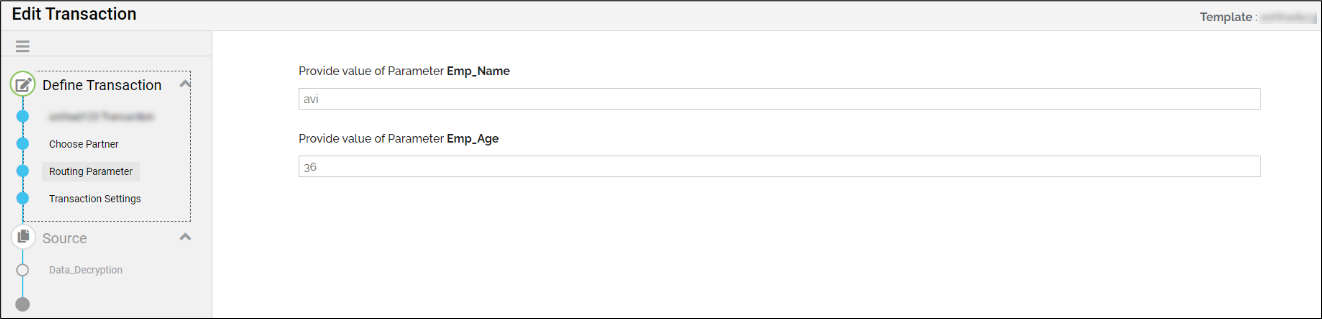
Create a Transaction based on this Template and pass the values for the parameters at the Routing Parameter step.
The value you pass here is the value for Query or Header parameter.