Granting Template Access
You can grant access to a particular Template to one or multiple partners to allow them to use the Template for creating a Transaction. There are two conditions for granting access to a particular Template:
- The Template must be in an active state.
- The Partner to whom you are granting access is self onboarded.
To grant access:
-
Click Configure> Templates.
-
On the Templates screen, click
 > Grant Access.
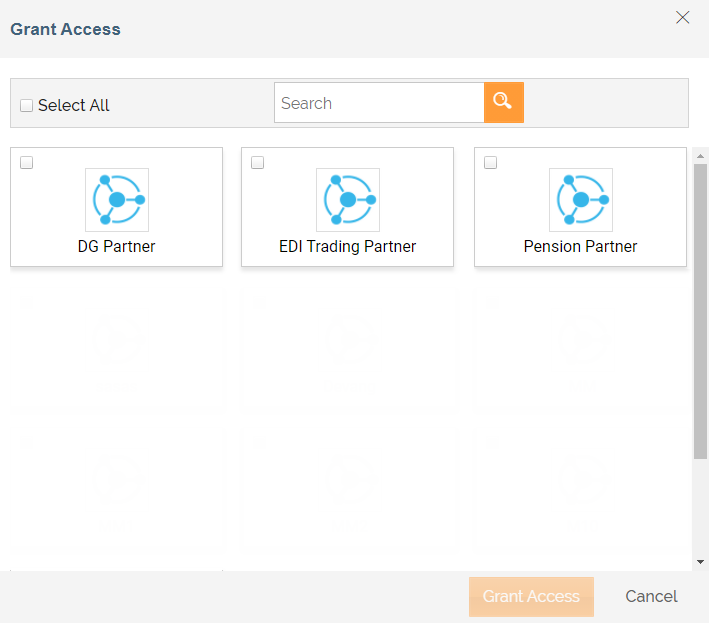
On the Grant Access screen all the self onboarded Partners of the Network(s) for which Template is created, will be populated.
> Grant Access.
On the Grant Access screen all the self onboarded Partners of the Network(s) for which Template is created, will be populated. -
Select the check box for the partner to whom you want to grant the access.
You can select multiple partners at a time or you can also select the Select All check box to grant the access to all the listed partners.
-
Click Grant Access.
The Partner can now use this Template to create a Transaction.

If you grant access to a deactivated Template, when the Partner login to Adeptia Connect, the Template status will be displayed as Inactive.
You can also revoke access to a Template from the Partner anytime whenever you need. Click > Revoke Access. On the Revoke Access screen, click Revoke Access to revoke access to the Template from the Partner. You can select multiple partners at a time or you can also select the Select All check box to revoke the access to all the listed partners.
Next Step
You may be interested in...