Activating a Template
After you have mapped the fields of the Source and the Target application of the Template or you have defined the Source and Target application of a Template, you will be prompted to turn on the Template. Unless you confirm it, the state remains OFF. You may choose to turn ON/OFF either at the time of creation or through the Templates screen later. Turning On a Template means activating a Template to create Transactions.
 | Only a Company administrator and an IT User can activate a Template. |
|---|
To activate a Template:
-
Click Configure> T emplates.
-
On the Templates screen, click
 to activate. indicates deactivated Template.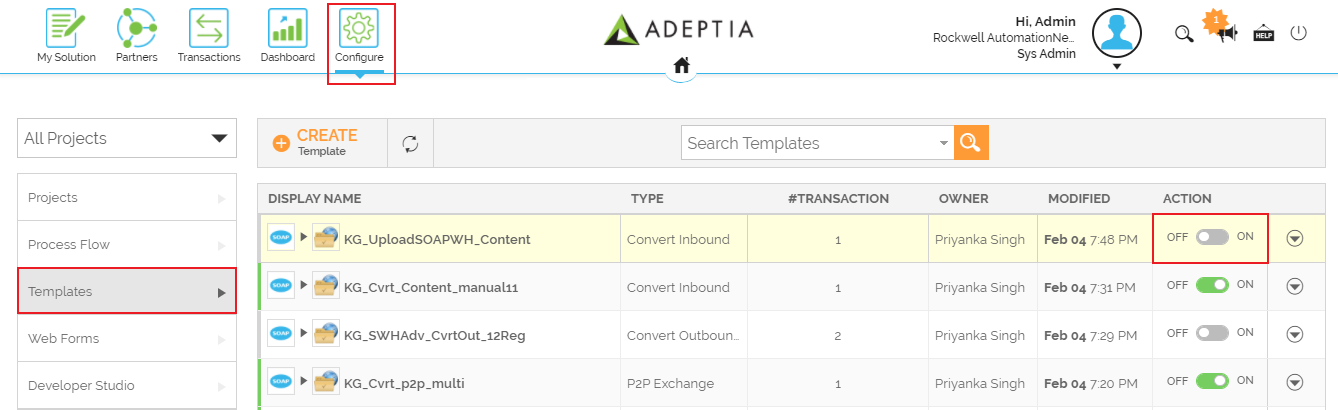
-
Click Yes, turn On, when prompted to confirm.
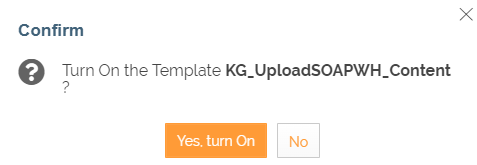 This activates a Template. You can now use it to create Transactions.
|  indicates activated Template. indicates activated Template. |
|---|
| You can sort the Templates based on any of the columns available on the Templates Manage page. |
|---|
Next Step
You may be interested in...