SAP Client
SAP client is a service created in Adeptia Connect to communicate with the SAP server. While sending Intermediate Document (IDoc) it does not require any gateway, IDoc is directly sent to a client. However, when receiving IDoc from SAP, Adeptia's SAP Server acts as a gateway, and the client is the receiving end of a service in a client/server model type of system.
Creating a SAP Client
-
Click Configure > SAP > SAP Client.
-
Click Create SAP Client.
-
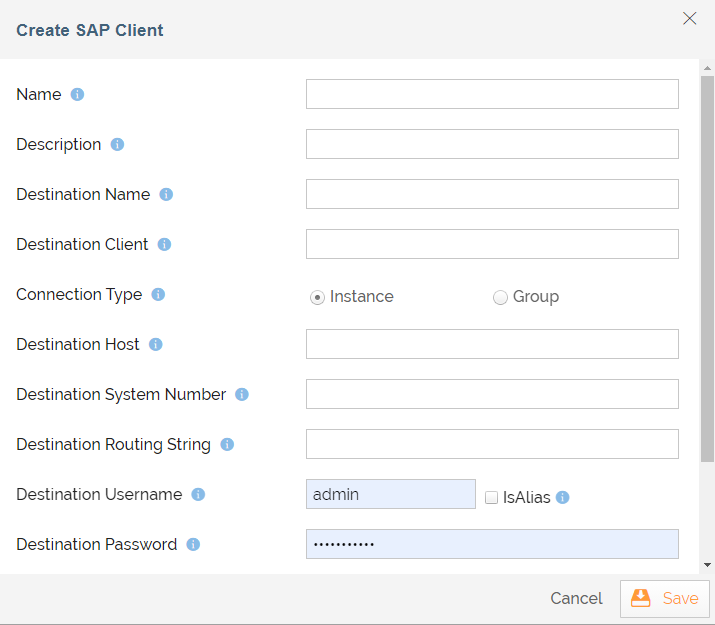
On the Create SAP Client screen, enter the details as explained in the table below:
Field Name Description Name Name of the SAP client. Description Description of the SAP client. Destination Name Client destination from which to obtain the repository. Destination Client SAP client. Connection Type The number of connections that should be registered at the gateway. Destination Host SAP application server host. Destination System Number SAP system number. Destination Routing String SAP router string to use for networks being protected by a firewall. Destination Username Logon user. Destination Password Logon password. 
Contact your administrator managing your SAP server to know what values to enter in the above fields. -
Expand Modify default settings option if you want to modify the default settings for SAP Client.
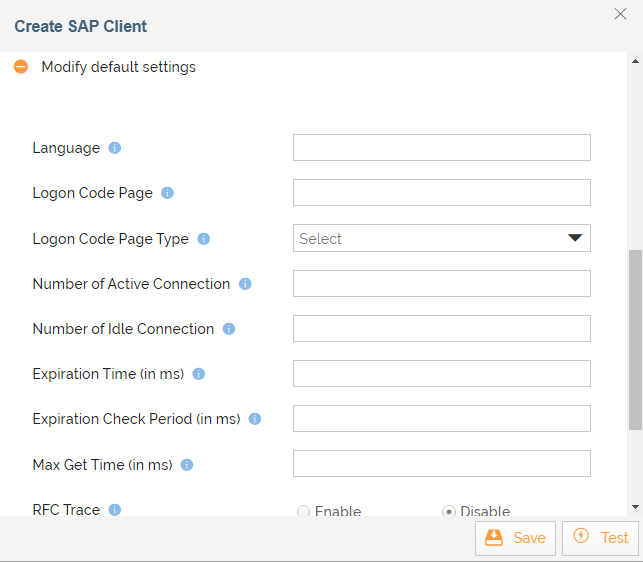
Field Name Description Language Logon language. Logon Code Page Initial logon code page in SAP notation. Logon Code Page Type Initial logon code page type (1-non unicode or 2-Unicode enabled). Number of Active Connection Maximum number of active connections that can be created for a destination simultaneously. Maximum number of idle connections kept open by the destination. A value of 0 has the effect that there is no connection pooling i.e. connections will be closed after each request. Expiration Time (in ms) Time in ms after that the connections hold by the internal pool can be closed. Expiration Check Period (in ms) Interval in ms with which the timeout checker thread checks the connections in the pool for expiration. Max Get Time (in ms) Max time in ms to wait for a connection, if the max allowed number of connections is allocated by the application. RFC trace Enable/disable RFC trace. CPIC Trace Enable/disable CPIC trace (0 no trace, 1,2,3 different trace levels). SNC Mode Secure Network Communications (SNC) mode. -
Select the project from Select Project field.
-
Click Save.

You can click Test to test SAP Client.
You may be interested in...