XML Validator
You can use an XML Validator to validate the whole XML file or parts of it. However, this feature is more appropriate while validating portions of XML streams. For validation, you need to provide the Xpath of the elements of the XML file and the path of the XSD against which the schema will validate that XML file.
Steps to create an XML Validator service
- Configure > LAYOUTS > XML Validator.
- Click CREATE XML Validator Layout.
- On the Create Layout screen, type the name and description of the new XML layout in the Name and Descriptionfields respectively.
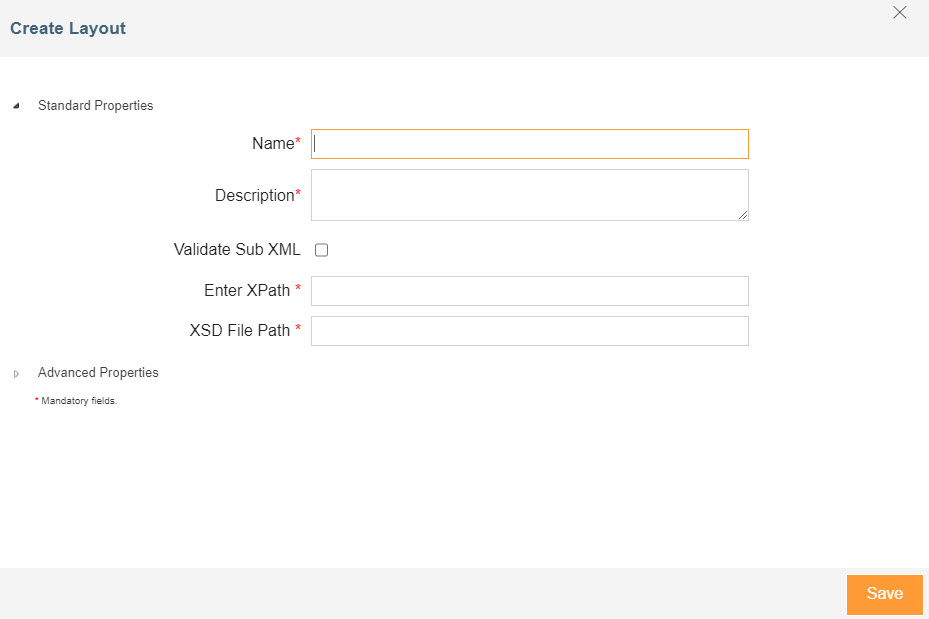 4. Select the Validate Sub XML check box if you want to validate the Sub XML.
5. In the Enter XPath field, enter the XPath of the XML file you want to validate.
6. In the XSD File Path field, enter the path of XSD file which layout will use to validate against the XML file.
7. Expand Advanced Properties and select the Project in the Project field.
8. Click Saveto save the XML Validator layout.
4. Select the Validate Sub XML check box if you want to validate the Sub XML.
5. In the Enter XPath field, enter the XPath of the XML file you want to validate.
6. In the XSD File Path field, enter the path of XSD file which layout will use to validate against the XML file.
7. Expand Advanced Properties and select the Project in the Project field.
8. Click Saveto save the XML Validator layout.
After creating the XML Validator service, you can place it after the source service. If the file does not match the XSD, the XML Validator service will fail and the process flow will be aborted.
You may be interested in...