Spazio MFT/s Listener
Spazio Listener enables you to specify when and how frequently a process flow should be executed based on the creation of a new file, for example, queueName="FILE.QMGR01" queueName="FILE.QUEUE02", in a pre-defined location.
 | Before you use Spazio Listener in Adeptia Connect v3.7.3, ensure that you have place the common-io-2.4.jar at the ...<ConnectServerInstallFolder>/ServerKernel/Solutions/GBI/bin ****location. |
|---|
To create spazio listener:
-
ClickConfigure > EVENTS > Spazio MFT/s Listener.
-
Click Create Spazio MFT/s Listener.
-
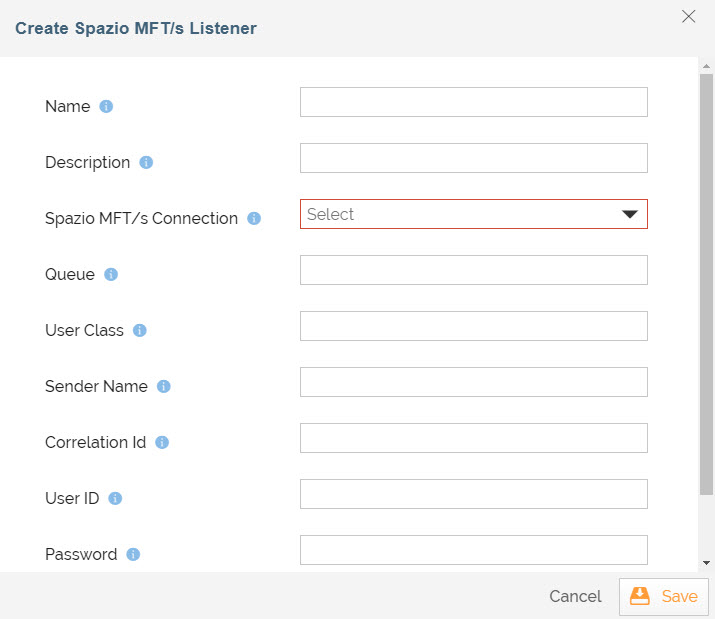
On the Create Spazio MFT/s Listener screen, provide the following details.
| Name | Name of the Spazio MFT/s listener. | | Description | Description of the Spazio MFT/s listener. | | Spazio Connection | Select the Spazio MFT Server Connection in the field under which you want to create MFT File Event. | | Queue | Name of the default Queue where files are queued. | | User Class Name | Name of the Primeur Spazio MFT/s user class. | | Sender Name | Name of Primeur Spazio MFT/s sender. The sender in this context is a logical MFT level sender identifier (not the actual userid/subject in AuthN/AuthZ terms) and can be used for filtering. | | Correlation Id | Name of Primeur Spazio MFT/s correlation identifier. Correlation identifier is a logical tag that can be associated with Primeur Spazio MFT/s files having some business level affinity (for example, "PAYROLL.FILES") and can be used for filtering. | | User Id | Primeur Spazio MFT/s connection user id. | | Password | Primeur Spazio MFT/s connection password. | | Select Project | Select the project that you want to associate with Spazio MFT/s listener. |
Field Name Description -
Click Save.

You can sort the Spazio MFT/s Listener based on any of the columns available on the Spazio MFT/s Listener Manage page.
You may be interested in...