Removing Layout
You can remove a layout from the source or destination panels. If a source or destination layout is removed, everything associated with the mapping of the schema such as Mapping Area, Connection Lines, and each property is removed.
Steps to remove a layout
- Ensure that the source and destination layout are loaded and all their elements are listed under their respective nodes.
- Select the root element of the layout that you want to remove, click more icon and then select Remove Layout option.
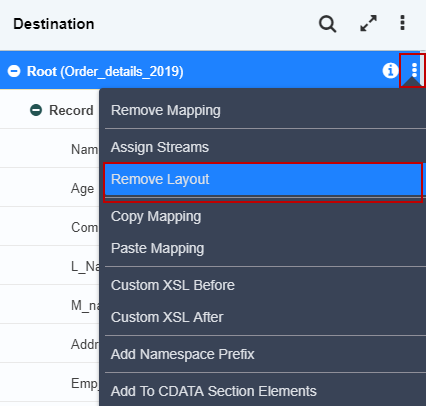
- A screen is displayed confirming the removal of the selected layout.
 4. Click Yes to remove the layout. This removes the selected layout.
 | A layout can be removed only from the root element. Thus, the Remove layout option is displayed as active only for the root element. |
|---|
You may be interested in...