Filtering of Elements/Attributes in Destination Data
You can filter elements or attributes from appearing in the destination XML. There are two ways to filter data:
- Using IFF Condition
- Using Apply Filter The Apply Filter method is recommended as it is easy to use and can be done individually on multiple nodes, directly from the Web Mapper applet.
Using Apply Filter
Steps to filter using Apply Filter
- Ensure that the source and destination layout are loaded and all their elements are listed under their respective nodes.
- Select the destination element that you want to filter, click more icon and then select Apply Filter option.
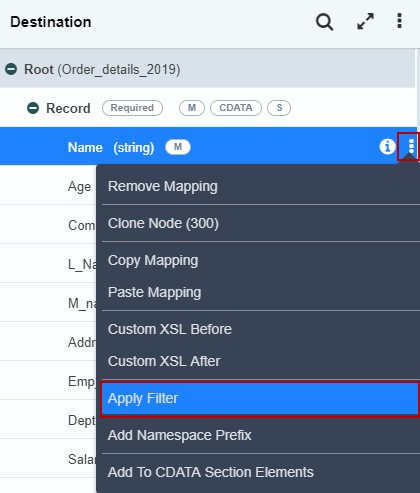 3. This selection will filter the selected element from the target output XML data.
- You can apply this filtering option on the element or attribute levels.
- Once the filter is applied on the destination element, the letters (FL) are displayed next to each filtered destination element. This signifies that the filter has been applied for the destination element.
You may be interested in...