Creating Clone of Destination Element
Cloning means generating replicas of the destination elements or nodes. You can create clones of all destination elements. Steps to create a clone
- Ensure that the source and destination layouts are loaded and all their elements are listed under their respective nodes.
- Select the destinationelement, click more icon and then select the Clone Node option to open Clone Node: Record screen.
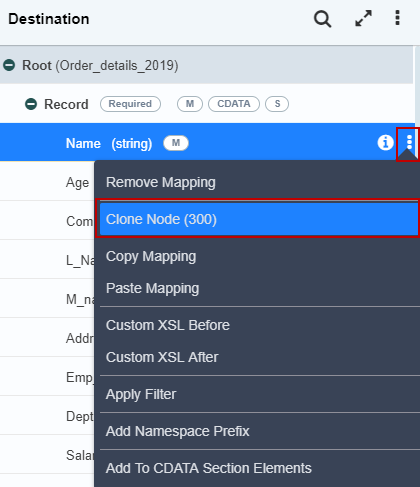
 | You can create a clone of all destination nodes except the root node. Thus, the Clone Nodesub-option is displayed as inactive for the root node. |
|---|
- Select the number in the Number of Clone(s) field and click Create Clone(s).
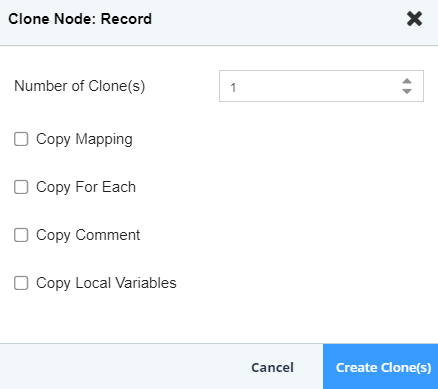
| You can create a maximum of 300 occurrences of an element, with one main element and 299 clones. |
|---|
- The element which is created using cloning is displayed with the suffix [1] after its name. Subsequent clones that are created for that element will have the suffix [2] and so on.
Removing Clone of Destination Element
Steps to remove a clone
- Ensure that the source and destination layouts are loaded and all their elements are listed under their respective nodes.
- Select the cloned element that you want to remove, click more icon and then select the Remove Clone option.
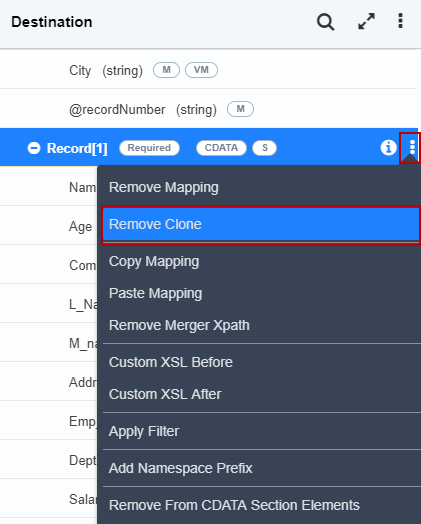 3. A screen is displayed confirming the removal of the selected clone.
 4. Click Yes to remove the clone. This removes the selected clone from the destination layout.
| If more than one clone has been created for an element, then you need to remove the clones in descending order. |
|---|
You may be interested in...