Executing a Custom Dashboard
After you have created the dashboard design, you need to execute it to publish it as a Custom Dashboard. You can execute the dashboard design either from the Design screen or from the Custom Dashboard screen.
To execute from the Design screen:
- Click Configure > CUSTOM DASHBOARD > Design.
- Under Action, click More
 arrow and then click Executefor the design you want to execute.
A new browser tab opens displaying the components that was chosen while creating the Dashboard Design.
arrow and then click Executefor the design you want to execute.
A new browser tab opens displaying the components that was chosen while creating the Dashboard Design. - Select the refresh time from the Select refresh delay (in seconds) to configure the refresh time.
To execute from the Custom Dashboard screen:
- Go to theDashboard page.
- Click Custom Dashboard icon in the left pane.
- Click
 to the design to execute.
A new browser tab opens displaying the components that was chosen while creating the Dashboard Design.
to the design to execute.
A new browser tab opens displaying the components that was chosen while creating the Dashboard Design.
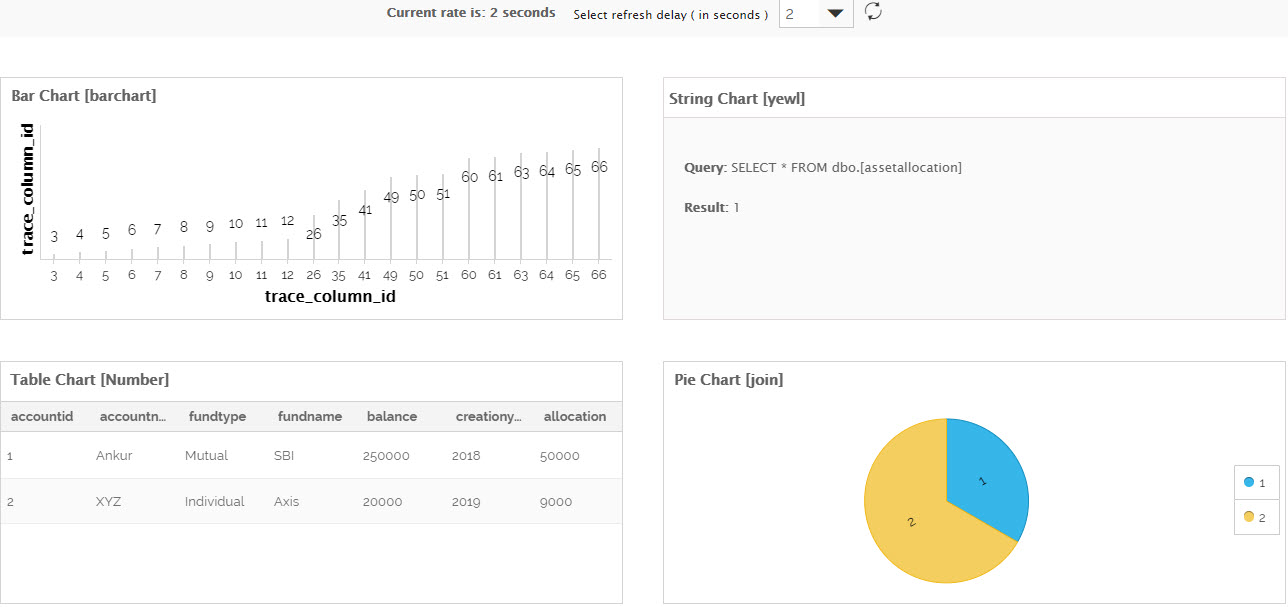
- Select the refresh time from the Select refresh delay (in seconds) to configure the refresh time.
You may be interested in...