Database Driver
A database driver is used to specify the type of database and driver jar files that are required to connect to that database. Database jar files are drivers that are used to connect to database servers. There are specific jar files for a specific database server. These jar files are available with the database servers. Driver jar files can also be obtained from the following locations:
Oracle Server http://www.oracle.com/technology/software/tech/java/sqlj_jdbc/index.html
Steps to create a Database Driver
- Click Configure > ACCOUNTS > Database Driver.
- ClickCREATE Database Driver.
- On Create Database Driver screen, enter the name and description of the new Database Source in the Name and Description fields respectively.
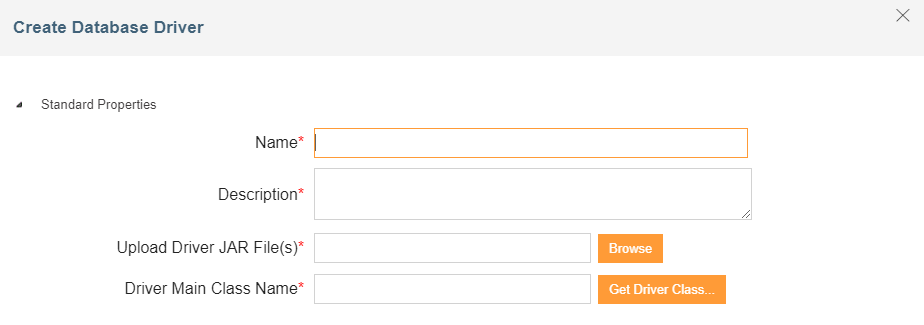 4. In the Upload Driver Jar File(s), browse to and upload the driver jar files for the database.
5. On the Upload Jar File screen, browse to and select the jar file. The path of the selected jar file is displayed in the Browse File fields.
4. In the Upload Driver Jar File(s), browse to and upload the driver jar files for the database.
5. On the Upload Jar File screen, browse to and select the jar file. The path of the selected jar file is displayed in the Browse File fields.
A list of required Jar files for different databases is in the following table.
| Database Servers | Driver Jar Files |
|---|---|
| Oracle | Classes12.jar For Oracle BLOB Data type: base.jar, oracle.jar and util.jar |
| IBM DB2 (Ver 7.1) | db2java.zip (7.1 version) |
| IBM DB2 (Ver 8.1) | db2jcc.jar |
| MS SQL | msbase.jar, mssqlServer.jar and msutil.jar |
| JTDS-SQL Server | Jtds.jar |
| HSQL DB | hsqldb-1.7.2.jar |
- Click Upload JAR. The file name is displayed under the heading File Names.
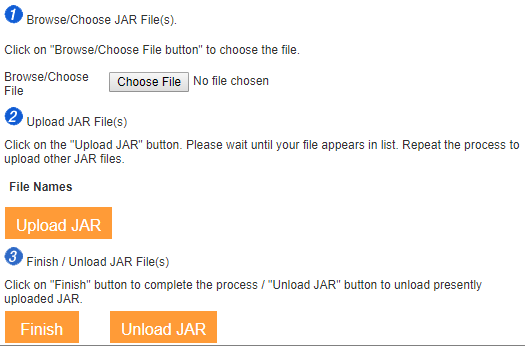 7. Repeat steps 5 to 6 to upload additional jar files.
 | If required, you can also unload the JAR files. To unload jar files, click Unload JAR. |
|---|
-
Click Finish to return to the Create Database Driver Info screen. The uploaded jar file(s) is displayed in the Upload Driver Jar File(s) field.
-
Enter the main class name of the database in the Driver Main Class Name. Driver Main Class Name is a fully qualified Java class name for the main database driver class. The driver class name typically starts with a com., net. or org. followed by the company domain.
For example, the JDBC driver class for mysql.com is called com.mysql.jdbc.Driver. Click Get Driver Class to select the Database Driver Main Class Definition in the Select Class field.
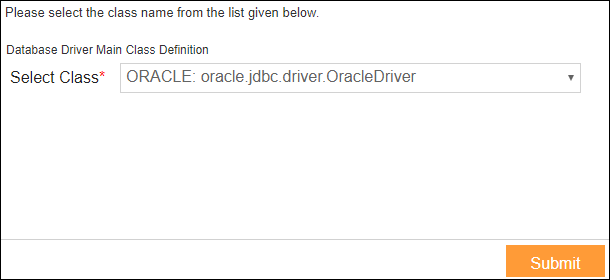 Click Submit. A list of Driver Main Class Name of different databases appears.
Database Servers Driver Main Class Definition Oracle oracle.jdbc.driver.OracleDriver
For Oracle BLOB Data type:
com.ddtek.jdbc.oracle.OracleDriverIBM DB2 (Ver 7.1) COM.ibm.db2.jdbc.net.DB2Driver IBM DB2 (Ver 8.1) com.ibm.db2.jcc.DB2Driver MS SQL com.microsoft.jdbc.sqlServer.SQLServerDriver JTDS-SQL Server net.sourceforge.jtds.jdbc.Driver HSQLDB org.hsqldb.jdbcDriver MS Access sun.jdbc.odbc.JdbcOdbcDriver MS Excel sun.jdbc.odbc.JdbcOdbcDriver -
Expand Advanced Propertiesand select the project of the activity in the Project list.
-
Click Save.
You may be interested in...