Using Context Pad
Context Pad provides contextual actions around an element like appending another element to it, viewing its properties, etc. You can use Context Pad to design your Process Flow by adding different elements to it without the need of going to Repository View or Palette. To access context pad, click the activity on Canvas area.
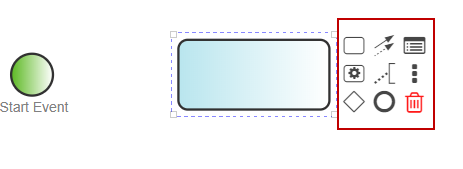
Options of the Context pad are explained in the table below.
| Element | Name | Function |
|---|---|---|
 | Append Activity | To add an activity in process flow. |
 | Connect Using Sequence Flow or Association | To connect the activities in process flow. |
 | View Properties | Opens Activity Properties panel of the selected activity. |
 | Append Preconfigured Activity | Opens Repository View panel to add the preconfigured activity. |
 | Append Text Annotation | To add a Text Annotation in a activity. |
 | Options | Provides an option to attach server entity, server exception, and copy the activity. |
 | Append Gateway | To add a Gateway in process flow. |
 | Append End Event | To add End Event in process flow. |
 | Remove | Provides an option to remove the activity. |
You may be interested in...