Process Flow variable
A variable is declared when the action is executed while running the process flow. Variable is generally used to set the value of any field of an activity used in a process flow, during the execution of the process flow. For example, if you want to specify an algorithm/cipher for file encryption in a Process Flow, you can define a Process Flow variable, encryptionAlgorithm, and set its value to any of the following algorithms/ciphers that you want to use.
- IDEA
- TRIPLE_DES
- CAST5
- BLOWFISH
- DES
- AES_128
- AES_192
- AES_256
- TWOFISH
- CAMELLIA_128
- CAMELLIA_192
- CAMELLIA_256 You can create and use a Process Flow Variable throughout the execution of a process flow.
Steps to create a Process Flow variable
- OpenProcess Designer.
- Click View Process Flow Properties option in toolbar.
 3. Select VARIABLES in the Process Flow Properties Panel.
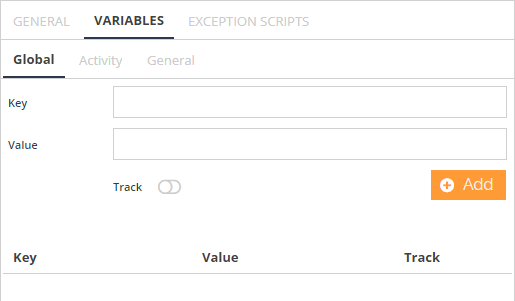 4. Enter the name and value of the process flow variable in KeyandValue textbox of Global tab.
 | Select Track Toggle button to track all changes made to the Process Flow variable. Clickhere to get more details. |
|---|
- Click Add.Once a new process flow variable is created, it is added to the list in the Process Flow Variables tab.