Creating Scripts for Post Process Application in Process Flow
Using Process Flow in a Template
While creating a Process Flow, in the Process Designer, write the following script in the Service exception field under the OnException Scripts tab.

 | import org.apache.commons.lang.exception.ExceptionUtils; Throwable rootCause = ExceptionUtils.getRootCause(exception); String exceptionMessage = null; if(rootCause == null) exceptionMessage = exception.getMessage(); else exceptionMessage = rootCause.getMessage(); context.put("subprocess_code", "ERROR_IN_CHILD_FLOW"); context.put("subprocess_text", exceptionMessage); |
|---|
Process Flow Calling Another Transaction
If the Process Flow is further calling a Transaction, you need to create a custom plugin using below JavaScript. After you have created a custom plugin, use it in the Process Flow.
JavaScript for Custom Plugin to set child context Param to call any Transaction:
Code
import com.adeptia.connect2.runtime.RuntimeUtils;
RuntimeUtils.setChildContext(inputStream, context, service.getLogger(), "<<ACTION_NAME>>", "<<TransactionName>>", "<<PartnerName>>");
where,
ACTION_NAME is the name of the call or spawn.
TransactionName is the name of the Transaction.
PartnerName is the name of the Partner for which Transaction is created.
for example,
| Copy Code Code |
|---|
RuntimeUtils.setChildContext(inputStream, context, service.getLogger(), "Action_Name", "FTP_To_Email_Transaction", "Adeptia");
|
| Ensure that you have provided the values in double quotes ("). |
|---|
If you are the owner of the Transaction then type null (without double quotes) as a value in the partner name, for example,
| Copy Code Code |
|---|
RuntimeUtils.setChildContext(inputStream, context, service.getLogger(), "<<ACTION_NAME>>", "<<FTP_To_Email_Transaction>>", null);
|
JavaScript for Custom Plugin to set child context Param for calling another process flow:
Code
import com.adeptia.connect2.runtime.RuntimeUtils;
RuntimeUtils.setChildContext(inputStream, context, service.getLogger(), "<<ACTION_NAME>>", null);
JavaScript to check child flow is Aborted or not:
| Copy Code Code |
|---|
import com.adeptia.connect2.runtime.RuntimeUtils;
return RuntimeUtils.isChildFlowAborted(context, "<<resultCtxVarName>>");
|
where,
resultCtxVarName is the name of the context variable that contains the status of the sub-flow. The value can be Executed, Aborted, Queued, or Waiting.
JavaScript for Custom plugin to abort parent flow:
Code
import com.adeptia.connect2.runtime.RuntimeUtils;
RuntimeUtils.abortParentFlow(context, "<<resultCtxVarName>>");
Process Flow Design
Following are the sample designs of the Process Flow, calling a Transaction through Call or Spawn action:
Using SIngle Call

Using Multiple Call
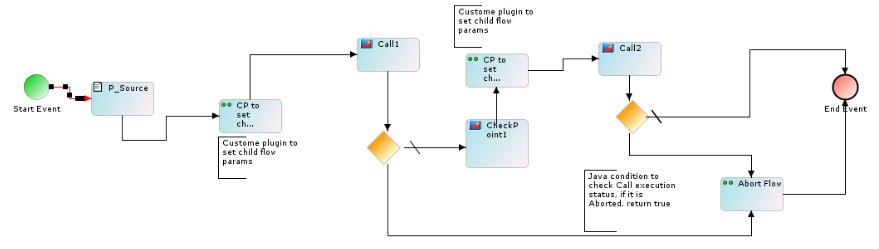
Using Single Spawn
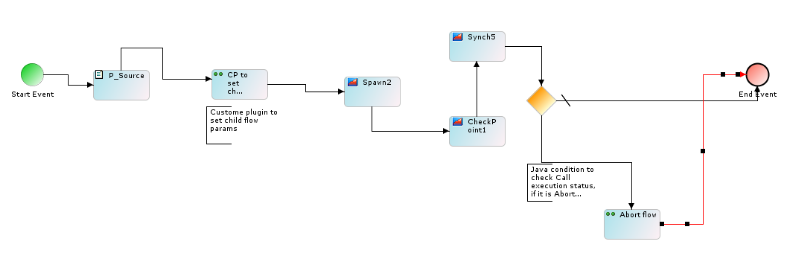
Using Multiple Spawn
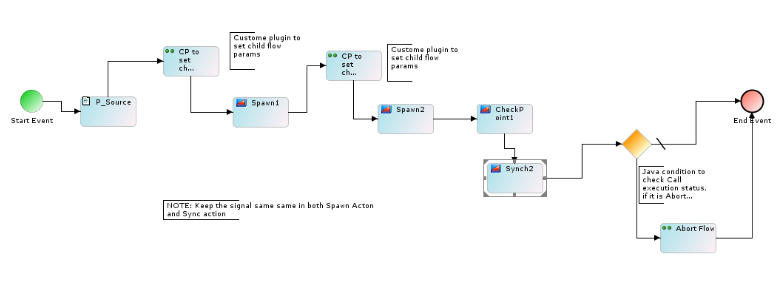
Calling Transaction in Call or Spawn
To call a Transaction in Call or Spawn action:
- In the Process Designer, select Call or Spawn action.
- On the Properties tab, in the flowId field, select the following process Flow:
