Deployment
Deployment Infrastructure - Key Components
Before you prepare to deploy Adeptia Connect, you should know about various components of the product. Following figure shows various key components of Adeptia Connect.
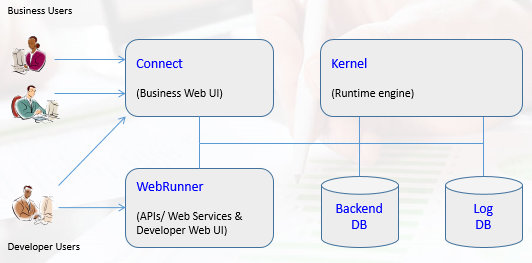
- Connect Portal
- Web-based user interface for business and developer users
- Used to configure transactions (connections), monitor, and manage
- WebRunner
- Web-based user interface for developer users and listener for API/WS calls
- Used to create transaction templates, complex processes, validations, mappings etc.
- Kernel
- Run time engine that executes transactions and flows for data processing
- Backend Database
- Stores all metadata related to users, transactions, configurations, partners
- Log Database
- Stores all run time execution details, log information and audit trails
Recommended Deployment
| Simple Case Deployment - Single Server | High Availability Deployment - Clustered |
|---|---|
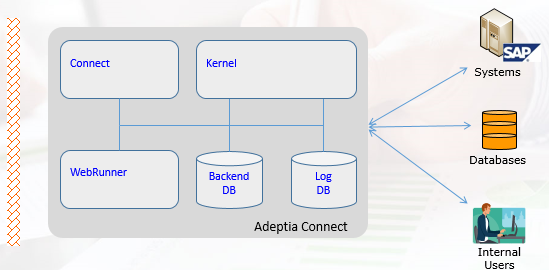 • Connect, WebRunner, Kernel run in their own JVM • Minimum System Requirements • Dedicated or Virtual Server, OS = Windows or Linux • 8 Core CPU, 16GB RAM, 100GB HDD minimum • Database: MySQL or MS SQL Server or Oracle | 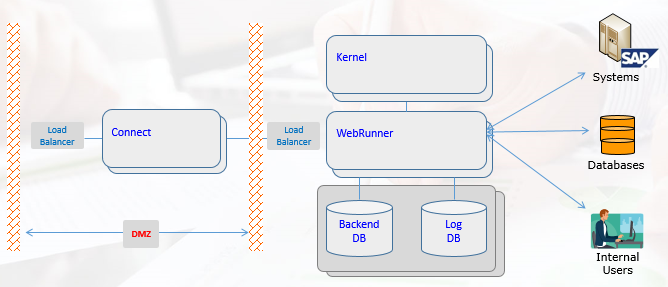 • • Redundant and Scalable architecture, no single point of failure • Minimum 6 servers –2 for Connect, 2 for Kernel + WebRunner, 2 for DB • Cluster of Kernel nodes can be increased to scale with high data and transaction volumes |
Key Steps for Deployment
- Adeptia Server Installation (WebRunner and Kernel)
- Adeptia Connect Installation
- SSL Certificates setup and configuration
- License Setup and Activation
- Local install verification (Start Services and Admin Logon)
- System Configuration Settings as per checklist
- Cluster and Load Balancer Configuration
- Internal and External Load balancer Configuration
- LDAP integration and configuration and Verification
- SSO/SAML Configuration (if applicable) and Verification
For detailed installation Refer to Connect Portal installation guide
disaster-recovery-dr-environment.md