Authentication Modes - LDAP and SAML SSO
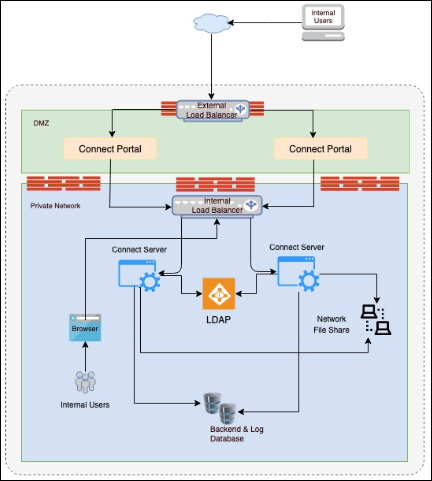
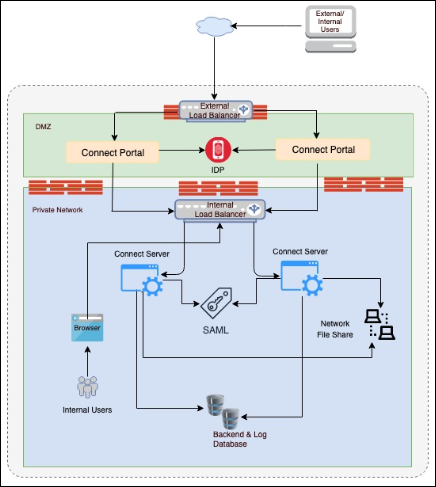
- Adeptia Connect primarily supports three types of Authentication: Native, SAML SSO, and LDAP.
- It is recommended to use LDAP authentication for internal users, and a SAML for the external users.
- In multi-mode authentication, a combination of LDAP and SAML is supported. Native authentication is not supported in multi-mode.
- While using a multi-mode authentication with LDAP and SAML, LDAP can only be used for internal users.
- Multi-Factor Authentication is not supported.
| Network Diagram with LDAP | Network Diagram with SAML SSO |
|---|---|
 |  |
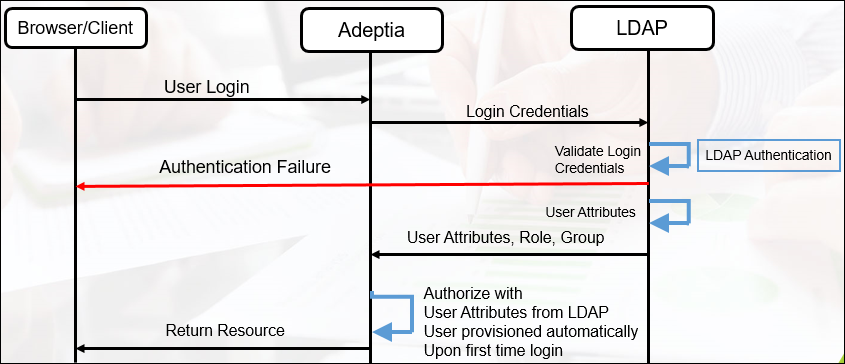
Authentication Flows
| LDAP Authentication Flow | SAML SSO Authentication Flow |
|---|---|
 | 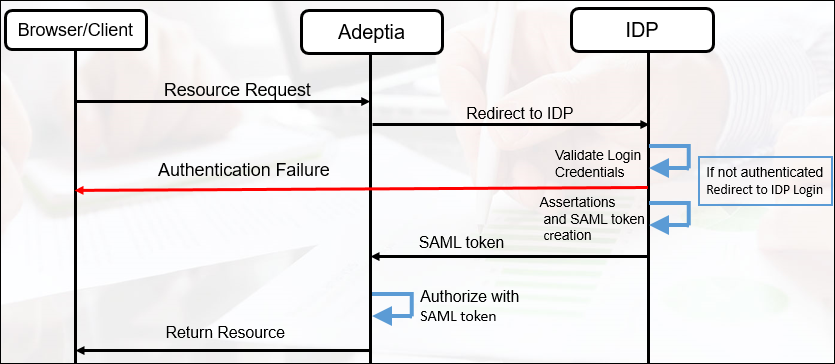 |
SAML SSO Authentication Flow
The application will use this mapping to verify user attributes in SAML Response with User attributes in Adeptia. If the value of all the attributes matches, it will allow access:
<?xml version="1.0" encoding="UTF-8"?>
<SAMLConfiguration>
<mapping>
<field>
<mapped-attribute>FirstName</mapped-attribute>
</field>
</mapping>
<mapping>
<field>
<mapped-attribute>EmailAddress</mapped-attribute>
</field>
</mapping>
</SAMLConfiguration>