Xero
Xero is online accounting software for small businesses. Use Xero to manage invoicing, bank reconciliation, bookkeeping, and much more.
For more information, click here.
Field (Account) Information
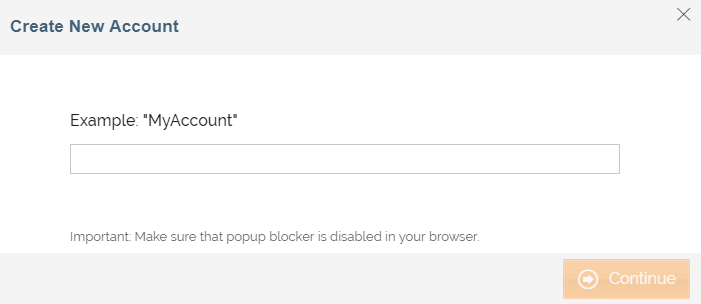
While configuring the Source or Destination of a Template or Transaction, you need to create an account to connect Xero with Adeptia Connect. While creating an account, you need to specify the location from where Adeptia Connect will access the data.
Click  to add an account.

Specify the following information for Xero:
| Field Name | Description |
|---|---|
| Account Name | A short, descriptive name that helps you re-use this account in the future. |
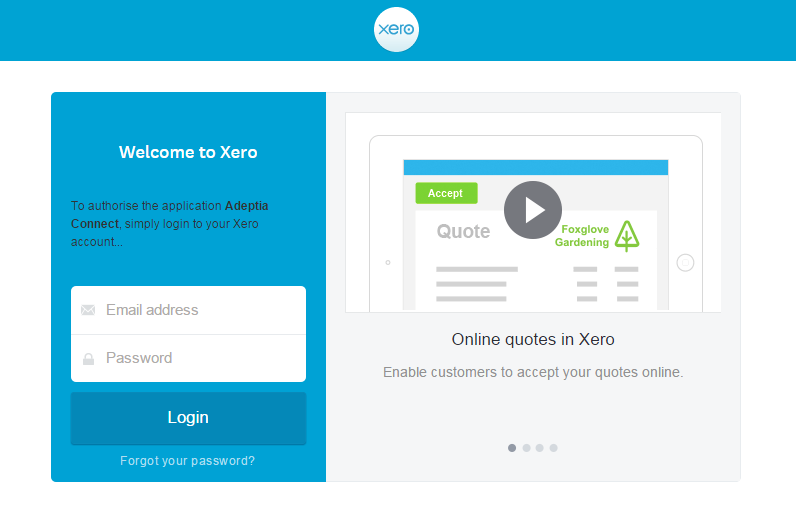
Click Continue. The Xero login screen appears.
| Field Name | Description |
|---|---|
| Email address | Email address to log in to your Xero account. |
| Password | Password to log in to your Xero account. |
Triggers
A Trigger specifies when a particular Transaction will start executing. While configuring the Source of a Template, you need to choose an event.
Following triggers are available for Xero at Source.
| Trigger Name | Description |
|---|---|
| New Bank Transaction | Triggers when a bank transaction is added or updated. |
| All Bank Transactions | Retrieve the list of all bank transactions. |
| New Bank Transfer | Triggers when a bank transfer is added or updated. |
| All Bank Transfers | Retrieve the list of all bank transfers. |
| New Branding Theme | Triggers when a branding theme is added or updated. You can add branding themes to apply to sales invoices, credit notes, statements, quotes, and purchase orders. You can also add a standard branding theme to apply to receipts and remittance advises. |
| All Branding Themes | Retrieve the list of all branding themes. |
| New Contact | Triggers when a contact is added or updated. |
| All Contacts | Retrieve the list of all contacts. |
| New Credit Note | Triggers when a credit note is added or updated. Add a credit note for your customers, that is not linked to a sales invoice you have already created for them - you can allocate the credit note to an invoice later. |
| All Credit Notes | Retrieve the list of all credit notes. |
| New Employee | Triggers when an employee is added or updated. |
| All Employees | Retrieve the list of all employees. |
| New Expense Claim | Triggers when an expense claim is added or updated. |
| All Expense Claims | Retrieve the list of all expense claims. |
| New Invoice | Triggers when an invoice is added or updated. |
| All Invoices | Retrieve the list of all invoices. |
| New Item | Triggers when an item is added or updated. |
| All Items | Retrieve the list of all items. |
| New Journal | Triggers when a journal is added or updated. Journals are a tool typically used by accountants or bookkeepers to work directly with the General Ledger to create both debit and credit entries for specific types of transactions that cannot be entered normally in Xero. For example, recording of accrued expenses or completed work not invoiced. |
| All Journals | Retrieve the list of all journals. |
| New Manual Journal | Triggers when a manual journal is added or updated. Manual Journals in Xero display all journals you have posted manually (including their status). |
| All Manual Journals | Retrieve the list of all manual journals. |
| New Payment | Triggers when a payment is added or updated. |
| All Payments | Retrieve the list of all payments. |
| New Receipt | Triggers when a receipt is added or updated. |
| All Receipts | Retrieve the list of all receipts. |
| New User | Triggers when a user is added. |
| All Users | Retrieve the list of all users. |
Actions
An Action specifies how the data will be transferred at the destination location. While configuring the Destination (Target) of a Template, you need to choose an action.
Following actions are available for Xero at Destination.
| Action Name | Description |
|---|---|
| Create Invoice | Creates an invoice. |
| Create Account | Creates an account other than credit card and PayPal account. |
| Create Bank Transaction | Creates a bank transaction. |
| Create Bank Transfer | Creates a bank transfer. |
| Create Contact | Creates a contact. |
| Create Contact Group | Creates a contact group. |
| Create Credit Note | Creates a credit note. |
| Create Employee | Creates an employee. |
| Create Expense Claim | Creates an expense claim. An expense claim is a collection of receipts from spending personal money that the organization needs to pay back to you. After submitting an expense claim, you will be reimbursed for your spending. |
| Add Contacts To Contacts Group | Adds contact to contact group. |
| Create Item | Creates an item. |
| Create Manual Journal | Creates a manual journal. |
| Create Payment | Creates a payment. |
| Create Receipt | Creates a receipt. |
| Create Tax Rate | Creates a tax rate. You can charge or record specific tax amounts on invoices, bills, and transactions that you enter into Xero. See https://help.xero.com/int/Settings_TaxRates for more information. |
| Update Account | Updates an account other than bank account. |
| Delete Account | Deletes an account other than bank account. |
| Update Bank Transaction | Updates a bank transaction. |
| Delete Bank Transaction. | Deletes a bank transaction. |
| Update Contact | Updates a contact. |
| Delete Contact | Deletes a contact. |
| Update Contact Group Name | Updates a contact group name. |
| Delete Contact Group Name | Deletes a contact group name. |
| Update Credit Note | Updates credit note with either a DRAFT, SUBMITTED, or AUTHORISED. |
| Delete Credit Note | Deletes a credit note. |
| Update Employee | Updates an employee. |
| Delete Employee | Deletes an employee. |
| Update Expense Claim | Updates expense claim. |
| Update Invoice | Updates an invoice with either a DRAFT, SUBMITTED or AUTHORISED status. |
| Delete Invoice | Deletes an invoice with either a DRAFT, SUBMITTED, or AUTHORISED status. |
| Update Item | Updates an item. |
| Update Manual Journal | Updates a manual journal with DRAFT or POSTED status. |
| Delete Manual Journal | Deletes a manual journal with DRAFT or POSTED status. |
| Delete Payment | Deletes a payment. |
| Update Receipt | Updates a receipt with DRAFT status. |
| Delete Receipt | Deletes a receipt. |
| Update Tax Rate | Updates a tax rate . All the existing tax components must be supplied when updating a tax rate otherwise, the component will be deleted. |
| Delete Tax Rate | Deletes a tax rate only when the tax rate is not the default on an account or used on a repeating invoice. |