Shopify
Shopify is a powerful e-commerce web application that helps you to set up your online store, sell online, market and manage your business.
For more information, click here.
Field (Account) Information
While configuring the Source or Destination of a Template or Transaction, you need to create an account to connect Shopify with Adeptia Connect. While creating the account, you need to specify the location from where Adeptia Connect will access the data.
Click  to add an account.

Specify the following information:
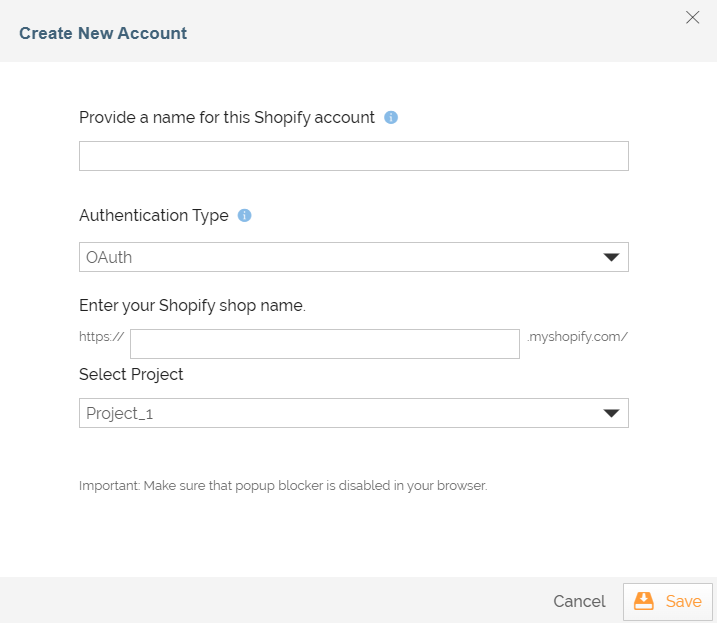
| Field Name | Description |
|---|---|
| Account Name | A short, descriptive name that helps you re-use this account in the future. |
| Authentication Type | The type of authentication you want to use. The available options are: • OAuth: If you select this option, you need to provide the Shopify shop name for authentication. • API Key Authentication: If you select this option, you need to provide the Shopify shop name as well as the API Key for authentication. |
| Enter your Shopify shop name | Name of your shop on Shopify. |
| API Key | The API key generated during the application registration process on Shopify. |
| Select Project | Name of the project. |
Click Continue.
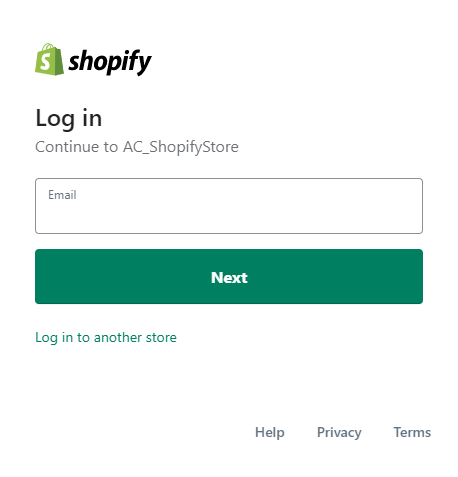
The Shopify login screen appears.
Provide your Shopify email, click Next.
| Field Name | Description |
|---|---|
| Email address to log in to your Shopify account. |
Enter the password, and click Log in.
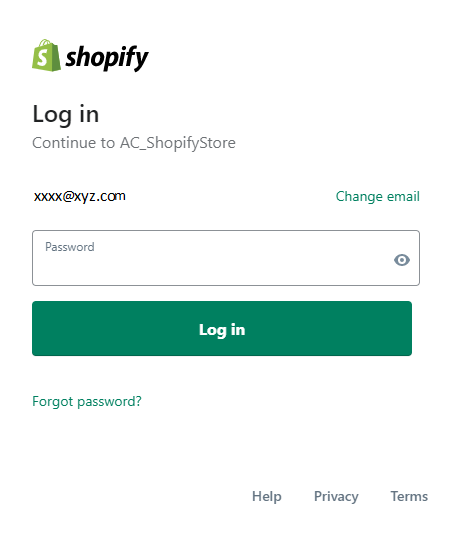
| Field Name | Description |
|---|---|
| Password | Password for Shopify account. |
Triggers
A Trigger specifies when a particular Transaction will start executing. While configuring the Source of a Template, you need to choose an event.
Following triggers are available for Shopify at Source.
| Trigger Name | Description |
|---|---|
| New Customer | Triggers when a new customer is added. |
| New or Updated Customer | Triggers when a new customer is created or an existing customer is modified. |
| All Customers | Retrieves the list of all customers. |
| New Order | Triggers when a new order is placed. |
| New or Updated Order | Triggers when a new order is created or an existing order is modified. |
| All Orders | Retrieves the list of all orders. |
| New or Updated Draft Order | Triggers when a new draft order is created or an existing draft order is modified. |
| All Draft Orders | Retrieves the list of all draft orders. |
| New Page | Triggers when a new page is added. Shop owners are encouraged to use pages for information that customers will use often, such as an 'About Us' page, or a 'Contact Us' page. |
| New or Updated Page | Triggers when a new page is created or an existing page is modified. |
| All Pages | Retrieves the list of all pages. |
| New Product | Triggers when a new product is added. |
| New or Updated Product | Triggers when a new product is created or an existing product is modified. |
| All Products | Retrieves the list of all products. |
| New Event | Triggers when an event occurs such as the creation of a product or creation of an order. |
| All Events | Retrieves the list of all events. |
| New Metafield | Triggers when a new metafield is created. Using metafields, you can store additional information for products, collections, orders, blogs, pages and your shop. |
| New or Updated Metafield | Triggers when a new metafield is created or an existing metafield is modified. |
| All Metafields | Retrieves the list of all metafields. |
| New Webhook | Triggers when a new webhook is created. A Webhook is a tool for retrieving and storing data from a certain event. It allows you to register an http:// or https:// URL where the event data can be stored in JSON or XML formats. See https://docs.shopify.com/api/webhook for more information. |
| New or Updated Webhook | Triggers when a new webhook is created or an existing webhook is modified. |
| All Webhooks | Retrieves the list of all webhooks. |
| New Abandoned Checkout | Triggers when a new abandoned checkout is created. Not everybody who adds something to a cart makes it all the way through to purchase a product. Sometimes they give up along the way. Anytime a potential customer provides their contact information but does not complete the order, Shopify stores that as an abandoned checkout. |
| New or Updated Abandoned Checkout | Triggers when a new abandoned checkout is created or an existing abandoned checkout is modified. |
| All Abandoned Checkouts | Retrieves the list of all abandoned checkouts. |
| All Carrier Services | Retrieves the list of all carrier services. |
| All Addresses of Customer | Retrieves the list of all customers address. |
| New Fulfillment | Triggers when a new fulfillment is added. |
| New or Updated Fulfillment | Triggers when a new fulfillment is created or an existing fulfillment is modified. |
| All Fulfillments | Retrieves the list of all fulfillments. |
| All Fulfillment Services | Retrieves the list of all fulfillment services. |
| All Order Risks | Retrieves the list of all risks of an order. |
| All Images of Product | Retrieves the list of all images of a product. |
| All Variants of Product | Retrieves the list of all variants of a product. |
| All Transcations | Retrieves the list of all transactions. |
| All Zipping Zones | Retrieves the list of all zipping zones. |
Actions
An Action specifies how the data will be transferred to the destination location. While configuring the Destination (Target) of a Template, you need to choose an action.
Following actions are available for Shopify at Destination.
| Action Name | Description |
|---|---|
| Create Customer | Creates a new customer. |
| Update Customer | Updates an existing customer. |
| Delete Customer | Deletes an existing customer. |
| Create Customer Address | Creates a new customer address. |
| Update Customer | Updates an existing customer address. |
| Delete Customer | Deletes an existing customer address. |
| Create Order | Creates a new order. |
| Update Order | Updates an existing order. |
| Delete Order | Deletes an existing order. |
| Create Page | Creates a new page. |
| Update Page | Updates an existing page. |
| Delete Page | Deletes an existing page. |
| Create Product | Creates a new product. |
| Update Product | Updates an existing product. |
| Delete Product | Deletes an existing product. |
| Create Product Image | Creates a new product image. |
| Update Product Image | Updates an existing product image. |
| Delete Product Image | Deletes an existing product image. |
| Create Product Variant | Creates a new product variant. |
| Update Product Variant | Updates an existing product variant. |
| Delete Product Variant | Deletes an existing product variant. |
| Create Redirect | Creates a new redirect. Whenever you change the URL of one of your store’s pages, you run the risk that customers could return to their bookmarks and saved links and find them broken. To solve this, create an URL redirect. URL redirection is a technique for making a web page direct a visitor to a new URL address. |
| Update Redirect | Updates an existing redirect. |
| Delete Redirect | Deletes an existing redirect. |
| Create Smart Collection | Creates a new smart collection. A smart collection is a grouping of products defined by simple rules set by shop owners. A shop owner creates a smart collection and then sets the rules that determine which products go in them. Shopify automatically changes the contents of smart collections based on their rules. See https://docs.shopify.com/api/smartcollection for more information. |
| Update Smart Collection | Updates an existing smart collection. |
| Delete Smart Collection | Deletes an existing smart collection. |
| Create Theme | Creates a new theme. |
| Update Theme | Updates an existing theme. |
| Delete Theme | Deletes an existing theme. |
| Create Metafield | Creates a new metafield. Using metafields, you can store additional information for products, collections, orders, blogs, pages and your shop. |
| Update Metafield | Updates an existing metafield. |
| Delete Metafield | Deletes an existing metafield. |
| Create Webhook | Creates a new webhook. A Webhook is a tool for retrieving and storing data from a certain event. It allows you to register an http:// or https:// URL where the event data can be stored in JSON or XML formats. See https://docs.shopify.com/api/webhook for more information. |
| Update Webhook | Updates an existing webhook. |
| Delete Webhook | Deletes an existing webhook. |
| Create Carrier Service | Creates a new carrier service. |
| Update Carrier Service | Updates an existing carrier service. |
| Delete Carrier Service | Deletes an existing carrier service. |
| Create Draft Order | Creates a new draft order. |
| Update Draft Order | Updates an existing draft order. |
| Delete Draft Order | Deletes an existing draft order. |
| Create Fulfillment | Creates a new fulfillment. |
| Update Fulfillment | Updates an existing fulfillment. |
| Create Fulfillment Event | Creates a new fulfillment event. |
| Delete Fulfillment Event | Deletes an existing fulfillment event. |
| Create Fulfillment Service | Creates a new fulfillment service. |
| Update Fulfillment Service | Updates an existing fulfillment service. |
| Delete Fulfillment Service | Deletes an existing fulfillment service. |
| Create Order Risk | Creates a new order risk. |
| Update Order Risk | Updates an existing order risk. |
| Delete Order Risk | Deletes an existing order risk. |
| Create Transaction | Creates a new transaction. |