NetSuite
NetSuite is the leading integrated cloud business software suite, including business accounting, ERP, CRM, and e-commerce software.
For more information, click here.
Field (Account) Information
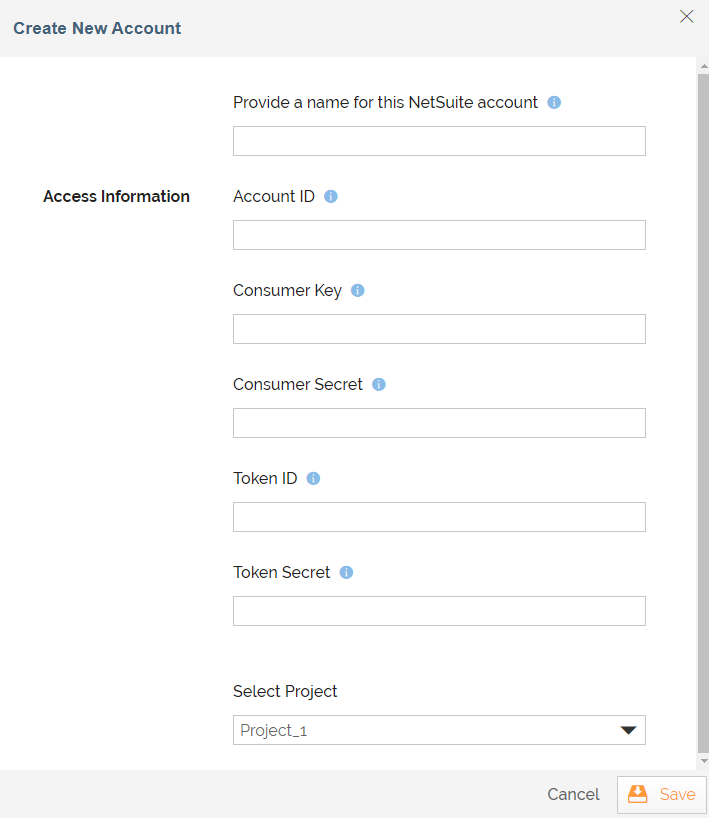
While configuring the Source or Destination of a Template or Transaction, you need to create an account to connect NetSuite with Adeptia Connect. While creating an account, you need to specify the location from where Adeptia Connect will access the data.
Click  to add an account.

Specify the following information for NetSuite:
| Field Name | Description |
|---|---|
| Account Name | A short, descriptive name that helps you re-use this account in future. |
| Account ID | The account number used to login to the NetSuite platform. You can find the account ID in the NetSuite by going to Setup> Integration> Web Services Preferences. |
| Consumer Key | The client identifier issued to the client. To obtain the Consumer Key, you need to create integration record on the Netsuite's Integration Records Manage screen. |
| Consumer Secret | The client secret issued to the client during the application registration process. To obtain the Consumer Key, you need to create integration record on the Netsuite's Integration Records Manage screen. |
| Token ID | Token ID for the user who will send the SOAP web services request for this application. To obtain the Token ID, you need to generate an Access Token for the integration record on the Netsuite's User Token Management screen. |
| Token Secret | Token secret for the user who will send the SOAP web services request for this application. To obtain the Token ID, you need to generate an Access Token for the integration record on the Netsuite's User Token Management screen. |
| Select Project | The project you want to associate with NetSuite account. |
Triggers
A Trigger specifies when a particular Transaction will start executing. While configuring the Source of a Template, you need to choose an event.
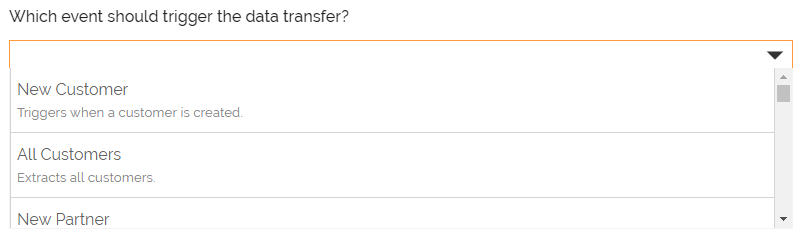
Following triggers are available for NetSuite at Source.
| Trigger Name | Description |
|---|---|
| New Customer | Triggers when a customer is created. |
| All Customers | Extracts the details of all customers. |
| New Partner | Triggers when a partner is created. |
| All Partners | Extracts all partners. |
| New Purchase Order | Triggers when a purchase order is created. |
| All Purchase Orders | Extracts all purchase orders. |
| New Sales Order | Triggers when a sales order is created. |
| All Sales Orders | Extracts all sales orders. |
| New Invoice | Triggers when an invoice is created. |
| All Invoices | Extracts all invoices. |
| New Inventory Item | Triggers when an inventory item is created. |
| All Inventory Items | Extracts all inventory items. |
| New Estimate | Triggers when an estimate is created. |
| All Estimates | Extracts all estimates. |
| New Opportunity | Triggers when an opportunity is created. |
| All Opportunities | Extracts all opportunities. |
| New Employee | Triggers when an employee is created. |
| All Employee | Extracts all employees. |
| New Task | Triggers when a task is created. |
| All Tasks | Extracts all tasks. |
| New Solution | Triggers when a solution is created. |
| All Solutions | Extracts all solutions. |
| New Vendor | Triggers when a vendor is created. |
| All Vendors | Extracts all vendors. |
| New Cash Refund | Triggers when a cash refund is created. |
| All Cash Refund | Extracts all cash refunds. |
| New Contact | Triggers when a contact is created. |
| All Contacts | Extracts all contacts. |
| New Phone Call | Triggers when a phone call is created. |
| All Phone Calls | Extracts all phone calls. |
| All Notes | Extracts all notes. |
| All Messages | Extracts all messages. |
| All Accounts | Extracts all accounts. |
| All Campaigns | Extracts all campaigns. |
| New Or Updated Customer | Triggers when a customer is created or an existing customer is modified. |
| New Or Updated Partner | Triggers when a partner is created or an existing partner is modified. |
| New Or Updated Purchase Order | Triggers when a purchase order is created or existing purchase order is modified. |
| New Or Updated Sales Order | Triggers when a sales order is created or existing sales order is modified. |
| New Or Updated Invoice | Triggers when an invoice is created or an existing invoice is modified. |
| New Or Updated Inventory Item | Triggers when an inventory item is created or an existing inventory item is modified |
| New Or Updated Estimate | Triggers when an estimate is created or an existing estimate is modified. |
| New Or Updated Opportunity | Triggers when an opportunity is created or an existing opportunity is modified. |
| New Or Updated Employee | Triggers when an employee is created or an existing employee is modified. |
| New Or Updated Task | Triggers when a task is created or an existing task is modified. |
| New Or Updated Solution | Triggers when a solution is created or an existing solution is modified. |
| New Or Updated Vendor | Triggers when a vendor is created or an existing vendor is modified. |
| New Or Updated Cash Refund | Triggers when a cash refund is created or an existing cash refund is modified. |
| New Or Updated Contact | Triggers when a contact is created or an existing contact is modified. |
| New Or Updated Phone Call | Triggers when a phone call is created or an existing phone call is modified. |
| New Custom Record | Triggers when a custom record is created. |
| All Custom Records | Extracts all custom records. |
| New Or Updated Custom Record | Triggers when a custom record is created or an existing custom record is modified. |
Actions
An Action specifies how the data will be transferred at the destination location. While configuring the Destination (Target) of a Template, you need to choose an action.
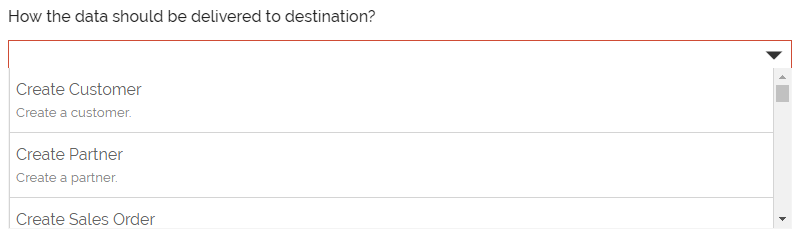
Following actions are available for NetSuite at Destination.
| Action Name | Description |
|---|---|
| Create Customer | Creates a customer. |
| Create Partner | Creates a partner. |
| Create Sales Order | Creates a sales order. |
| Create Purchase Order | Creates a purchase order. |
| Create Invoice | Creates an invoice |
| Create Inventory Item | Creates an inventory item. |
| Create Estimate | Creates an estimate. |
| Create Opportunity | Creates an opportunity. |
| Create Employee | Creates an employee. |
| Create Task | Creates a task. |
| Create Solution | Creates a solution. |
| Create Vendor | Creates a vendor. |
| Create Cash Refund | Creates a cash refund. |
| Create Account | Creates an account. |
| Create Campaign | Creates a campaign. |
| Create Message | Creates a message. |
| Create Contact | Creates a contact. |
| Create Note | Creates a note. |
| Create Phone Call | Creates a phone call. |
| Create Item Fulfillment | Creates an item fulfillment. |
| Create Item Receipt | Creates a phone call. |
| Create Custom Record | Creates a custom record. |
| Update Customer | Updates a customer. |
| Update Partner | Updates a partner. |
| Update Sales Order | Updates a sales order. |
| Update Purchase Order | Updates a purchase order. |
| Update Invoice | Updates an invoice. |
| Update Inventory Item | Updates an inventory item. |
| Update Estimate | Updates an estimate. |
| Update Opportunity | Updates an opportunity. |
| Update Task | Updates a task. |
| Update Employee | Updates an employee. |
| Update Solution | Updates a solution. |
| Update Vendor | Updates a vendor. |
| Update Account | Updates an account. |
| Update Contact | Updates a contact. |
| Update Note | Updates a note. |
| Update Phone Call | Updates a phone call. |
| Update Item Fulfillment | Updates an item fulfillment. |
| Update Item Receipt | Updates an item receipt. |
| Update Custom Record | Updates a custom record. |
| Create or Update Customer | Creates or updates a customer. |
| Create or Update Partner | Creates or updates a partner. |
| Create or Update Sales Order | Creates or updates a sales order. |
| Create or Update Purchase Order | Creates or updates a purchase order. |
| Create or Update Invoice | Creates or updates invoice. |
| Create or Update Inventory Item | Creates or updates an inventory item. |
| Create Or Update Estimate | Creates or updates an estimate. |
| Create or Update Opportunity | Creates or updates an opportunity. |
| Create or Update Employee | Creates or updates an employee. |
| Create or Updates Task | Creates or updates task. |
| Create or Update Solution | Creates or updates a solution. |
| Create or Update Vendor | Creates or updates a vendor. |
| Create Or Update Cash Refund | Creates or updates a cash refund. |
| Create or Update Account | Creates or updates an account. |
| Create or Update Contact | Creates or updates a contact. |
| Create or Update Note | Creates or updates a note. |
| Create or Update Phone Call | Creates or updates a phone call. |
| Create Or Update Item Fulfillment | Creates or updates an item fulfillment. |
| Create Or Update Item Receipt | Creates or updates an item receipt. |
| Create Or Update Campaign | Creates or updates a campaign. |
| Delete Customer | Deletes a customer. |
| Delete Partner | Deletes a partner. |
| Delete Sales Order | Deletes a sales order. |
| Delete Purchase Order | Deletes a purchase order. |
| Delete Invoice | Deletes an invoice. |
| Delete Inventory Item | Deletes an inventory item. |
| Delete Estimate | Deletes an estimate. |
| Delete Opportunity | Deletes an opportunity. |
| Delete Employee | Deletes an employee. |
| Delete Task | Deletes a task. |
| Delete Solution | Deletes a solution. |
| Delete Vendor | Deletes a vendor. |
| Delete Cash Refund | Deletes a cash refund. |
| Delete Account | Deletes an account. |
| Delete Campaign | Deletes a campaign. |
| Delete Message | Deletes a message. |
| Delete Contact | Deletes a contact. |
| Delete Note | Deletes a note. |
| Delete Phone Call | Deletes a phone call. |
| Delete Item Fulfillment | Deletes an item fulfillment. |
| Delete Item Receipt | Deletes an item receipt. |
| Delete Custom Record | Deletes a custom record. |
Mapping
While creating a mapping, a Reference field can be mapped to an expression. It can also mapped to a value from the Lookup.