Box
With Box, you can store all kinds of files online – from presentations, school papers, photos and videos to financials, spreadsheets and taxes. Keep everything organized in folders just like on your desktop.
Box helps transform how your company works. More than simple sync and share, Box helps every employee collaborate easily and securely across teams, with customers, and with partners - on any device, in any app, anywhere.
For more information, click here.
Field (Account) Information
While configuring the Source or Destination of a Template or Transaction, you find an Accountoption to connect Box with Adeptia Connect. Using Account configuration, you need to specify the location from where the data is to be accessed. In this process, provide the details of the application account to grant permission to access data.
Specify the following information for Box:
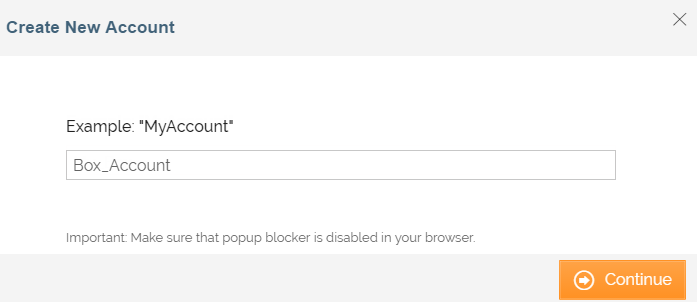
| Field | Description |
|---|---|
| Account Name | A short, descriptive name that helps you re-use this account in future. |
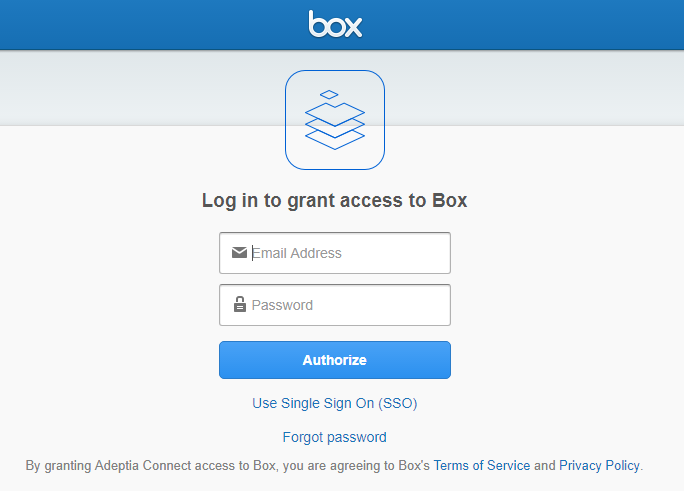
| Field | Description |
|---|---|
| Account Name | A short, descriptive name that helps you re-use this account in future. |
| Email Address | Email address to log into your Box account. |
| Password | Password to log into your Box account. |
Triggers
A Trigger specifies when a particular Transaction will start executing. While configuring the Source of a Template, you need to choose an event.
Following triggers are available for Box at Source.
| Trigger Name | Description |
|---|---|
| New File in Directory | Triggers when a new file is added. |
Actions
An Action specifies how the data will be transferred at the destination location. While configuring the Destination (Target) of a Template, you need to choose an action.
Following actions are available for Box at Destination.
| Action Name | Description |
|---|---|
| Create New File | Creates a file (with a unique name) at the specified location. |
| Copy File From Trigger | Creates a file (with the same name as Source file) at the specified location. |