Active Directory
Microsoft's Active Directory is a directory service often bundled with Microsoft Windows Server operating systems or as a part of Azure hosting. It is an interface for user authentication and identity as well as a device (like computers or printers) registration. It authenticates and authorizes all users and computers in a Windows domain type network - assigning and enforcing security policies for all computers and installing or updating software.
For example, when a user logs into a computer that is part of a Windows domain, Active Directory checks the submitted password and determines whether the user is a system administrator or normal user. Also, it allows management and storage of information, provides authentication and authorization mechanisms, and establishes a framework to deploy other related services: Certificate Services, Federated Services, Lightweight Directory Services and Rights Management Services.
For more information, click here.
 | Ensure that you have downloaded the drivers to use the application in Adeptia Connect. |
|---|
Field (Account) Information
While configuring the Source or Destination of a Template or Transaction, you find an Accountoption to connect Active Directory with Adeptia Connect. Using Account configuration, you specify the location from where the data is to be accessed. In this process, enter the details of the application account to grant permission for data access.
Specify the following information for Active Directory:
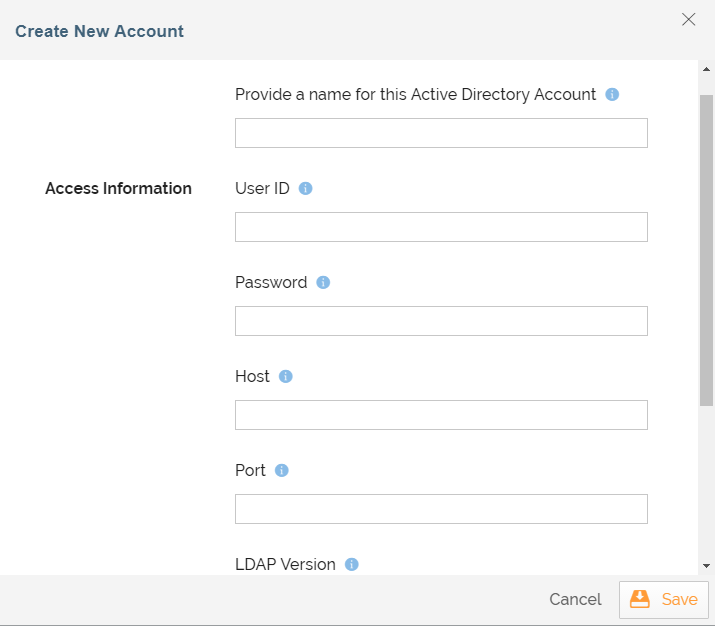
| Field Name | Description |
|---|---|
| Account Name | A short, descriptive name that helps you re-use this account in future. |
| User ID | User Id to log into your Active Directory account. |
| Password | Password to log into your Active Directory account. |
| Host | Domain name or IP address of the Active Directory server. |
| Port | Port number on which Active Directory server is running. |
| LDAP Version | LDAP version used to connect to and communicate with the server. |
| Base DN | Base portion of the distinguished name, used for limiting results to specific subtrees. |
Triggers
A Trigger specifies when a particular Transaction will start executing. While configuring the Source of a Template, you need to choose an event.
Following triggers are available for Active Directory at Source.
| On Records | Triggers when the new records are added. | | On Records Added or Updated | Triggers when the new records are added or existing records are updated. | | All Records | Extracts all records starting from the beginning. |
| Trigger Name | Description |
|---|
Actions
An Action specifies how the data will be transferred at the destination location. While configuring the Destination (Target) of a Template, you need to choose an action.
Following actions are available for Active Directory at Destination.
| Action Name | Description |
|---|---|
| Add Records | Adds the new records in the account. |
| Update Existing Records | Updates existing records in the account. |
| Add Records or Update Existing Records | Adds the new records or updates existing records in the account. |